Larry-G
V.I.P ,
- Joined
- May 19, 2010
- Messages
- 32,540
- Reaction score
- 405
- Points
- 0
- Age
- 48

New VIX Image ET 9x00 Series Version 2.4
15/05/2012 - Open ViX 2.4.96
From VIX Team
Enigma: 04-05-2012.
Enigma Plugins: 04-05-2012.
GCC Version: 4.4.4
Vu + Kernel Version: 3.2.2
Vu+ Drivers: 2012-03-23
If you have not already done so you will need to flash the latest bootloader
All Users
A full flash is required for this version of ViX image. Because of extensive changes you will not be able to perform an online update or restore any settings/plugin backups
New Features
Blindscan
Now uses RF values in GUI not IF.
C band searches possible.
Supports symbol rates from 1 - 45MHz.
Channel Selection
Support added to change font sizes and number of rows.
Support added to have a 3rd event showing (skin dependent)
Support added to display start time and end time for all events shown.
EPG Selection
Added help screen to all epg selection screens.
Added support to change font sizes and number of rows.
Language Selection
Added English (UK) to available languages.
Translations
Added support for English (UK).
Sorting
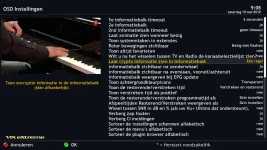
You may now sort Menus, Settings and Plugin Browser alphabetically.
Network Browser
Uses less memory during Scan.
Moved to new Setup Mounts screen.
Openwebif
New style webif now accessed using default port 80
Old style webif still available if required for use with certain PC signal meters and Fancontrol 2
About Screen
Added network info.
Plugins
As part of streamlining the image, removed NFS, AFP, Samba, OpenVPN, Inadyn, MiniDLNA & uShare from default image (still available to install through feeds)
Bootlogo's
Now available for direct install via plugins feed.
On Screen Hints
Now available as options are selected.
USB DVB
Added dvb-as102 support (by Gennart1).
Skin
Brand New skin ViXBMC by markus625 added to feeds.
Native skins updated and optimised.
Instant Record from channel list, EPG or current channel.
Enhanced Movie List Features
Latest Drivers (23/3/2012).
Loads of under the hood changes made for a smoother user experience.
Button Mappings
Short Red** & *** - Show current channel EPG info (ViX Single EPG).
Long Red*** - HBBTV ( ET series and select channels only).
Short Green** & *** - Timers.
Long Green*** - AutoTimer Timers.
Short Yellow*** - EPG Search.
Long Yellow*** - Instant IMDB Database search on the current programme.
Short Blue - Extensions.
Long Blue*** - Plugins Menu.
EPG - Opens ViX EPG.
Left/Right** - Opens ViX QuickEPG.
Left/Right** - Opens ViX QuickEPG.
Up/Down** - Open Full Screen Channel List.
TV Button** - Open Full Screen Channel List.
Long TV Button - Open Bouquets List.
** Can be changed in ViX Menu
*** Can be turned off in ViX Menu
Special Thanks
Loads of under the hood changes made for a smoother user experience.
Button Mappings
Short Red** & *** - Show current channel EPG info (ViX Single EPG).
Long Red*** - HBBTV ( ET series and select channels only).
Short Green** & *** - Timers.
Long Green*** - AutoTimer Timers.
Short Yellow*** - EPG Search.
Long Yellow*** - Instant IMDB Database search on the current programme.
Short Blue - Extensions.
Long Blue*** - Plugins Menu.
EPG - Opens ViX EPG.
Left/Right** - Opens ViX QuickEPG.
Left/Right** - Opens ViX QuickEPG.
Up/Down** - Open Full Screen Channel List.
TV Button** - Open Full Screen Channel List.
Long TV Button - Open Bouquets List.
** Can be changed in ViX Menu
*** Can be turned off in ViX Menu
Special Thanks
- rytec - for his continued support.
- zoka.cc for his Picon sets
- All developers for their plugins used in the feeds of this image.
- All of the ViX Beta team for their hours of testing and dedication on getting this image working.
- Rob van der Does, belierzz, rimas, Henkka, raivo, eesatfan, Zartmy, Trial & june8 for their translation work.
- Silverfox0786 for channel settings, picons and bootlogo's.
- Huevos for his work on blindscan
- Gennart1 for dvb-as102 support
- Markus625 for skin ViXBMC
Note: Not all 3rd party plugins have been tested or are guaranteed to be compatable.
Requests
If anyone is interested in doing any translation work for the plugins and the image itself, please contact either Andy or Sicilian
Download
Download site for Latest Open Vix Builds (Beta's) www.openvix.co.uk
Stable release below
Bootloader for those that need it is the first file
Download site for Latest Open Vix Builds (Beta's) www.openvix.co.uk
Stable release below
Bootloader for those that need it is the first file
DOWNLOAD HERE
Code:
http://www.world-of-satellite.com/showthread.php?18175-New-VIX-Image-ET-9x00-Series-Version-2-4-15-05-2012