Superb quality and spec AB-Com PULSe 4K SE. Crazy offer! Only £99! FREE UK DELIVERY! 4K UHD, Enigma 2, Multiboot 4 images & more!...
Superb quality and spec AB-Com PULSe 4K Rev II Twin Satellite tuner only £149! FREE UK DELIVERY! 4K UHD, Enigma 2, SATA HDD facility, Multiboot 4 images & more!...

VIX Team Vu+ Duo Image - 05/09/2010 - Discussion

Status
Not open for further replies.
Hi all
Just loaded the image and looks great so far i just have one problem cant find the cron manager i use it to run a check script on cccam as i work away from home alot and the wife goes mad if the stb shows a black screen.
I know its asking alot but most basic things i can sort out myself, but can any of you nice people edit the script attatched so it works on this image instead of dreamelite.

the softcam manger checks that the softcam is running every 30mins so no need for that
 
Imagen EPG problems that have friends. İnfobar not go outside any of the EPG.
Waiting for your help.

Sorry, cannot understand what you're trying to say. Any chance of elaborating a bit more please? (Imagine english isn't your first language, so maybe try google translate and hopefully will help us to understand :))
 
Where do you change where you want to store EPG data? i want to store it on USB stick instead of HDD.

it automatically check for a large storage device, if no hdd is available is uses USB automatically
 
Thanks pooface
I did not know there was a sript running but cant find the cronjobs does not seem to be at the places you listed

the correct place is '/etc/cron/root' (root being a file not a folder)
 
sorry, should've mentioned about it being a file. My bad :p
 
Sorry, cannot understand what you're trying to say. Any chance of elaborating a bit more please? (Imagine english isn't your first language, so maybe try google translate and hopefully will help us to understand :))
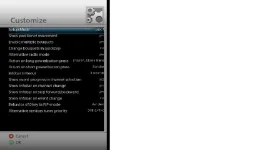
Menu> setup> system> Customize> Channel Selection EPG for on screen display = yes, but I do not receive the EPG information.
 
I think there is a problem with the rytec server as i am having problems as well
 
Hi all.
First let me say how happy i am with this new image the best yet...
sorry for this but i too have the problem with something blocking the info on the media player as mentioned by canthackit in post #31. can some one take a look at this please?
also when i rewind in time shift its jumps about alot and on my other images it was a smooth in rewind as it was in fastforward ? Any ideas please
thanks and kind regards
Baldrick75
 
how do you activate the coolepg
thanks
regards
jcl
 
Menu> setup> system> Customize> Channel Selection EPG for on screen display = yes, but I do not receive the EPG information.

I cannot see any option you are mentioning?!

attachment.php


All I can see (sorry for poor quality, cannot telnet in to grab a good quality screenshot...)
 

Attachments

  • customize.webp
    customize.webp
    16.7 KB · Views: 220
It's already activated as standard. Just press the epg button to get to it ;)

when i press the epg button it says please choose an extension
which one
thanks
regards
jcl
 
Hi there! Haven't installed the new image yet, but reading the verdict from others, you guy's have done a fenomenal job! :)
One question, is WLAN supported?

Best regards,
Yngve
 
Hi there! Haven't installed the new image yet, but reading the verdict from others, you guy's have done a fenomenal job! :)
One question, is WLAN supported?

Best regards,
Yngve

not in this release but planned to be in the upcoming version
 
when i press the epg button it says please choose an extension
which one
thanks
regards
jcl

I take it you've already installed a channel list, and haven't installed any plugins such as quickbutton (think that's the name)?! For me, it works perfectly fine straight off when pressing the epg button... My only guess is you've installed a plugin somewhere, or that your settings file you copied over to the image has messed something up...

What plugins have you installed (manually and through the download server)?! And have you actually transferred a channel list over to the box?!
 
Hi all.
First let me say how happy i am with this new image the best yet...
sorry for this but i too have the problem with something blocking the info on the media player as mentioned by canthackit in post #31. can some one take a look at this please?

If you want to look into it, the screen is called PVRState

grtz.
 
Status
Not open for further replies.

OpenViX Feeds Status

Back
Top