Superb quality and spec AB-Com PULSe 4K SE. Crazy offer! Only £99! FREE UK DELIVERY! 4K UHD, Enigma 2, Multiboot 4 images & more!...
Superb quality and spec AB-Com PULSe 4K Rev II Twin Satellite tuner only £149! FREE UK DELIVERY! 4K UHD, Enigma 2, SATA HDD facility, Multiboot 4 images & more!...

VIX Team Vu+ Duo Image - 05/09/2010 - Discussion

Status
Not open for further replies.
@satsatsat - Delete your existing epg.dat and re-download epg again manually.

That worked for me.

And do do that, telnet in to the box, and issue the commands:

Code:
init 4
rm /media/hdd
init 3
 
Can i install other skins except VIX Team Vu_HD+ Skin now?

yes you can mate.

i use the infinity skin, don't know the author of this particular version but it works fine, if you would like to try it let me know and i'll upload it.

regards: canthackit
 
might be a daft question ,,,but is newcamd supported in this image???
 
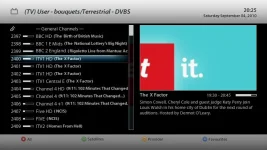
I know its common across all images but in the bouquet screen it would be nice if one of the colour buttons was add timer like it is in the epg or the channel program guide window.
If you browse the bouquet list and see something to record you have to either select it and record or exit and go to EPG.

Would this be easy implement ?
 
yes you can mate.

i use the infinity skin, don't know the author of this particular version but it works fine, if you would like to try it let me know and i'll upload it.

regards: canthackit

yeah would be nice if u upload it canthackit
 
When I used the sat postioner and fine tuner to save new postion it doesnt save when I store settings and goes back to previous setting.
 
it saves good here unknown

after u fine tune, go down to position scroll to the number wanted and then press the green button once. this will save it
 
I know its common across all images but in the bouquet screen it would be nice if one of the colour buttons was add timer like it is in the epg or the channel program guide window.
If you browse the bouquet list and see something to record you have to either select it and record or exit and go to EPG.

Would this be easy implement ?

Not sure what you mean???

If you go through the bouquets (i.e. press channel up/down button or the up/down in middle), you can then see all the channels for that bouquet. Then, press the blue button, navigate to a bouquet?! Yes... If you then press the epg button on a channel you have put the selection on to, then it will show all the epg titles for that channel. You can then choose the even that you want to record by selecting it and press the green button for a timer, or blue for an autotimer...
 
Yeah did, same thing it goes back to its postion without saving. Really strange that I have all theses strange problems. I could use the same feature on DE image with no issuse.
 
Have you tried settings your refresh rate to multi in A/V settings?

yes my friend but my tv see multi as 50Hz :(

only old imgs are working for my ntsc tv

i write an email to alex about this problem

dreambox 800 doesn't have this problem so i'm sure its drivers problem

now i use component cable with 50Hz i cant watch 3D tv because it must be hdmi cable

thank you
 
I know its common across all images but in the bouquet screen it would be nice if one of the colour buttons was add timer like it is in the epg or the channel program guide window.
If you browse the bouquet list and see something to record you have to either select it and record or exit and go to EPG.

Would this be easy implement ?

what bouquet list ?
 
Sorry Andy I meant this one.(attached)

D

As I posted previously in the thread, if you press the epg button on the channel you want to timer, then you can choose by moving up/down to it, and pressing the green or blue button to set a timer or autotimer... ;)
 
Sorry Andy I meant this one.(attached)

D

I dont think any Enigma2 images have an option for timer in bouquet screen. Would be a bit pointless too as the event would have already started, all the user needs to do is zap to the particular channel and press record button, then choose the recording option.
 
I just loaded the VIX Image to try it. All seems very good and ok but I notice that channel change takes a bit longer and there is a bit of a blink and shhh noise when changing the channels even when autoresolution is off. Any way to sort this would be appreciated.
 
Your the first to report slow channel change. Do you mean the black screen in between zapping channels? Is the a feature implemented by VU+ in recent updates.
 
Status
Not open for further replies.

OpenViX Feeds Status

Back
Top