Superb quality and spec AB-Com PULSe 4K SE. Crazy offer! Only £129! FREE UK DELIVERY! 4K UHD, Enigma 2, Multiboot 4 images & more!...
Superb quality and spec AB-Com PULSe 4K Rev II Twin Satellite tuner only £179! FREE UK DELIVERY! 4K UHD, Enigma 2, SATA HDD facility, Multiboot 4 images & more!...

[VU+ Duo] Auto timer problem

garryboy

New member
Joined
Jun 26, 2012
Messages
537
Reaction score
0
Points
0
Hi there I have latest build of vix on my vi duo.

When I select autotimer for a say e4 it changes it to e4 hd. Same for channel 5 it changed to channel 5 hd.

Any ideas why.

I have not changed any of the default setting.

Cheers
Garry
 
not come across that one, you certain your recording on the SD variants of the channels?

Might be worth going into the AT menu and disabling override with alternatives
 
yeh definately selecting the SD channels. it works fine on one off timer but not on Autotimer.

i have disabled the override with alternatives in the AT menu as suggested but still does the same. :confused:
 
I have set an autotimer for a program called " Gates " on Sky Living HD.. It shows up in my AT but not my timers.
When i set it up the message box said it set x amount of auto timers but 0 timers.

I dont think its a setup problem as my other auto timers are working.

Could this be a program ( channel ) issue ? Anyone found this before ?
 
Only every has something similar with a AT many moons ago and that was because the channel name was missing for whatever reason.

I would go into the AT and check all the info and filters. Its not disabled at the end of the list is it?

Have you got show conflicts enabled?
 
I have set an autotimer for a program called " Gates " on Sky Living HD.. It shows up in my AT but not my timers.
When i set it up the message box said it set x amount of auto timers but 0 timers.

I dont think its a setup problem as my other auto timers are working.

Could this be a program ( channel ) issue ? Anyone found this before ?

Have you tried a new download of EPG? Blue button -> Cross EPG Downloader

Then check your timers to see it it was added?
 
Clues?
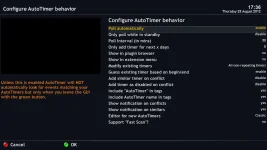
AT.webp

Only every has something similar with a AT many moons ago and that was because the channel name was missing for whatever reason.

I would go into the AT and check all the info and filters. Its not disabled at the end of the list is it?

Have you got show conflicts enabled?
 
Add timer as disabled on conflict - enable this and you may find the timer that was being missed out was conflicting.
 
Sorted.... the program i was trying to AT happened at 00.30 in the morning and the timer was setting itself at 23.00 - 01.30 but from the day before. I changed day from tue to wed and now works.
 
I had seen something like this before.
It was because I wanted to set how many times it recorded in the autotimer.
Have you any special configurations in the autotimer.
Upload a screenshot of the autotimer config for the program itself with description of any settings you changed from the default....


I have set an autotimer for a program called " Gates " on Sky Living HD.. It shows up in my AT but not my timers.
When i set it up the message box said it set x amount of auto timers but 0 timers.

I dont think its a setup problem as my other auto timers are working.

Could this be a program ( channel ) issue ? Anyone found this before ?
 
Right I've upgraded to 3.0 and issue still remains.

I had set auto timer to record x factor on stv.

I changed my mind so set disabled and deleted it and then selected auto timer to record itv hd instead.

When I press the green button to view timers it's still showing the Stv.

It's as of it's remembering the stv one and overriding the new itv hd

Annoying!
 
when you deleted the Auto Timer did you go into Timer (green button) and delete the recording that was set for XFactor on STV? as this may be the reason why it didn't record it on ITV HD as it would have been a duplicate...
 
Deleting the auto timer doesn't delete any timers it has set-up, just stops them being added in future.
You need to delete the timers it set as well as auto-timer if you want all traces of it removed.
 
when you deleted the Auto Timer did you go into Timer (green button) and delete the recording that was set for XFactor on STV? as this may be the reason why it didn't record it on ITV HD as it would have been a duplicate...

Yes I pressed green button and deleted the timer from there.

How can I remove all trace of the auto timer as to avoid duplicates.

Thanks for your help mate.
 
by deleting the auto timer and the timer should delete all traces, I tried to replicate what you were getting but i could replicate it as when i deleted the auto timer and timer, and created a new one, it picked the channel i told it too
 
Thanks punisher.

Where do i find the option to delete the auto timer.

Thanks again
 
Ah found it in the by pressing menu and timer. Then autotimers.

Never new that existed.

Every days a school day and all that.

Thanks again for everyone's assistance
 
Ah found it in the by pressing menu and timer. Then autotimers.

Never new that existed.

Every days a school day and all that.

Thanks again for everyone's assistance

Long press green button does the same thing when using VIX.
 

OpenViX Feeds Status

Back
Top