Superb quality and spec AB-Com PULSe 4K SE. Crazy offer! Only £129! FREE UK DELIVERY! 4K UHD, Enigma 2, Multiboot 4 images & more!...
Superb quality and spec AB-Com PULSe 4K Rev II Twin Satellite tuner only £179! FREE UK DELIVERY! 4K UHD, Enigma 2, SATA HDD facility, Multiboot 4 images & more!...

[VU+ Duo] New ViX Team VU+ Duo OE3.0 Discussion

Status
Not open for further replies.
My < and > buttons dont work. They are supposed to move epg 24hrs but dont do anything. Did'nt work on Vix 2.4 either for me.
I have to scroll across manually.

Does anyone else have a problem with as soon as they open the EPG and press right (>), two events are selected?

I think somethings wrong with my EPG. A fresh flash doesn't seem to get rid of whatever the problem is though.
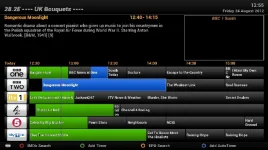
 
Sorry, not > or < just the normal arrow keys. Here's an SS example after pressing EPG, chose my Bouquet (Entertainment) and then pressed Down to go to BBC2:

screenshot.webp

It happens every time I go in to any bouquet without fail.

Again, it's probably something with my box as the Bouquet is Entertainment, but it still displays 28.2E --- UK Bouquets --- at the top (the bouquet the channel I'm currently watching is in). A fresh flash doesn't resolve either problem and I don't know how to completely factory reset my box.
 
Sorry, not > or < just the normal arrow keys. Here's an SS example after pressing EPG, chose my Bouquet (Entertainment) and then pressed Down to go to BBC2:

View attachment 18901

It happens every time I go in to any bouquet without fail.

Again, it's probably something with my box as the Bouquet is Entertainment, but it still displays 28.2E --- UK Bouquets --- at the top (the bouquet the channel I'm currently watching is in). A fresh flash doesn't resolve either problem and I don't know how to completely factory reset my box.

no need for a factory reset as the process of flashing a image first erases the old one.
 
My < and > buttons dont work. They are supposed to move epg 24hrs but dont do anything. Did'nt work on Vix 2.4 either for me.
I have to scroll across manually.

Works perfectly here.
Have you any plugins installed that could be causing that? or a dodgy remote even?
 
no need for a factory reset as the process of flashing a image first erases the old one.

I'm not sure that's 100% true as after I flashed yesterday, I went through the setup guide until I got to network settings, before I scanned I FTP'd and my lamedb and bouquets were still there. Unless that's just FileZilla cashing, but I'm pretty sure I refreshed it.

Both problems (bouquet name and selected event) still happen with both the following scenarios:

1:
- Fresh flash
- Setup guide, Network, Tuner Setup, Scan
- Load on SgtFlipFlop Bouqets
- Reboot
- go to EPG, problem still there

2:
- Fresh flash
- Setup guide, Network, Tuner Setup, Scan
- Install AutoBouquet
- Reboot
- Run AutoBouquet
- Reboot
- go to EPG, problem still there
 
The flashing process first erases the flash which is where the old image is stored, once it has been erased it then flashes the new image.
 
It must have been FileZilla caching then. Any other ideas? It's literally a blank system with a set of Bouquets. A bit puzzling as I never used to have either problem, both occurred round about the same time (2.3ish) and haven't gone away regardless of version installed.

About the only thing I haven't tried (that I can think of ofc :)) is flashing to another image then back to ViX.
 
It must have been FileZilla caching then. Any other ideas? It's literally a blank system with a set of Bouquets. A bit puzzling as I never used to have either problem, both occurred round about the same time (2.3ish) and haven't gone away regardless of version installed.

About the only thing I haven't tried (that I can think of ofc :)) is flashing to another image then back to ViX.


honestly i have no idea whats going wrong for you, as you suggested you could try flashing the original Vu image then flash ViX back ontop of that.
 
Works perfectly here.
Have you any plugins installed that could be causing that? or a dodgy remote even?

Only plugins i have are standard with vix plus 1 channel,autoshutdown & live football.
Remote is fine only couple of month old as is box, bought on WOS.
button 2,4,6,8 work but the 24Hr advance and back <> dont do anything.
 
when your channels bouquet is on screen i.e BBC1 HD, could an option be added (by pressing menu) to select zap to Tuner A or Tuner B? It would be very handy to have.
 
when your channels bouquet is on screen i.e BBC1 HD, could an option be added (by pressing menu) to select zap to Tuner A or Tuner B? It would be very handy to have.


Why?

The box automatically selects the first free tuner anyway.
 
Your not using the wrong picons its looks like a small bug which will more than likely be fixed via online updates, im sure auto resize was introduced earlier this may have been removed as im 100% "service title width" option is no longer there.

Any update on a fix for picons having extra space either side? They look really messy at the minute taking either white space or a predominant colour from the picon! Other than that everything is absolutely perfect :thumbsup:
 
Why?

The box automatically selects the first free tuner anyway.

Hi Stan, exactly, I'm watching 28.2 on a fixed dish and the box selects Tuner B (motor) to record another show on 28.2e, rendering the motor useless until the recording ends.

Correct; as a user you shouldn't be interested in which tuner the box uses :confused:

Hi Rob, normally I'm not interested, but in the situation above I could zap to Tuner B (motor) then the 28.2e recording will go on Tuner A, simples :)
 
Hi Stan, exactly, I'm watching 28.2 on a fixed dish and the box selects Tuner B (motor) to record another show on 28.2e, rendering the motor useless until the recording ends.

Hi Rob, normally I'm not interested, but in the situation above I could zap to Tuner B (motor) then the 28.2e recording will go on Tuner A, simples :)
Yes, you are correct; this is one of the rare cases a user-selected tuner would be fine.
 
IIRC In the recording settings, you can select which tuner to use first, which is different to what you asked first which was zapping.
 
Updated to Vix 3.0 today but my external HDD will not mount at all. I have an internal hdd which is mounts as media/hdd. For some reason it says 'file type: unrecognized' and mount fails in mount manager. When I revert to vix 2.4 it mounts perfectly and shows file type as fuseblk. I wonder what is wrong, can anyone help me mount this as media/usb? When I try set up mounts by pressing green it says to restart vu+ duo but it doesn't mount.
 
IIRC In the recording settings, you can select which tuner to use first, which is different to what you asked first which was zapping.
That is indeed different, and doesn't solve OP's problem.
Situation is as follows:
1- no recordings going on, the box will use the fixed disk for tuning (live-TV);
2- during this TV-watching a recording starts; as the fixed dish-tuner is now not available, the motor will be used instead.
Result: although only one recording is going on, live-TV watching is limited to the use of the fixed dish.
If one would have the choice to choose a tuner for zapping, the motor-tuner would have been chosen for live-TV. So whatever which recording is being started, the motor is still available for live-TV.

So a perfect solution seems to be an option in settings for preferred tuner for recordings (in this case would be set to the fixed dish tuner) and a setting for preferred tuner for live-TV (would be set to motor-tuner in this case)
 
Status
Not open for further replies.

OpenViX Feeds Status

Back
Top