Superb quality and spec AB-Com PULSe 4K SE. Crazy offer! Only £129! FREE UK DELIVERY! 4K UHD, Enigma 2, Multiboot 4 images & more!...
Superb quality and spec AB-Com PULSe 4K Rev II Twin Satellite tuner only £179! FREE UK DELIVERY! 4K UHD, Enigma 2, SATA HDD facility, Multiboot 4 images & more!...

[VU+ Duo] New ViX Team VU+ Duo OE3.0 Discussion

Status
Not open for further replies.
That is indeed different, and doesn't solve OP's problem.
Situation is as follows:
1- no recordings going on, the box will use the fixed disk for tuning (live-TV);
2- during this TV-watching a recording starts; as the fixed dish-tuner is now not available, the motor will be used instead.
Result: although only one recording is going on, live-TV watching is limited to the use of the fixed dish.
If one would have the choice to choose a tuner for zapping, the motor-tuner would have been chosen for live-TV. So whatever which recording is being started, the motor is still available for live-TV.

So a perfect solution seems to be an option in settings for preferred tuner for recordings (in this case would be set to the fixed dish tuner) and a setting for preferred tuner for live-TV (would be set to motor-tuner in this case)

Just to add to this:
It is only a problem with timer recordings, if you do an instant record it will use the whichever tuner is being used for the current channel (live tv) and leave the other one free.
For example last night there was something on Tuner A (my fixed dish) which my wife said she wanted recording just as it started so I did an instant record which then left Tuner B (motorised) free, with a timer it would have used Tuner B if I had been on another channel with Tuner A and tied up the motorised dish
 
Just to add to this:
It is only a problem with timer recordings, if you do an instant record it will use the whichever tuner is being used for the current channel (live tv) and leave the other one free.
For example last night there was something on Tuner A (my fixed dish) which my wife said she wanted recording just as it started so I did an instant record which then left Tuner B (motorised) free, with a timer it would have used Tuner B if I had been on another channel with Tuner A and tied up the motorised dish
Instant recording or planned recording makes no difference in this story: the box will always try to use the tuner that's in use already.
In the above story the situation was that the tuner in use (for live-TV) is on another transponder than the planned timer, so the other tuner must be used.
 
word up chaps, great new image as per usual.

Only gripe I have is that the partnerbox plugin isnt working.

I'm confused on which we are meant to install? 1)partnerbox, 2) pernetbox-po or 3) partnetbox-src or 4) any combination of these:mad:

After each install, I get an error & the plugin is not listed:
"some plugins are not availeble:
Extensions/Partnerbox ('epgselction')
Extensions/Partnerbox ('epgselction')"

Does anyone have any advice on how to tweek this to work? I use this quite often to stream service between dou & solos.

This was working on v2.4

Regards
 
We're aware of the issue & looking into it. pernetbox-po & partnetbox-src do not need to be installed for normal usage.
Have you tried the remotestreamconvert plugin? Not an ideal solution as it creates bouquets that aren't compatible with channel editors, but works perfectly for streaming channels from another box,
 
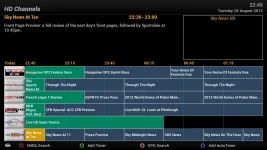
Just done online update and glad to see picon width back in the epg menu... Picons now fit perfectly, small fix in the grand scheme of things but appreciated :)
 

Attachments

  • screenshot.webp
    screenshot.webp
    63.1 KB · Views: 71
Last edited:
Updated to Vix 3.0 today but my external HDD will not mount at all. I have an internal hdd which is mounts as media/hdd. For some reason it says 'file type: unrecognized' and mount fails in mount manager. When I revert to vix 2.4 it mounts perfectly and shows file type as fuseblk. I wonder what is wrong, can anyone help me mount this as media/usb? When I try set up mounts by pressing green it says to restart vu+ duo but it doesn't mount. I just did an online update but the problem remains and mount fails. As soon as I revert to 2.4 it works.

Can anyone help me please?
 
We're aware of the issue & looking into it. pernetbox-po & partnetbox-src do not need to be installed for normal usage.
Have you tried the remotestreamconvert plugin? Not an ideal solution as it creates bouquets that aren't compatible with channel editors, but works perfectly for streaming channels from another box,


i will give this a go latertonight, cheers judge

hang on - i actually installed this last night - I dont see anything different on any of the menu's - Where do I manage this plugin?

from readin a few other web pages, it seems that info should be on the "channel search" - where do i find this?

ah got it, sorted, found in menu->setup->service searching->remote chennel stream converter
 
Last edited:
Updated to Vix 3.0 today but my external HDD will not mount at all. I have an internal hdd which is mounts as media/hdd. For some reason it says 'file type: unrecognized' and mount fails in mount manager. When I revert to vix 2.4 it mounts perfectly and shows file type as fuseblk. I wonder what is wrong, can anyone help me mount this as media/usb? When I try set up mounts by pressing green it says to restart vu+ duo but it doesn't mount. I just did an online update but the problem remains and mount fails. As soon as I revert to 2.4 it works.

Can anyone help me please?

I guess it's an ntfs partition on the external drive?

Try running this command:

Code:
opkg install ntfs-3g

This should install ntfs ability on your box, and therefore allow you to use ntfs drives... Altho they are not really recommended to use...
 
This should install ntfs ability on your box, and therefore allow you to use ntfs drives...
If you only want to read from the HDD no extra installs are needed; this is just to be able to write too.


Altho they are not really recommended to use...
But it allows you to connect the HDD also to a Windows-PC.
 
Just done the online update. Thanks for fixing the the issue with the picons. Keep up the great work fellas. this is now the perfect image for me.. :thumbsup:

Cheers, Dave.
 
honestly i have no idea whats going wrong for you, as you suggested you could try flashing the original Vu image then flash ViX back ontop of that.

Only just had the time to do it but I still have the same issue. Flashed Original, then PLi (and scanned) then back to ViX. Literally just a scan, transfer the bouquets and a reboot and the problem still exists.

I'm totally lost, guess I'll just have to live with it as it's obviously something to do with my box.
 
Hello,
it will be possible, in the next version, to switch to the next ( or previous ) recording during play a video by pressing right ( or left ) arrow ?
I mean: now to play the next video I have to recall the recording list, then select the next video and press ok, it would be more quick to press the arrow key only.

Thanks
 
It is even much easier then that: go to Movielist --> Menu --> Settings and choose the desired action at end of file (return to list, play next etc.).
This is a per map setting, so you can make different settings for each folder (e.g. MP3'play next, recordings go to list etc).

It's all there folks!

And please: next time no double posting.
 
Switched Duo and Solo to 3.0 Vix and I find it truely brilliant.
Things I like (came from 2.3).
  • Quicker Boot
  • The exit button exiting movie player
  • When you enter any channel list (bouquet, sat, all channels etc) you go to the channel you are on in the list not the top one.
  • The autotimer includes the record on that day option in the first screen rather than going to edit screen....
  • New Playback options (loop, continuous etc)


Well done all.

Andy one other thing now that there are more hands on board with OE.
The good old "Hide locked Channels" request that used to be in Enigma1.
That would make it ace....
 
i have similar issue im using vu+duo (original) running vix 3.0 cross egp set to auto update 1am, i am using "open tv" as source 28.2 when i download its reads channels about 930ish then reading titles and gets stuck as 195kb and sits there until it times out...

not sure what to do/try to resolve. ?
 
i have similar issue im using vu+duo (original) running vix 3.0 cross egp set to auto update 1am, i am using "open tv" as source 28.2 when i download its reads channels about 930ish then reading titles and gets stuck as 195kb and sits there until it times out...

not sure what to do/try to resolve. ?

this used to happen to me when i had it set to save it to the data to internal flash. would just hang and eventually time out. as soon as i changed where i saved the data to i.e. usb or hdd it sorted it instantly.
incidently when i flashed to vix 3.0 i had to change settings to usb again.

hope this helps, Dave
 
It is even much easier then that: go to Movielist --> Menu --> Settings and choose the desired action at end of file (return to list, play next etc.).
This is a per map setting, so you can make different settings for each folder (e.g. MP3'play next, recordings go to list etc).

It's all there folks!

But this is the action to do at the END of file.
I want to switch to next recording into the list DURING the play of the current video ( e.g. to see the first 5 seconds of each recording without to return to the list or, as you say, go to the end to the current video ). This function was implemented in enigma1 ( I had this behaviour in my old DM7000 ) but disappeared in enigma2

And please: next time no double posting.

Sorry,but I didn't realise to post twice: I pressed "submit" button only once.

Thanks
 
But this is the action to do at the END of file.
I want to switch to next recording into the list DURING the play of the current video ( e.g. to see the first 5 seconds of each recording without to return to the list or, as you say, go to the end to the current video ). This function was implemented in enigma1 ( I had this behaviour in my old DM7000 ) but disappeared in enigma2


Sorry,but I didn't realise to post twice: I pressed "submit" button only once.

Thanks

unfortunately comparing functions between enigma1 and enigma2 does not really work as they are totally different systems. Processes that worked with the enigma1 platform would not necessarily mean it would work with the enigma2 system.
 
Delete the EPG.dat file and download again
 
Sorry To Jump In But 3.0 installed perfectly ....... but online update does not work not sure if anyone else has had this problem ? :(
 
Status
Not open for further replies.

OpenViX Feeds Status

Back
Top