Superb quality and spec AB-Com PULSe 4K SE. Crazy offer! Only £129! FREE UK DELIVERY! 4K UHD, Enigma 2, Multiboot 4 images & more!...
Superb quality and spec AB-Com PULSe 4K Rev II Twin Satellite tuner only £179! FREE UK DELIVERY! 4K UHD, Enigma 2, SATA HDD facility, Multiboot 4 images & more!...

[VU+ Duo] Cams freezing

Rahat786786

New member
Joined
Apr 8, 2012
Messages
369
Reaction score
0
Points
0
Seems as if all cams freeze after a period of time, mine freezes at night and when I wake up I have to manually restart it to get it working. Never was a problem on previous Vix 2.4 and I'm not the only user who has reported this problem.
 
None of the beta-testers ever experienced this. some of mine are up for weeks now.

exactly the same here, my receivers dont get switched off unless to load a new image and I still have no issues with cams freezing etc.
 
I'm using mgcamd 1.38. It works really well but at night it hangs for some reason. First I thought it was perhaps because I put the box on standby when I go to sleep but it happened today when I never had it on standby overnight. I am now thinking that it could be because of crossepgdownloader which I have set to download at 5:30am. Maybe the freeze occurs after this but obviously I can't check as I am not awake at that time. Today when I am home I will try to set the download time earlier and see if the cam works.
 
Quite a few of my friends have also had their cams freeze and a few have reverted back to 2.4 and all is working.
 
Hi,

Just to back up the mods, i'm using CCam 2.1.3. and I never have a problem with it freezing, and never have on any version of Vix. I don't do an auto download of CrossEPG (I prefer to do it manually), so can't comment on whether that is your problem, but you're way off the mark in your statement that ALL cams are frezing on Vix 3.0!
 
I'm using mgcamd 1.38.

Thats your problem right there..

I have been testing 1.38 for the past 4 days.. All was fine for the first 2 days.. then just intermittent drop outs from then on..

Just dump 1.38.. and go back to 1.35a.. Your problem will then be solved..
 
well im using Cccam 2.2.1 and i saw same problem this morning. It lost cam and i had to reflash to get it back online
 
well im using Cccam 2.2.1 and i saw same problem this morning. It lost cam and i had to reflash to get it back online

Where did you get the cam and how did you install it?

Did you do any settings restore?

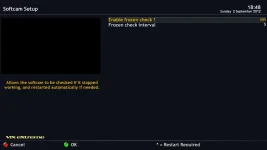
For those losing cams, can you post your logs also when in softcam manager press menu and it should give you times its checked to make sure cam is running - what does it say?

Even if the cam stops you should be able to manually restart it - no need to reflash
 
And the softcam log will show that.
Also are the settings in softcammanger-menu to check and re-activate enabled?
 
Got from 4shared website.
I know should not have to reflash but was final straw for me and its working again.
Will know in morning i guess

Where did you get the cam and how did you install it?

Did you do any settings restore?

For those losing cams, can you post your logs also when in softcam manager press menu and it should give you times its checked to make sure cam is running - what does it say?

Even if the cam stops you should be able to manually restart it - no need to reflash
 
Yes restart cam if frozen is enabled. I have installed mgcamd 1.35a, lets see how it goes. I now know the problem isn't the crossepg because I was out today and when I came back, cam had stopped working. I think if left on a channel for too long it freezes. Where do I find softcam logs?
 
So where do I find a softcam crash log mate?

It's not a crash log, but its in /tmp & called cam.check.log
Or you can view it on screen by pressing Blue -> Softcam Manager -> Info
 
Ok I am running mgcamd 1.35a so the previous cam log is gone so let's see if all is working tonight, I'll post a log if anything happens.
 

OpenViX Feeds Status

Back
Top