Superb quality and spec AB-Com PULSe 4K SE. Crazy offer! Only £99! FREE UK DELIVERY! 4K UHD, Enigma 2, Multiboot 4 images & more!...
Superb quality and spec AB-Com PULSe 4K Rev II Twin Satellite tuner only £149! FREE UK DELIVERY! 4K UHD, Enigma 2, SATA HDD facility, Multiboot 4 images & more!...

Logitech harmony remote, works great with the VU+ Duo

Sicilian

The Boss
Staff member
Joined
Mar 22, 2010
Messages
29,866
Reaction score
329
Points
83
Website
www.world-of-satellite.com
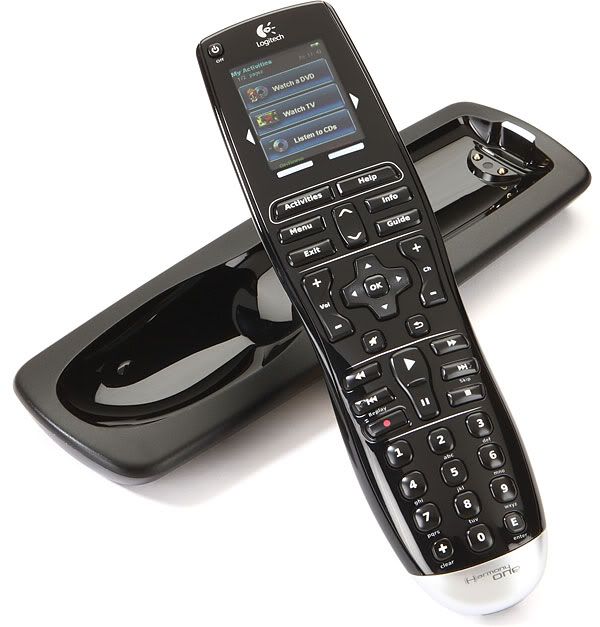
I thought I'd let members know that a Logitech harmony one universal remote works great with the VU+ Duo. Easily setup by manually learning the commands from the original VU+ Duo remote.

Code:
http://www.logitech.com/index.cfm/remotes/universal_remotes/devices/3898&cl=roeu,en
 
Re: Logitech harmony one remote, works great with the VU+ Duo

VU+ DUO is already in Logitech database. Its under Satellite/MaxDigital/VU+ DUO

One for All remotes doesnt work with VU+ DUO and you need to send remote to manufacturer for reprogramming. A sent my new 7960 remote to them today.
 
Re: Logitech harmony one remote, works great with the VU+ Duo

Thats 2 new things I've learn't today! :D Thank you for pointing that out m8. I'll re-prog mine from Logitech's database tonight :)
 
Re: Logitech harmony one remote, works great with the VU+ Duo

Sicilian said:
Thats 2 new things I've learn't today! :D Thank you for pointing that out m8. I'll re-prog mine from Logitech's database tonight :)
Me too
Thats great news for my logitech remote
thanks
 
Re: Logitech harmony one remote, works great with the VU+ Duo

OldSkulRide said:
VU+ DUO is already in Logitech database. Its under Satellite/MaxDigital/VU+ DUO

One for All remotes doesnt work with VU+ DUO and you need to send remote to manufacturer for reprogramming. A sent my new 7960 remote to them today.

Just programmed my harmony one remote with those settings, working perfect now. Originally I kept looking under Satellite/Marusys, thats why I could never finds it. Again many thanks :)
 
Re: Logitech harmony one remote, works great with the VU+ Duo

Video code: 2745
SAT code: 2799

These are codes for VU+ DUO if you have One for All Xsight remote control.
If you any other simpler remote control (without touch screen, without possibility to connect remote to PC etc.) then you need to send remote to OFA for reprogramming. I am getting mine remote from OFA tommorow or in two days. I already found out that OFA remote works great with VU+ using these codes. Thats great news!
 
I have logitech harmony remote 525 and confirm works great with VU+duo.
 
I thought I'd let members know that a Logitech harmony one universal remote works great with the VU+ Duo. Easily setup by manually learning the commands from the original VU+ Duo remote.

Code:
http://www.logitech.com/index.cfm/remotes/universal_remotes/devices/3898&cl=roeu,en
Thanks. There goes another 180 Euros.
 
All,

A few little questions on the Harmony One.

Are all the buttons on the VU + on the "One" and do long presses work as well.

Can buttons be reprogrammed or moved to other buttons on the pre programmed settings for the VU or have I to learn all buttons.

How many channel buttons with icons can be added to the display and is this a manual process one by one or does it let you set builtin channels for your region automatically.

I have a cheap hdmi switcher thats probably not in database. Can equipment be added manually and setup as part of an overall button (ie watch SAT = turn on TV, Amp, swticher to port 1).

If TV is on and I choose another option say switch from SAT to Antenna will a new TV power command be sent and turn off the TV.
 
One other thing.

The fact that it doesnt have coloured buttons on the remote is a poor decision.

h1.jpg


I know they appear as virtual buttons but this is a waste of the display and if you chage whats on the display (changing channel) I assume the coloured buttons are gone into a sub menu.

Bad decision to leave them out when 99% remotes have and use them...
 
Just bought one from Dix*ns at £117.99 inc.postage cheapest I could find
 
Code:
http://www.pixmania.co.uk/uk/uk/1975877/art/logitech/harmony-one-advanced-univ.html?srcid=369

Looks cheaper.
 
Code:
http://www.pixmania.co.uk/uk/uk/1975877/art/logitech/harmony-one-advanced-univ.html?srcid=369
Looks cheaper.

Good find Monty :)

how about the 515 model

It should work fine. Go here
Code:
[U]http://www.logitech.com/en-au/remotes/universal_remotes/devices/4738[/U]
Then click on Features > Compatibility check > Enter satellite box > MaxDigital for the manufacturer and VU+ Duo for the model ;)
 
All,

How do ye find the fact that the one doesnt have coloured buttons.
I know they are on the display but if something else is on the display how easy is it to have the coloured buttons appear and to get back to the options you had on the remote screen.

The colour buttons are so important on the VU+ (and most devices) its mad they are not there, plus it wouldnt be spouse friendly going into menus to find the coloured buttons when Sky receiver is heavily dependant on them too.
What would be the next best thing in a remote that has the ones features and has coloured buttons, a sky remote look and feel would also help.
 
All,

How do ye find the fact that the one doesnt have coloured buttons.
I know they are on the display but if something else is on the display how easy is it to have the coloured buttons appear and to get back to the options you had on the remote screen.

The colour buttons are so important on the VU+ (and most devices) its mad they are not there, plus it wouldnt be spouse friendly going into menus to find the coloured buttons when Sky receiver is heavily dependant on them too.
What would be the next best thing in a remote that has the ones features and has coloured buttons, a sky remote look and feel would also help.

The coloured buttons appear on the touch screen part ;)
 
But how is that in the real world.

When the coloured buttons are on the screen can the screen be switched to other functions. If yes how do you switch back to the coloured buttons.

Also the virtual coloured buttons on the screen are at the top of the remote (far away from the general buttons) when all the buttons normally used are further down.

The web is littered with complaints from reviewers and users on this issue. Maybe ONE v2 will have them.... Prices seem to be dropping maybe v2 is on the way ?
 
I see the newer 900 has the coloured buttons...
Mental price though.
D
 

OpenViX Feeds Status

Back
Top