Superb quality and spec AB-Com PULSe 4K SE. Crazy offer! Only £129! FREE UK DELIVERY! 4K UHD, Enigma 2, Multiboot 4 images & more!...
Superb quality and spec AB-Com PULSe 4K Rev II Twin Satellite tuner only £179! FREE UK DELIVERY! 4K UHD, Enigma 2, SATA HDD facility, Multiboot 4 images & more!...

[VU+ Duo] New power manager help.

I have installed 423 thanks but still having issues.

The power auto timer option has a limit of 300, so for example using it to shut down to deep sleep with repeat set it happens every 5 hrs should it not be able to do 24 hrs?

erm, no, as everyime you press a button on the remote resets the count to zero, so setting 24 hours it would never be reached. 'Auto' power timers are a count down timer.

The none auto power timer when set to go to deep sleep and then 2nd stage set to stand-bye goes into deep sleep but awakes a few minutes before the stand-bye time and asks if you wish to let the box go to deep stand-bye, if you say no then shortly after it asks if you want to go to stand-bye. The result if unattended is therefore still asleep. If you ignore the first request (wish to let the box go to deep stand-by?) that lasts about 3 mins it then goes back into deep stand-bye!
Is this the intention please?:confused:


sorry do not understand what you are saying.
 
Ok ill try again.

I can not set a single power timer that will start by setting deep sleep first say midnight then the second stage to go to stand bye at 8am as it puts it back into deep sleep at 8am if unattended.

If you attend the box at 8am and answer the yes/no Questions it will go to stand bye.
Is that any clearer?

I understand that the auto timers are count down and if the setting range was greater than 5 hrs like 16 hrs it could also be used for my purpose over a 24 hr repeated period.

What you seem to be implying that the timer kicks in when no activity! but I am only assuming as no info on how auto timers are intended to work, i asked previously.
 
Last edited by a moderator:
As you suggested I have tried the option of setting a repeating power timer, or timers.

1st attempt just set wake up it woke up, went to standby then when I turned on TV the box Immediately went back into deep sleep! on powering up the box it got as far as the 3rd rotating VIX then locked up with box display blank, powered off after 10 mins! I had to re-flash as permanently stalls at same point!

2nd attempt set timer to wake up 17:20 and seep sleep at 18:20 and the box starts to come out of deep sleep then hangs at 3rd rotating XIX, had to re-flash again as permanent!

Sorry cant get over first hurdle.
 
And today's feedback is the box display was on with the time frozen at wake-up time 7:59 actual time 8:30 turning on tv displayed black screen with rotating VIX. As was locked up again had to switch off and restart came up working.
 
And today's feedback is the box display was on with the time frozen at wake-up time 7:59 actual time 8:30 turning on tv displayed black screen with rotating VIX. As was locked up again had to switch off and restart came up working.

Please list exactly as follows and I will test: -

1) Exact timers you are setting.
2) You exact ViX build you are using.
3) VU+ Model you are using.
 
Please list exactly as follows and I will test: -

1) Exact timers you are setting.
2) You exact ViX build you are using.
3) VU+ Model you are using.

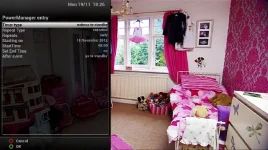
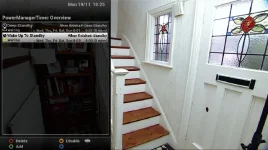
1)Screen shots for timers attached as a picture paints a thousand words! Please note that SET END TIME was set initially at same time but is not now shown, I have mentioned before.
2)My signature displays my build but its 3.0.423
3)Ultimo

Where can I get an opinion on the various Harmony RC please too?
 

Attachments

  • screenshot (1).webp
    screenshot (1).webp
    24.6 KB · Views: 19
  • screenshot (3).webp
    screenshot (3).webp
    55.6 KB · Views: 17
  • screenshot (2).webp
    screenshot (2).webp
    44.3 KB · Views: 16
1)Screen shots for timers attached as a picture paints a thousand words! Please note that SET END TIME was set initially at same time but is not now shown, I have mentioned before.
2)My signature displays my build but its 3.0.423
3)Ultimo

Where can I get an opinion on the various Harmony RC please too?

I'll try and test this evening and report back, but I tested similar timers on another model and all worked fine.
 
Thanks Ill be around for any test later.

The VIX update logs say that the stage 2 settings clearing issue have been fixed, they were fixed but now are not again as you can see.:cool:
 
just found a bug in WakeupToStandby timer, will build update soon, just want to do a few more tests.
 
VIX426 power timers, some good news the wake-up, wake-up to standby, with or without second stage settings now work fine, well dun.

The bad news is that go to deep sleep option has some strange results.

Setting go to deep sleep works OK no stage 2 timer.

Setting go to sleep with a second stage setting wake up to stand-bye say 10 mins later it goes into deep sleep, then it starts to wake up after about 7 mins, it display's on the panel do you want the box to go into deep stand bye? if you say yes it does! if you say no it goes into wake-up i.e. not stand-by as set!

If you ignore the panel request it display's ? for 3 mins then displays do you want to go into stand-bye? for another 3 mins. Having ignored both it then goes back to sleep!
 
VIX426 power timers, some good news the wake-up, wake-up to standby, with or without second stage settings now work fine, well dun.

The bad news is that go to deep sleep option has some strange results.

Setting go to deep sleep works OK no stage 2 timer.

Setting go to sleep with a second stage setting wake up to stand-bye say 10 mins later it goes into deep sleep, then it starts to wake up after about 7 mins, it display's on the panel do you want the box to go into deep stand bye? if you say yes it does! if you say no it goes into wake-up i.e. not stand-by as set!

If you ignore the panel request it display's ? for 3 mins then displays do you want to go into stand-bye? for another 3 mins. Having ignored both it then goes back to sleep!

sorry you lost me, please explain with screen shots, so i can understand what you are doing

thanks.
 
screenshot (5).webpscreenshot (4).webp

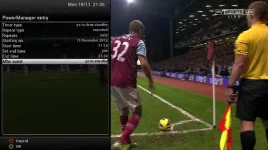
Screen shot 4 works
Screen shot 5 fails as it goes back into deep stand-bye, as I tried to describe in detail before.

As you can see the only difference is the sequence between the two.
 
View attachment 21053View attachment 21054

Screen shot 4 works
Screen shot 5 fails as it goes back into deep stand-bye, as I tried to describe in detail before.

As you can see the only difference is the sequence between the two.


let me try to explain what you are doing wrong


first screen shot 4:
whats this would do is, go to deepstandy @21:23, wake the box at @21:29 (deepstandy wakeup's always start 4 mins early to all time box to start, so timer is ready to the next stage), then at @21:33 goto standby.

second screenshot 5:
you have set the start date and time as 19-nov 8:00 this has already passed, you should have set the start date for 20-nov or the start at least 10 mins after the current time deepstandby timers need extra time to wake box see above. and put the box manually into deepstandby
remember that the start action is ALWAYS first. so doing what you did in 5 it would not activate untill tomorrow. the timer would automatically be scheduled for tomorrow. @8:00

hope this helps..


andy.
 
let me try to explain what you are doing wrong


first screen shot 4:
whats this would do is, go to deepstandy @21:23, wake the box at @21:29 (deepstandy wakeup's always start 4 mins early to all time box to start, so timer is ready to the next stage), then at @21:33 goto standby.

second screenshot 5:
you have set the start date and time as 19-nov 8:00 this has already passed, you should have set the start date for 20-nov or the start at least 10 mins after the current time deepstandby timers need extra time to wake box see above. and put the box manually into deepstandby
remember that the start action is ALWAYS first. so doing what you did in 5 it would not activate untill tomorrow. the timer would automatically be scheduled for tomorrow. @8:00

hope this helps..


andy.

I understand about being past the time date etc. Screenshot 5 works but screenshot 4 fails to end in standbye as it goes back to sleep at 21:33 not as I would like and you have expected it too.

If you can not now understand I give up. Thanks.
 
Last edited by a moderator:
I understand about being past the time date etc. Screenshot 5 works but screenshot 4 fails to end in standbye as it goes back to sleep at 21:33 not as I would like and you have expected it too.

If you can not now understand I give up. Thanks.

i will look into this but irc, the standard behaviour of deepsleep wakeup is to return to deep after timer ends, just like recording timers do.

will do some more test tomorrow for you

so to if i understand you, you want to wakeup from deep to live tv for a period of time then go to standby?

not just wake from deep to standby ?
 
I would like it to wake from deep standbye and go into standbye as it wakes.

The box has now shut down with the timer set as in screenshot 5 as I expected as the timer was running (green run indicator) even though the start time of 8:00 was past and I believe it will come on into stand-bye at 8 tomoz. I am perfectly happy with that as it meets all my current needs.

If the timer is set as in screenshot 4 the 2nd stage is never achieved as goes back to deep stand-bye.

Cheers for testing tomoz.:cool:
 
I would like it to wake from deep standbye and go into standbye as it wakes.

The box has now shut down with the timer set as in screenshot 5 as I expected as the timer was running (green run indicator) even though the start time of 8:00 was past and I believe it will come on into stand-bye at 8 tomoz. I am perfectly happy with that as it meets all my current needs.

If the timer is set as in screenshot 4 the 2nd stage is never achieved as goes back to deep stand-bye.

Cheers for testing tomoz.:cool:

then for that use 'Wakeup to standby" ;) thats why i coded it ;)

what i have is the following


1 Timer


"Wakeup to Standby" @08:00 with an end time of 22:00 and action of "Go To DeepStandby"
 
Morning,my box was on this morning in stand-bye showing time correct @ 8:40 and date. I turned on TV and the box display changed to "your box is shutting down" and then went to deep stand-bye!

I use HDMI to turn box on and the power timer is the one in sreenshot 5 that I expected to work!
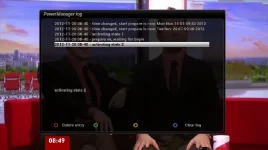
The timer log only contains data from when I turned on TV at 8:40
I will test your own power timer settings shortly and post results with screenshots.:cool:
 

Attachments

  • screenshot (6).webp
    screenshot (6).webp
    27.5 KB · Views: 13

OpenViX Feeds Status

Back
Top