Superb quality and spec AB-Com PULSe 4K SE. Crazy offer! Only £129! FREE UK DELIVERY! 4K UHD, Enigma 2, Multiboot 4 images & more!...
Superb quality and spec AB-Com PULSe 4K Rev II Twin Satellite tuner only £179! FREE UK DELIVERY! 4K UHD, Enigma 2, SATA HDD facility, Multiboot 4 images & more!...

New HDD not automatically mounting in Vu Duo with Vix

  • Thread starter Thread starter wl1
  • Start date Start date
W

wl1

Guest
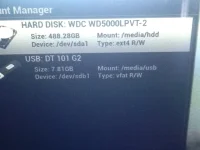
I replaced a 1Tb 3.5" Sata for a 2.5" 500Gb Sata drive. I got it working Ok, timeshift, recording, playback etc...but when the box is turned off, or comes out of Deep Sleep, the HDD is recognisd, but not mounted.

I manually Mount the HDD - and all is well again.

Anybody seen this before, or can offer advice.

HDD - WD5000LPVT

See pics...
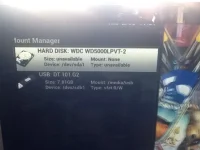
vuduo.webpvuduo2.webp

Thanks,

Wayne
 
What build?

There was an issue many moons ago but that was a very distant build
 
It's the latest one. But the trigger was changing the HDD, not software update.

I have looked at the logs, but not much sense to me. Sda1 is not mounting. Any ideas? I am running without Deep Standby, so this is annoying rather than urgent.
 
It's the latest one. But the trigger was changing the HDD, not software update.

I have looked at the logs, but not much sense to me. Sda1 is not mounting. Any ideas? I am running without Deep Standby, so this is annoying rather than urgent.

Have you tried initializing the drive seeing as its new ?.

Sent from my GT-I9300 using Tapatalk 2
 
The HDD was initialised etc when it was installed. Formatted etc, and works, once mounted.

It just doesn't remount on reboot from Deep Standby or Power Off.
 
Does anybody know how to execute a script which, following a delay on power up, will execute a script to mount the HDD.?
 
Does anybody know how to execute a script which, following a delay on power up, will execute a script to mount the HDD.?

You shouldn't need any script. If the box isn't detecting the HDD, find the issue & fix that.

Using Tspanel perchance?

I wouldn't recommend using TS Panel at all, does more harm than good & could easily be the cause of this problem in the first place.
 
Unless TSPanel is part of the standard Vix download, then no, it's not loaded.

I am happy to fix the root cause, rather than bypass with a script. Some help on doing that is required - where would I start? I think the logs, but I am not familiar with the contents when it was running fine.
 
Unless TSPanel is part of the standard Vix download, then no, it's not loaded.

I am happy to fix the root cause, rather than bypass with a script. Some help on doing that is required - where would I start? I think the logs, but I am not familiar with the contents when it was running fine.

No TSpanel is not included in the official ViX image by default, the reason it was mentioned is because TSpanel is a known culprit in such circumstances, so we tend to ask first rather than spending days trying to help only to discover it is a TSpanel related problem.


Sent from my iPad using Tapatalk HD
 
Any ideas on the best way to make progress?

I have considered getting another HDD, but that might be a waste.

I have tried removing plugins etc, turning off timeshift, but the HDD refuses o stay mounted on oot up. Once mounted manually, it is fine until next power cycle.
 

OpenViX Feeds Status

Back
Top