Superb quality and spec AB-Com PULSe 4K SE. Crazy offer! Only £129! FREE UK DELIVERY! 4K UHD, Enigma 2, Multiboot 4 images & more!...
Superb quality and spec AB-Com PULSe 4K Rev II Twin Satellite tuner only £179! FREE UK DELIVERY! 4K UHD, Enigma 2, SATA HDD facility, Multiboot 4 images & more!...

IPTV List

satmanbasil

V.I.P
Joined
Mar 30, 2010
Messages
893
Reaction score
3
Points
0
Location
SouthEast UK
Hi there

Latest hobby is looking into this IPTV system I have the pluging IPTV downloader list and to view some of the available IPTV broadcast I have tsmedia plugin too.
My question concerns the downloader list can anyone confirm if tsmedia should be able to read this list or do i have to ftp the data to tsmedia to enable viewing of channels it reports.
Also its my understanding not all IPTV can be seen with a vu+ is this correct and if so is there a way to check which ones i can, right now its been suck it and see opening maybe 3 in 10 channels i wanted to see.
I did see a prog made by the people who make the vlc player to view streams and test any views on if this would be a useful tool to download.

Look forward to hearing from those in advance state of iptv training lol
 
My question concerns the downloader list can anyone confirm if tsmedia should be able to read this list or do i have to ftp the data to tsmedia to enable viewing of channels it reports.
I'm not sure what you mean.
The IPTV-list downloader adds bouquets to your box that can be viewed by simply zapping to it (just as is the case with live-TV).
TS-media allows you to watch a stream from within the plugin, not via a bouquet.


Also its my understanding not all IPTV can be seen with a vu+ is this correct and if so is there a way to check which ones i can, right now its been suck it and see opening maybe 3 in 10 channels i wanted to see.
As always this is a matter of supported codecs. Any STB can only show you video contents when the codecs are supported in the hardware of the box.
The WMV-codec is largely used these days for IPTV and unfortunately VU+ has not enabled the WMV-codecs in their drivers.
Please report and ask via
Code:
http://www.vuplus.com/supportBugReportWrite.html
The more complaints the better.
Xtrend has support for WMV on all their boxes.


I did see a prog made by the people who make the vlc player to view streams and test any views on if this would be a useful tool to download.
Can you provide a link please?
 
HI all
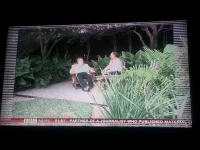
I have sent a complaint as suggested above because sometimes when i put an IPTV channel on from the bouquet that iptv list has made it crashes my box and i have to turn the power off from the back (very annoying) and reboot and when i do i get this border on my tv. SneuEeoUMDG8qT54L5wbhtUcibNbLiCMJdKjdbNdanM.webp
so to get a rid of this problem i have to go in to Settings>setup>system>user interface>position setup then change any of the settings in there slightly and it makes the boarder go away then exit even without saving settings. Im using openvix-3.0.720 on vu duo, there is an update to 721 but it will not update for some reason just gets stuck on the update screen. is there something i am doing wrong or is this normal for vu duo on vix?
 
hi,
disable overscan at your TV if possible.

ciao

Gesendet von meinem GT-P1000 mit Tapatalk 4
 
hi,
disable overscan at your TV if possible.

ciao

Gesendet von meinem GT-P1000 mit Tapatalk 4

Hi Trial
Thanks i will try that but i still dont understand why this only happens when the vu crashes? could it be a bug on the vix image?
 
it's far better to disable overscan from the TV's end if possible rather than adjusting the OSD.
 
it's far better to disable overscan from the TV's end if possible rather than adjusting the OSD.
Thanks I have done that i will report back if it happens again after a system crash, it might not happen now im on 721.
 
Hi skratch,
I do not know for sure but it seems that the driver of VU+ only clears the OSD area you configured and in case of a crash the picture outside this area contains garbage which you see.

And beside this OVERSCAN IS EVIL:-)

ciao
 
Hi skratch,
I do not know for sure but it seems that the driver of VU+ only clears the OSD area you configured and in case of a crash the picture outside this area contains garbage which you see.
Ah ok
And beside this OVERSCAN IS EVIL:-)

ciao

Ah ok seems better since updating to 721 but it still happens but very faint now will try and take another picture.
 
Ah ok seems better since updating to 721 but it still happens but very faint now will try and take another picture.

If you restart E2 after making the settings change & before it crashes, does it solve the issue?
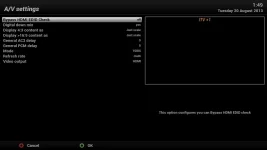
Also, what have you set in Menu -> Setup -> System -> A/V settings? a screenshot might be better here as there can be lots of info to compare.
 
If you restart E2 after making the settings change & before it crashes, does it solve the issue?
Also, what have you set in Menu -> Setup -> System -> A/V settings? a screenshot might be better here as there can be lots of info to compare.
It hasn't happened again yet but here is my settings.
This is ITV+1 Screenshot.webp
 
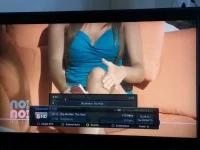
Ok after a failed update to 722 it happened again much i had to take a picture because it doesn't show on a screenshot.
 

Attachments

  • lines on vu.webp
    lines on vu.webp
    57.5 KB · Views: 30
Last edited:

OpenViX Feeds Status

Back
Top