Superb quality and spec AB-Com PULSe 4K SE. Crazy offer! Only £129! FREE UK DELIVERY! 4K UHD, Enigma 2, Multiboot 4 images & more!...
Superb quality and spec AB-Com PULSe 4K Rev II Twin Satellite tuner only £179! FREE UK DELIVERY! 4K UHD, Enigma 2, SATA HDD facility, Multiboot 4 images & more!...

VU+ Solo2 and Sky card

xfish

New member
Joined
Aug 17, 2013
Messages
23
Reaction score
0
Points
0
Location
UK
That's my first post so welcome everyone :)
It's also my first linux based receiver so the questions I have are probably noob-style
I've just received my shiny Solo2 from World-of-Sattelite.com and with a help of many forums I was trying to set it up.
On the paper it didn't loook too bad but ....

Solo2 is for now connected to sky dish, two signals (I'm waiting for motorised dish)
I am trying to use my Sky card in Solo (Movies, Sport and HD)
I have Vix software preinstalled, I managed to install Cccam and with empty config file I can watch FTV channels.
Than I tried to change settings in Ccam.
I have two lines in cfg file
BOXKEY: /dev/sci0 xx xx xx xx
SMARTCARD CLOCK FREQUENCY: /dev/sci0 3570000
Boxkey is from my sky box in hex - but nothing happens. Still no HD channels from SKY
I would rather not touch Oscam as it looks even more complicated for me to config.
If Oscam is my only route is there any copy and paste config for Sky that I could use?

Another problem I have is network. Solo 2 is connected by wire to my router. I know its IP but when tried to use vucc I have Access denied error.
Ping is fine, at the end I used Windows to send config file to the receiver.... but why it doesn't work with VUCC?

I am sure I will have more questions later...
Thx
Thomas
 
Are you sure your box key is correct?
Do any of the paid channels clear?

Sent from my GT-I9305 using Tapatalk 4
 
I believe box key is fine.
What details should I have in Ccam info?
In general I have: available shares:2 (no idea what it is)
Clients: blank

Server: 127.0.0.1:17050

Shares:/dev/sci1 - CaID:0963
127.0.0.1:17050 - CaID:0963
System:nds
Upshops:0
Maxdown:11

Share: Unknown 2

Entitlements:
handled 92(0) ecms and 0(0) emms
Entitlement info
003 16-10-2013
00b 16-10-2013
and so on...

ECM info: blank


I don't know if these settings are ok because it's black magic for me but maybe somebody smarter than me will see any obvious errors.

I knew that people are using these boxes for illegal sharing but didn't know that it would be so difficult to use genuine SKY card to work.


Thanks

Edit:
I changed card slot to sci1 and also in Cccam.config but it didn't help

To answer the question: no paid channels available
 
Last edited:
Have you got a line in there like this

BOXKEY: /dev/sci0 YR LD 56 JK - blue should be your box key
 
I would recommend using oscam... I have attached the latest oscam binary here (extract before uploading ;)). Upload this via ftp to your box, at /usr/softcams, and change the permissions to 755. oscam.conf, oscam.server and oscam.user need to go to /etc/tuxbox/config/

The following is a copy and paste from another forum (thanks to vortex):

Code:
Setting up Oscam to read a Sky UK card 

OSCAM FOR SKY UK
================

This tutorial is aimed solely at those wishing to use Oscam to read their Sky UK
cards instead of either newcs or CCCam, given that the latter are now having
problems. It does not attempt to cover all aspects of Oscam and only those
relevant to the specific topic are explained.

(1) Obtaining Oscam
===================

New Oscam versions are released almost daily for most platforms, and, in
addition, source code is also available. This makes Oscam very up to date.
Many people may well be happy with what can be downloaded directly through their
box's CAM updates, but if you want to download the latest binaries or simply
want to be independent you can Google for them.

(2) Installing Oscam
====================

If you've installed Oscam through your box's updater, then it will have put
Oscam itself and the configuration files where it thinks fit. The configuration
files can go almost anywhere you like, you just specify where with the -c option
when starting Oscam. I'm going to assume the Oscam binary is in /var/bin and is
simply called oscam, and the configuration files are in /var/keys, as this is
how I do it myself.

(3) Configuring Oscam for Sky UK
================================

Oscam has many configuration files. For our purposes you only need worry about
three of them - oscam.conf, oscam.server and oscam.user. If the others are
missing, Oscam will still work. When discussing each configuration file, I'm
only going to explain those elements which are important to us; those which you
won't need to change are just quoted.

oscam.conf
---------
[global]
logfile = stdout
# if you specify a location for a saved log file, be aware it gets very large
# very quickly
disablelog = 0
disableuserfile = 0
usrfileflag = 0
clienttimeout = 5000
fallbacktimeout = 2500
clientmaxidle = 120
failbantime = 30
cachedelay = 120
bindwait = 120
netprio = 0
clientdyndns = 0
resolvedelay = 30
unlockparental = 0
nice = -1
serialreadertimeout = 1500
maxlogsize = 50
waitforcards = 1
preferlocalcards = 1
saveinithistory = 1
readerrestartseconds = 5
lb_mode = 1
lb_save = 0
lb_nbest_readers = 2
lb_nfb_readers = 1
lb_min_ecmcount = 5
lb_max_ecmcount = 500
lb_reopen_seconds = 900
resolvegethostbyname = 0
failbantime = 10
double_check = 1


# [monitor]
# only activate this if you really need it
# for most people the web interface is better
# port = 988
# nocrypt = 127.0.0.1,192.168.2.1-192.168.2.254
# aulow = 120
# hideclient_to = 0
# monlevel = 4
# appendchaninfo = 0

[newcamd]
# this is for your clients with mgcamd (i.e. a CWS = line)
# or an N: line in CCcam
port = 12345@0963:000000
# 0963 is the CAID for Sky UK, and 000000 means all channels
key = 0102030405060708091011121314
# your Deskey
allowed = 1.0.0.0-255.255.255.255
# IP addresses allowed to connect (i.e. all)
keepalive = 1
mgclient = 0
# don't allow multiple log-ins from same user; some Abcom and
# DGStation boxes require this to be set to 1

[cccam]
# for your clients with CCCam (i.e. they have a C: line)
port = 12000
# or whatever you use.
reshare = 0
ignorereshare = 0
version = 2.1.3
updateinterval = 240
minimizecards = 0
stealth = 1

[dvbapi]
# if you want to use Oscam as your client as well as server
# doesn't work well on some non Dreamboxes
enabled = 1
# set to 0 if using mgcamd as the client and DVBAPI
user = local
# it must be a user defined in oscam.user to work correctly
au = 1
# or 0 as you prefer
boxtype = dm7000
# use dreambox for earlier dreamboxes with ppc processors
pmt_mode = 0

[webif]
# very useful and fairly straightforward
httpport = 80
httpuser = user
httppwd = pass
httprefresh = 10
httpallowed = 127.0.0.1,192.168.2.2-192.168.2.4
# can only be opened from those (LAN) IPs
httphideidleclients = 1
httpreadonly = 0
# oscam.conf ends


oscam.server
-----------
# Oscam has a very wide definition of "server". It includes not
# only your local cards but also your feeds from your friends using
# CCCam, newcs, etc. I'm only going to deal with local cards, newcs and
# CCCam
# it consists of a number of sections headed [reader]

[reader]
label = lower card
enable = 1
protocol = internal
device = /dev/sci0
caid = 0963
# 0963 is Sky UK.
# boxid = 01234567
# Oscam can read a Sky card i.d, but you can also put this
# in manually
detect = cd
cardmhz = 357
# this helps the card run more smootly
group = 1
# Oscam has the concept of groups. Only users in group 1 can
# use this reader. I'm only using one group.
emmcache = 1,3,2
ecmcache = 1
blockemm-unknown = 1
blockemm-g = 1
# these ensure smooth decrypting
lb_weight = 101
# for load balancing - can be commented out.


[reader]
label = upper card
enable = 1
protocol = internal
device = /dev/sci1
caid = 0963
detect = cd
cardmhz = 357
group = 1
emmcache = 1,3,2
ecmcache = 1
blockemm-unknown = 1
blockemm-g = 1
lb_weight = 100


[reader]
# replaces a CCcam "C:" line
label = CCcam
enable = 1
protocol = cccam
device = myfeed.hisip.com,12000
# IP address,port
account = myname
password = mypass
# your user name and password
services = 
inactivitytimeout = 1
reconnecttimeout = 30
group = 1
ecmcache = 1
blockemm-unknown = 1
lb_weight = 100
cccversion = 2.1.1
# YOUR CCcam version presented to him; not his!
cccmaxhops = 3
# from him to you!
audisabled = 1
# doesn't receive updates


[reader]
# for a newcs or other newcamd feed
# replaces a CWS = line in newcamd.list
label = Newcamd
enable = 1
protocol = newcamd
key = 0102030405060708091011121314
# deskey
device = myfeed.hisip.com,12345
# IP address, port
account = myname
password = mypass
inactivitytimeout = 1
reconnecttimeout = 30
group = 1
ecmcache = 1

# oscam.server end

oscam.user
=========
# everybody needs an entry, even yourself.


[account]
# for your own box.
user = local
description = for local mgcamd or DVBAPI
pwd = mypass
disabled = 0
group = 1
uniq = 1
au = 1
# if you want the card updated from yourself

[account]
# for friend who may be using CCcam although works
# any protocol defined in oscam.conf
user = friend1
pwd = pass1
description = for friend with CCCam
disabled = 0
group = 1
uniq = 1
sleep = 0
au = 0
cccmaxhops = 3
cccreshare = 0
keepalive = 1


[account]
# intended for a friend using mgcamd, although works
# with any protocol defined in oscam.conf
user = friend2
pwd = pass2
description = for friend with mgcamd
disabled = 0
group = 1
uniq = 1
sleep = 0
au = 0
keepalive = 1

# oscam.user end

I cannot state that this will work as I haven't tested it, but I imagine it should work...
 

Attachments

Thank you for all replies.

I found this copy and paste config and tried to play with a bit earlier today, created oscam config files, ftp them to /etc/tuxbox/config/, oscam was installed but still no luck.

There's one thing I noticed: with ccam I had some data in ccam info. With oscam - nothing.
Show /tmp/ecm.info - doesn't do anything
Show clients - Error[Errno 146] Connection refused
Show readers, Show Log - the same error
Card infos - nothing happens
ECM Statistics - nothing happens

What is wrong?

Today VUCC finally connected to my box.
Happy days.
 
Did u try oscam using the version I posted above? The ipk versions of oscam on the forum are really old, so if using them, they might not work properly...


Sent from my iPad using Tapatalk HD
 
Yes, I used the file attached by you. Unzipped, moved the file to /usr/softcams, change permission to 755 in FileZilla and started it (stopped older version of oscam and ccam) - nothing has changed and still no info on oscam information page
 
In oscaminfo press menu and change the setting in there. Sorry cant remember what to, it should than show readers.

But if your not getting anything config is not right or its the update of death.

Can you post your cccam file with personal info change.

Sent from my GT-I9305 using Tapatalk 4
 
I've tried many different oscams - always the same result: on oscam info page I got error 146

What else can I do ?! My new Solo2 is closer and closer to go through the window...
 
My new Solo2 is closer and closer to go through the window...
Not sure if that would help .... :p


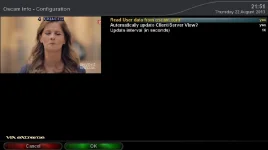
In oscaminfo press menu and change the setting in there. Sorry cant remember what to, it should than show readers.

Oscam Info --> Setup -->

Make settings like in attached screenshot; that should do the trick.
 

Attachments

  • OscamSetup.webp
    OscamSetup.webp
    14.5 KB · Views: 273
.can you PLEASE post up your cccam and or oscam config settings so can see if there correct, remove personal info though or change it to non identifiable ones.

Sent from my GT-I9305 using Tapatalk 4
 
Not sure if that would help .... :p


Oscam Info --> Setup -->

Make settings like in attached screenshot; that should do the trick.
:thumbsup:
And that was the problem. :)
It's working now.
I lost two evenings and solution was one click away...

Tomorrow I should have mortised dish delivered and will have more questions for sure.
Thank you once again.
 
Not sure whether this will help, but I've read somewhere about adding your pin to unblock certain channels. I remember my parents used to have to enter the pin everytime they wanted to watch a movie which was age restricted... Could it be that?

In oscam.server, under the read, add the following:

Code:
pincode = PUT YOUR PIN IN HERE

See if that helps?
 
Ok
As promised here come more questions ;)

I set up Tuner A with positioner USALS (double checked - they're fine)

I believe dish is not on true south so instead I was trying to move positioner to 28.2E and then find satellite but when I tell positioner to go to 28.2E (first I use Goto 0) it stops around 32E, for Astra 19.2 - goes to around 22, for Hot Bird 13E - around 16 on positioner scale. What's even more strange all W satellites are fine If I tell goto 11W - it stops at 11W

Any ideas what it is and how to fix it? Or maybe that's how it supposed to be?
 
If westerly positions are fine, and easterly are not, it looks like the pole is far from vertical (and/or other misalignments: elevation etc.....).

A few degrees off is not a problem; you can cheat with moving your own position a bit. But if there's a difference as you describe you must go into all the gory details and try to align all elements of the geometry.
 
EDIT: it's just me being stupid

One more question.
How can I tell positioner to use current position as 28.2 E
 
Last edited:
If you want to use Usals correctly then you need to get the ladder out and set the dish up properly. Btw by selecting eg 28.2e will not point at 28.2e - it all depends on your location where it will point at.
 

OpenViX Feeds Status

Back
Top