Superb quality and spec AB-Com PULSe 4K SE. Crazy offer! Only £99! FREE UK DELIVERY! 4K UHD, Enigma 2, Multiboot 4 images & more!...
Superb quality and spec AB-Com PULSe 4K Rev II Twin Satellite tuner only £149! FREE UK DELIVERY! 4K UHD, Enigma 2, SATA HDD facility, Multiboot 4 images & more!...

[VU+ Solo2] Active Softcam is not displayed ...

snoopy2013

Forum Supporter
Donated Member
Joined
Oct 23, 2013
Messages
153
Reaction score
0
Points
0
Hello,

first of all: Thank`s a lot for your great Image!!! :thumbsup:

Today I have installed on my two Receivers (Solo2 + ET5000) the actual Vix Image (Build 763) and updated (now: Build 765).

What struck me: the active Softcam is not displayed in the Screen Softcam-Setting, although it runs ok (please take a look to the sreenshot) ... :confused:

Is this possibly a little bug?

Regards

PS: Please excuse my bad english.
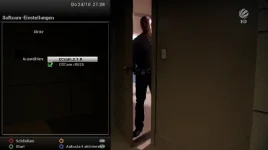
 

Attachments

  • screenshot_softcam.webp
    screenshot_softcam.webp
    12.1 KB · Views: 71
Have you got required config files?

If yes, start the cam using telnet command and see what error is reported.
 
Unfortunately, I do not know how to start softcams using telnet commands (I have tried "oscam stop" and "oscam start", but it did not happen anything ...) - sorry but I am not familiar with it.

Can you please tell me the exact telnet command or what I need to do exactly?

Thank you for your efforts.
 
All emulators on vix are located at /usr/softcams/

Log in via telnet (I use Putty). Issue the following the following command (make sure that the name of emulator is spelt excactly as listed)
Code:
/usr/softcams/OSCam.r8625

You've not confirmed whether you have the config files.
 
Hi mate

If your using oscam you need in var/tuxbox the following 3 files

oscam.conf
oscam.server
oscam.user
so take a look
 
Good Morning,

yes, I have all the needed config files on the box (CCcam.cfg in /etc and all the oscam files in /etc/tuxbox/config).

The softcams are also reading my cards OK - only the active softcam isn`t shown in "Softcam-Setting".

I have deinstalled and new installed both softcams, but just with the same result ...

Regards
 
PS (unfortunately, I could not edit the previous post):

Could it possibly be the content of the config files?

Is there anywhere a functioning template for the config files?
 
Last edited:
i use CCcam and after every new image and backup restore it happens to me.
When i check extentions to delete softcam there is none. i just reload CCcam ipk file via ftp/tmp
 
i use CCcam and after every new image and backup restore it happens to me.
When i check extentions to delete softcam there is none. i just reload CCcam ipk file via ftp/tmp
When restoring a softcam will be 'copied in' , i.e. not installed (just as if you FTP the files to the desired location). That means that the cam isn't installed, so OPKG has no knowledge of it's existence. And hence it cannot be deleted via OPKG (plugin browser --> red). Manually deleting the cam-files is the only way to 'de-install' (and make sure to make a new settings backup when done).
 
When restoring a softcam will be 'copied in' , i.e. not installed (just as if you FTP the files to the desired location). That means that the cam isn't installed, so OPKG has no knowledge of it's existence. And hence it cannot be deleted via OPKG (plugin browser --> red). Manually deleting the cam-files is the only way to 'de-install' (and make sure to make a new settings backup when done).

You are right:) i use plugin browser>red to check if the softcam is installed, not to delete actually, to see if a new install is necessary.
 
If nobody of you has a different idea what could be the reason, that in my boxes the active Softcam is not displayed, it will probably be the best, I take a complete new installation.

I will then report the results here.

Nevertheless, thanks again you for your help.
 
Hi mate
When you removed and reinstalled the softcams did you reboot the receiver to allow new cams to start?

also if you do a google your find many sites that will show you how to config your oscam files to work

Good Morning,

yes, I have all the needed config files on the box (CCcam.cfg in /etc and all the oscam files in /etc/tuxbox/config).

The softcams are also reading my cards OK - only the active softcam isn`t shown in "Softcam-Setting".

I have deinstalled and new installed both softcams, but just with the same result ...

Regards
 
Hi,

now I've just reinstalled my Solo2 - Result:

First the softcam was displayed correctly as "active" in "Softcam-Setting". But after installing "autofs" (opkg install autofs) and configuring "auto.network" and restart the box, the softcam was not displayed anymore as "active" although the softcam still works ok ...

Is there any solution for this (little) "problem" after install of "autofs/auto.network"?

Regards
 
Hi,

now I've just reinstalled my Solo2 - Result:

First the softcam was displayed correctly as "active" in "Softcam-Setting". But after installing "autofs" (opkg install autofs) and configuring "auto.network" and restart the box, the softcam was not displayed anymore as "active" although the softcam still works ok ...

Is there any solution for this (little) "problem" after install of "autofs/auto.network"?

Regards

never used please explain or send me config's so i can test.
 
Hello,

I hope I understood the question correctly to explain what "autofs" is (and hopefully I can express myself reasonably understandable in english :whistle:):

"Autofs" is a kind of automounter. You simple need to make an "opkg install autofs". After this you find the config files for the automounter in "/etc". In "auto.network" you have tu define the share folder. After that start the automounter with "/etc/init.d/autofs start". Advantage is that the share folders are always mounted just and only when access. For example so it does not matter which box is first turned on (it is then not necessary to connect via the networkmenu again).

My "auto.network" is for example:

PHP:
# automatically generated by enigma 2
# do NOT change manually!
Filme_Festplatte_Keller -fstype=nfs,rw,soft,tcp,nolock, 192.168.178.191:/media/hdd/movie
Filme_Festplatte_Studio -fstype=nfs,rw,soft,tcp,nolock, 192.168.178.192:/media/hdd/movie

After installing and start "autofs" a still active softcam is not displayed any longer as active in "Softcam-Settings".

Thank you for your efforts.

Regards
 
Last edited:
Hi
seems to me this autofs has something to do with your problem, never come across it myself and must beg the question do you really need this to be working on your receiver??
 
Hello,

of course it is not existentially but it is a very useful way to mount network devices. Particular, there are no problems, even if a device is not available at the start of the box.

If you want, you can take a look for example in Forum "Open Pli" or "VTI" and search for "autofs" and "auto.network". Then you will see that many user find "autofs" very useful.

I just find it a little sad that in Open Vix image after start of "autofs" ("autofs" itself works so well in the Vix image without problems) it comes to the described problems with display of activity and control of Softcams.

Perhaps the problem can be found and eliminated anyway?

Regards

PS:
Independently of this problem, currently Open Vix is my favored Image! :thumbsup:
 

OpenViX Feeds Status

Back
Top