Superb quality and spec AB-Com PULSe 4K SE. Crazy offer! Only £99! FREE UK DELIVERY! 4K UHD, Enigma 2, Multiboot 4 images & more!...
Superb quality and spec AB-Com PULSe 4K Rev II Twin Satellite tuner only £149! FREE UK DELIVERY! 4K UHD, Enigma 2, SATA HDD facility, Multiboot 4 images & more!...

[VU+ Uno] New VIX Image and Video Mode Problem

Hello Judge - WOW!

I learned something new today! - Thank you . . . .

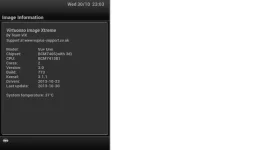
I need to work out how to save the screenshots that are needed now but have copied and pasted the Box Info on a word document . . . . Will this do for now?

no, not for me anyway, don't use word.
right click, save image as...
or if using telnet, follow that tutorial & screenshots will be saved in /tmp/
 
Okay, it is asking for the Vu Username and Password?

I have never created one or knew that there was one
 
What's asking for it, telnet, webif, your neighbour?

by default, username is root & password is left blank.
 
Sorry "putty" was asking for it.

The neighbour might ask for it but won't get it. : )

Thank you, I'll now read the tutorials, might be a bit later that I post the screenshots now, my brain is frazzled.

My hats off to you guys who do this daily . . . .
 
Sorry "putty" was asking for it.

The neighbour might ask for it but won't get it. : )

Thank you, I'll now read the tutorials, might be a bit later that I post the screenshots now, my brain is frazzled.

My hats off to you guys who do this daily . . . .

Dont worry, it may be baffling rite now but you'll soon get the hang of it enough to be the one offering help to the newer crop of newbies.
 
Hello Phoenix/Rob,

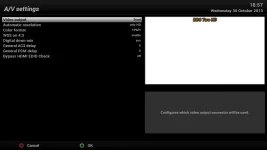
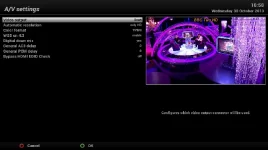
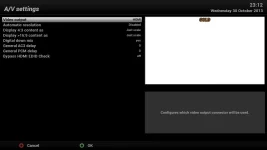
I have attached the screenshots that I grabbed with "putty" . . . . this is weird . . . this is not what my A/V settings say when I look at the menu on the TV . . . . they say HDMI not scart . . . .

If you need other screenshots, please let me know

Phoenix . . . I need the patience of a Saint to help others. . . I have the patience of a Sanj.

Judge - Thank you kindly for your help - I hope I got the screenshot grab thing right . . .

I have read AndyBlac's new thread, maybe I need to wait for the updates . . .
 

Attachments

  • grab.webp
    grab.webp
    10.6 KB · Views: 31
  • screenshot.webp
    screenshot.webp
    29.9 KB · Views: 34
Last edited:
A/V Settings Shown on TV menu

This is what I see as the A/V settings on the TV
 

Attachments

  • Screenshot TV.webp
    Screenshot TV.webp
    25.3 KB · Views: 29
Judge - Thank you kindly for your help - I hope I got the screenshot grab thing right . . .

No worries, glad you figured them out, a million times better than photos...

I'm confused though, which are your current settings?
Also, can you take a screenshot with AR disabled so we can see the other settings.

Finally, what build number are you currently using?
 
Current Build and Settings

Hello Judge,

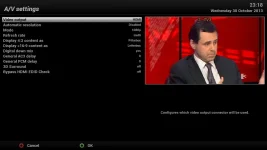
I have attached the Screenshot of the Current Settings.

When I change the AR settings to "Disabled" as I have done now and access the TV/Uno from the WebIF I can see the channel and get a picture but when I am watching the channel on the TV I get "Not supported Mode" and no picture.

When I change the A/V settings Auto Resolution to "Just HD" I am able to watch the SD channels on the TV.

I hope this makes sense
 

Attachments

  • grab.webp
    grab.webp
    9 KB · Views: 28
Current Settings

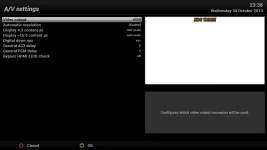
Sorry missed this screenshot of the current A/V settings
 

Attachments

  • grab.webp
    grab.webp
    11.1 KB · Views: 24
OK, can you still take a screenshot of the AV settings screen when it's disabled, even if no pic is showing on your TV.
Also, how did you install build 773, fresh flash or online update? if online update, do you know what build it was from?

What make & model is your TV?
 
Hello Judge,

The only screenshot I can make of the AV settings screen is the one I have posted above - to see the "Not Supported Mode" I have to take a picture. That is the strange part, on WebIF it is showing me a picture of the SD channel but on the TV I cannot see the picture when the AR is disabled - It just gives me the error message "Not Supported Mode".

I have been doing an online update daily on my box for the past 6 months- call me pedantic!

I started getting the Not Supported Mode on the TV a couple of days ago when we had the storm - I assumed my dish had become misaligned. I then saw Andy's message to do a clean flash - I downloaded the new image from the Image Manager and tried to flash but it got stuck on Reflash in Progress for the night - I then saved some of the Images on USB flash pens but they are not being read on the box. I have tried several images and several USB pens. The unit just boots into normal mode even though I pressed - button.

I cannot recall what version it updated from but have to assume it was updating to the latest image when I was doing the daily online updates.

I have a 2006 Samsung LCD Model LE46M51B.
 
Last edited:
I tried the flash again earlier - it keeps getting stuck on Reflash in Progress.

What if I do a Factory Reset? I am tempted to wipe everything and start again.

I see what you mean - there are a few options missing from my screenshot
 
If you use the image manager to download build 773 & the image manager to flash it, does the box also get stuck on "Reflash in Progress"?
 
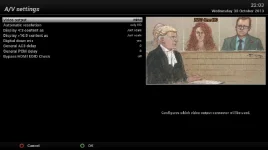
Current SD Settings No Picture

Screenshot of SD channel no picture on Webif and no Error Message Showing
 

Attachments

  • grab.webp
    grab.webp
    11.4 KB · Views: 24
Yes - I have only been able to use the Image Manager to flash, USB has not worked recently. I have been downloading the new versions as they have been out since yesterday and trying to reflash.

It does get stuck on Reflash in Progress.

I then turn the box off at the back to restart it.
 
Screenshot of SD channel no picture on Webif and no Error Message Showing
Still missing current options, doesn't matter if you're on a HD or SD channel.
You need to get the flash issue fixed.

Try using the image manager as posted above & let us know if flashing that way works.
 

OpenViX Feeds Status

Back
Top