

F
ford
Guest
Hi guys.
At the Admins request, here is a small tutorial regarding possible fix for a dead Vu+duo.
The normal symptom of the problem being a non starting box, showing only the red standby LED on the top left of the display.
When removing the cover, you will see in the first pic, the cable connecting the power supply to the motherboard.
BE AWARE!!!
Be careful to avoid touching the power supply components, as the switch mode capacitor can give you quite a shock, even when disconnected from the mains suppy.
You have been warned
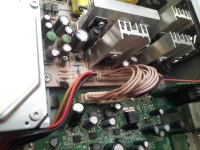
With the box switched on, measure the supply as illustrated on each pin out of the power supply, in respect to ground.
You can attach the ground cable of your multimeter the the metal chassis of the box.
Is much easier this way.
Do not disconnect any cables whilst doing this, or the power supply will shut down!!
The connector to the left in the pic is the 5 and 12 volt power to the HDD.
If you hear the drive spooling up on power up, and the box is dead, it's a reasonable indication that the power supply itself may be ok!
If all the voltages are ok, proceed to the next step.
I have made the next step easier for newbies, but some basic soldering skills are required.
If in doubt at this point, please seek professional advice.
PM me, and i'll do my very best to help you all.
Please see attached pic.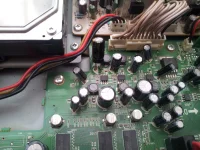
I have used some fine wire cutters to cut the old capacitor out, so if you are quick enough, as you can see in the pic, you can very neatly tack the new capacitor to the motherboard without removing the board itself!
If you are not so slick with the soldering iron, you may cause the remaining pins from the capacitor, to the motherboard to become unstable and dry jointed.
If you feel confident enough, remove the motherboard, and do it correctly.
As I said, the reason I did it this way, was because you can do a good enough job without removing the board, providing you are quick, and careful!
Try to use a 220 to 330 mfd 25, or 35 volt capacitor, although 16 volt will suffice.
NOTE THE POLARITY OF THE CAPACITOR!!
The negative pin, is as you can see on the left!!!
The capacitor to replace is C807 as written on the motherboard.
I did the whole thing in under 15 minutes.
This capacitor serves as part of the motherboard DC-DC converter operation.
At the Admins request, here is a small tutorial regarding possible fix for a dead Vu+duo.
The normal symptom of the problem being a non starting box, showing only the red standby LED on the top left of the display.
When removing the cover, you will see in the first pic, the cable connecting the power supply to the motherboard.
BE AWARE!!!
Be careful to avoid touching the power supply components, as the switch mode capacitor can give you quite a shock, even when disconnected from the mains suppy.
You have been warned
With the box switched on, measure the supply as illustrated on each pin out of the power supply, in respect to ground.
You can attach the ground cable of your multimeter the the metal chassis of the box.
Is much easier this way.
Do not disconnect any cables whilst doing this, or the power supply will shut down!!
The connector to the left in the pic is the 5 and 12 volt power to the HDD.
If you hear the drive spooling up on power up, and the box is dead, it's a reasonable indication that the power supply itself may be ok!
If all the voltages are ok, proceed to the next step.
I have made the next step easier for newbies, but some basic soldering skills are required.
If in doubt at this point, please seek professional advice.
PM me, and i'll do my very best to help you all.
Please see attached pic.
I have used some fine wire cutters to cut the old capacitor out, so if you are quick enough, as you can see in the pic, you can very neatly tack the new capacitor to the motherboard without removing the board itself!
If you are not so slick with the soldering iron, you may cause the remaining pins from the capacitor, to the motherboard to become unstable and dry jointed.
If you feel confident enough, remove the motherboard, and do it correctly.
As I said, the reason I did it this way, was because you can do a good enough job without removing the board, providing you are quick, and careful!
Try to use a 220 to 330 mfd 25, or 35 volt capacitor, although 16 volt will suffice.
NOTE THE POLARITY OF THE CAPACITOR!!
The negative pin, is as you can see on the left!!!
The capacitor to replace is C807 as written on the motherboard.
I did the whole thing in under 15 minutes.
This capacitor serves as part of the motherboard DC-DC converter operation.
Last edited by a moderator:


