Superb quality and spec AB-Com PULSe 4K SE. Crazy offer! Only £99! FREE UK DELIVERY! 4K UHD, Enigma 2, Multiboot 4 images & more!...
Superb quality and spec AB-Com PULSe 4K Rev II Twin Satellite tuner only £149! FREE UK DELIVERY! 4K UHD, Enigma 2, SATA HDD facility, Multiboot 4 images & more!...

[Venton Unibox HDx] Background update Check is in progress

  • Thread starter Thread starter imgold
  • Start date Start date
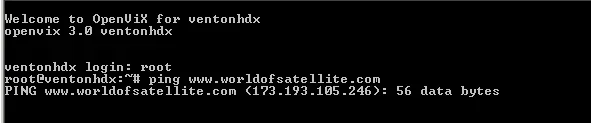
As I suspected: the box can't reach WoS.
You already rebooted the router? Maybe try another DNS?

hmm looks like i'm doomed - for reasons known only to itself my billion router won't change the settings when i change dns server info (currently set to googles dns 8.8.8.8 / 8.8.4.4

Update has always worked fine up till 48 hours ago and dns lookups work so I don't really see what the problem could be :-|
 
Welcome to OpenViX for et9x00
openvix 3.0 et9x00


et9x00 login: root
Last login: Mon Feb 17 18:27:47 +0000 2014 on /dev/pts/0.
root@et9x00:~# ping www.world-of-satellite.com
PING www.world-of-satellite.com (94.75.215.25): 56 data bytes
64 bytes from 94.75.215.25: seq=0 ttl=55 time=34.571 ms
64 bytes from 94.75.215.25: seq=1 ttl=55 time=34.523 ms
64 bytes from 94.75.215.25: seq=2 ttl=55 time=34.414 ms
64 bytes from 94.75.215.25: seq=3 ttl=55 time=34.574 ms
^C
--- www.world-of-satellite.com ping statistics ---
4 packets transmitted, 4 packets received, 0% packet loss
round-trip min/avg/max = 34.414/34.520/34.574 ms
root@et9x00:~#
 
this the results when I ping to wos
Welcome to OpenViX for et9x00
openvix 3.0 et9x00


et9x00 login: root
Last login: Mon Feb 17 18:27:47 +0000 2014 on /dev/pts/0.
root@et9x00:~# ping www.world-of-satellite.com
PING www.world-of-satellite.com (94.75.215.25): 56 data bytes
64 bytes from 94.75.215.25: seq=0 ttl=55 time=34.571 ms
64 bytes from 94.75.215.25: seq=1 ttl=55 time=34.523 ms
64 bytes from 94.75.215.25: seq=2 ttl=55 time=34.414 ms
64 bytes from 94.75.215.25: seq=3 ttl=55 time=34.574 ms
^C
--- www.world-of-satellite.com ping statistics ---
4 packets transmitted, 4 packets received, 0% packet loss
round-trip min/avg/max = 34.414/34.520/34.574 ms
root@et9x00:~#
 
obvious question but have you tried reflashing the image without using a backup ?, just in case it's a software error on your side ?.
 
quick follow up - managed to change my dns to opendns 208.67.222.222 / 208.67.220.220 problem still the same also tried my isp's defau;t dns of 62.24.243.4 and still the same result

6ZSWl.webp
 
tried to update via telnet and this is the result

Welcome to OpenViX for et9x00
openvix 3.0 et9x00


et9x00 login: root
Last login: Mon Feb 17 18:30:49 +0000 2014 on /dev/pts/0.
root@et9x00:~# init 4
root@et9x00:~# opkg update
Downloading http://enigma2.world-of-satellite.com/feeds/3.0/et9x00/3rdparty/Pack
ages.gz.
Inflating http://enigma2.world-of-satellite.com/feeds/3.0/et9x00/3rdparty/Packag
es.gz.
Updated list of available packages in /var/lib/opkg/lists/openvix-3rdparty.
Downloading http://enigma2.world-of-satellite.com/feeds/3.0/et9x00/all/Packages.
gz.
Inflating http://enigma2.world-of-satellite.com/feeds/3.0/et9x00/all/Packages.gz
.
Updated list of available packages in /var/lib/opkg/lists/openvix-all.
Downloading http://enigma2.world-of-satellite.com/feeds/3.0/et9x00/et9x00/Packag
es.gz.
Inflating http://enigma2.world-of-satellite.com/feeds/3.0/et9x00/et9x00/Packages
.gz.
Updated list of available packages in /var/lib/opkg/lists/openvix-et9x00.
Downloading http://enigma2.world-of-satellite.com/feeds/3.0/et9x00/et9x00_3rdpar
ty/Packages.gz.
Inflating http://enigma2.world-of-satellite.com/feeds/3.0/et9x00/et9x00_3rdparty
/Packages.gz.
Updated list of available packages in /var/lib/opkg/lists/openvix-et9x00_3rdpart
y.
Downloading http://enigma2.world-of-satellite.com/feeds/3.0/et9x00/mips32el/Pack
ages.gz.
Inflating http://enigma2.world-of-satellite.com/feeds/3.0/et9x00/mips32el/Packag
es.gz.
Updated list of available packages in /var/lib/opkg/lists/openvix-mips32el.
Downloading http://enigma2.world-of-satellite.com/feeds/ocram/Packages.gz.
Inflating http://enigma2.world-of-satellite.com/feeds/ocram/Packages.gz.
Updated list of available packages in /var/lib/opkg/lists/ocram-picons.
Downloading http://rossi2000.x10.mx/feeds//Packages.gz.
Inflating http://rossi2000.x10.mx/feeds//Packages.gz.
Updated list of available packages in /var/lib/opkg/lists/rossi2000.
Collected errors:
* unzip: Invalid gzip magic
root@et9x00:~# opkg upgrade
root@et9x00:~#
 
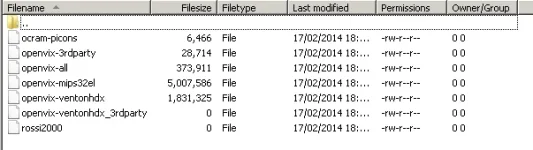
Hi me again. I'm back to square one with this issue. Tried deleting all files as Rob said to no joy. Any other tips please?
 
I am using a Netgear DGND 3700 v2 router and I changed it to the TalkTalk router I was given by my ISP and still doesn't work. I cant see how the problem is my end unless I am missing something. every time I try software update it says there is a background update check but I have disabled this option on the settings.Hope someone finds a cure and thanks for your help so far.
 
is it possible there is a virus on the box? if so how can i clean it - dont really want to reflash and lose all my settings if i can help it :(
702mK.webp
 
Wee update here as this was happening to me

I removed some plugins from the box via the plugin menu

Skin - blue hd2
Esame game

Rebooted and it worked !


Try removing some plugins and or skins :confused:
 
Please do in telnet
Code:
init 4 && opkg update && opkg list-upgradable
and post the result.
this is the result

Welcome to OpenViX for et9x00
openvix 3.0 et9x00


et9x00 login: root
Last login: Mon Feb 17 20:39:47 +0000 2014 on /dev/pts/0.
root@et9x00:~# init 4
root@et9x00:~# opkg update
Downloading http://enigma2.world-of-satellite.com/feeds/3.0/et9x00/3rdparty/Pack
ages.gz.
Inflating http://enigma2.world-of-satellite.com/feeds/3.0/et9x00/3rdparty/Packag
es.gz.
Updated list of available packages in /var/lib/opkg/lists/openvix-3rdparty.
Downloading http://enigma2.world-of-satellite.com/feeds/3.0/et9x00/all/Packages.
gz.
Inflating http://enigma2.world-of-satellite.com/feeds/3.0/et9x00/all/Packages.gz
.
Updated list of available packages in /var/lib/opkg/lists/openvix-all.
Downloading http://enigma2.world-of-satellite.com/feeds/3.0/et9x00/et9x00/Packag
es.gz.
Inflating http://enigma2.world-of-satellite.com/feeds/3.0/et9x00/et9x00/Packages
.gz.
Updated list of available packages in /var/lib/opkg/lists/openvix-et9x00.
Downloading http://enigma2.world-of-satellite.com/feeds/3.0/et9x00/et9x00_3rdpar
ty/Packages.gz.
Inflating http://enigma2.world-of-satellite.com/feeds/3.0/et9x00/et9x00_3rdparty
/Packages.gz.
Updated list of available packages in /var/lib/opkg/lists/openvix-et9x00_3rdpart
y.
Downloading http://enigma2.world-of-satellite.com/feeds/3.0/et9x00/mips32el/Pack
ages.gz.
Inflating http://enigma2.world-of-satellite.com/feeds/3.0/et9x00/mips32el/Packag
es.gz.
Updated list of available packages in /var/lib/opkg/lists/openvix-mips32el.
Downloading http://enigma2.world-of-satellite.com/feeds/ocram/Packages.gz.
Inflating http://enigma2.world-of-satellite.com/feeds/ocram/Packages.gz.
Updated list of available packages in /var/lib/opkg/lists/ocram-picons.
Downloading http://rossi2000.x10.mx/feeds//Packages.gz.
Inflating http://rossi2000.x10.mx/feeds//Packages.gz.
Updated list of available packages in /var/lib/opkg/lists/rossi2000.
Collected errors:
* unzip: Invalid gzip magic
root@et9x00:~# opkg list-upgradable
root@et9x00:~#
 
Wee update here as this was happening to me

I removed some plugins from the box via the plugin menu

Skin - blue hd2
Esame game

Rebooted and it worked !


Try removing some plugins and or skins :confused:


Strangely I only had this problem after i installed blue hd2 skin ...
 

OpenViX Feeds Status

Back
Top