


I have a New Samsung 1TB M3 external USB hard disk. I would like to use it as NTFS for ease of use between my W7 systems. I understand there are ext readers for W7. When I insert the disk with factory build there is a small (200Mb) EISA partition and an NTFS partition. My VU Solo 2 will see the EISA partition, but the NTFS partition is "unknown" size, the same is true for exFAT- please see image
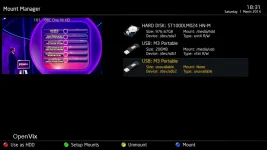 EISA (200Mb usable) but NTFS or exFAT and is not usable.
However Mac OS files system HFS is fine, please see this image
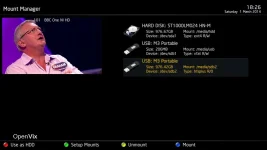 Formatted on Mac OS
Next I tried flattening the disk to a single NTFS or exFAT partition - same problem
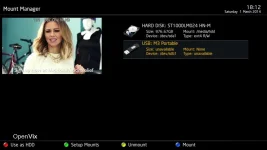
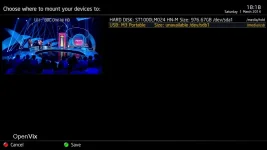 NTFS or exFAT on its own
You can set the mount point as you can see above but it does not take. The only way I have been able to use my disk is by initialising it to ext4. To do that it must be viewable in the storage manager as you can imagine. The disk can only be seen by storage manager if it has a "recognisable" partition, i.e. the one with two partitions above or the HFS. NTFS or exFAT on its own is not seen, so cannot be initialised by Storage Manager (even though above there is an "unknown" mount point).
Finally just to show the initialised disk is fine, so the problem issue I have is with NTFS or exFAT - but it is NTFS I want.
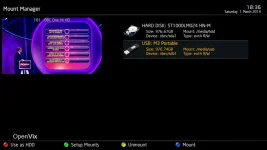
Please note that I took the images at different times to show the problem. If anyone can shed any light on this matter it would be great. Thanks!
EISA (200Mb usable) but NTFS or exFAT and is not usable.However Mac OS files system HFS is fine, please see this image
Formatted on Mac OSNext I tried flattening the disk to a single NTFS or exFAT partition - same problem
NTFS or exFAT on its ownYou can set the mount point as you can see above but it does not take. The only way I have been able to use my disk is by initialising it to ext4. To do that it must be viewable in the storage manager as you can imagine. The disk can only be seen by storage manager if it has a "recognisable" partition, i.e. the one with two partitions above or the HFS. NTFS or exFAT on its own is not seen, so cannot be initialised by Storage Manager (even though above there is an "unknown" mount point).
Finally just to show the initialised disk is fine, so the problem issue I have is with NTFS or exFAT - but it is NTFS I want.
Please note that I took the images at different times to show the problem. If anyone can shed any light on this matter it would be great. Thanks!


