Superb quality and spec AB-Com PULSe 4K SE. Crazy offer! Only £99! FREE UK DELIVERY! 4K UHD, Enigma 2, Multiboot 4 images & more!...
Superb quality and spec AB-Com PULSe 4K Rev II Twin Satellite tuner only £149! FREE UK DELIVERY! 4K UHD, Enigma 2, SATA HDD facility, Multiboot 4 images & more!...

[TM-TWIN-OE] problem with cross epg also new Zeus image

antwan

New member
Joined
Oct 20, 2013
Messages
133
Reaction score
0
Points
0
Hi peeps
I have just upgraded to new Zeus image seems awesome but I have a couple of Issues which I can't seem to resolve

When powered on from standby the VIX logo spins in the top left of screen this goes on for ever and the spinning halts then goes slow then stops. whilst this is happening I have no control over the box ie no response from remote. The only solution is if I reboot the box then seems stable again.


After reboot the cross epg is totally lost so I have to download again. Also when I press the info button I used to get the watched channel info. What I get now is full epg.
so just wondered if any one can point me to cross epg .. what settings should be.

Thanks in advance for any info.
 
build is 008 ..last update showing as 2014-03-23
 
Hi now running 009 hav to wait and see if ok.
Still having issue with epg ...when pressing info button it fetches up full epg, where as before it just showed channel info any ideas plse.??
 
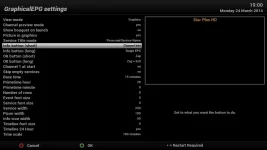
It is not a feature I use so not too familiar with it. The default settings are as pictured. i.e long press.

If you want to change it, open the epg and press "menu"
 

Attachments

  • single epg.webp
    single epg.webp
    19.7 KB · Views: 65
With regards your epg issue, what are you after exactly? Do you want to press epg button and the 7 day guide is on just that channel you are watching?
 
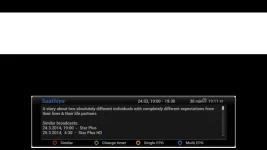
@Antwan, is this what you are after?
 

Attachments

  • single epg 2.webp
    single epg 2.webp
    11.2 KB · Views: 58
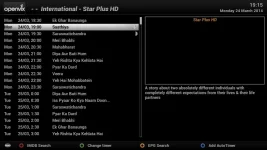
Or this. As I said, not familiar with feature.
 

Attachments

  • single epg 3.webp
    single epg 3.webp
    31 KB · Views: 44
yes mate this is what I am after but only comes up on long press of info button. short press I get full epg.
tried swopping values in menu as in your attachment rebooted and still same.
@Antwan, is this what you are after?
 
thanks for info ..whats mbq , guessing a extension plse advise
rgds Antwan
 
yes mate this is what I am after but only comes up on long press of info button. short press I get full epg.
tried swopping values in menu as in your attachment rebooted and still same.

Picture is default. You need to change it to opposite. Unless someone confirms that something is wrong.

MQB is a plugin. Multi Quick Button. It allows you to map what buttons do. You don't need it for this issue.
 
yeah this is what I'm after ... short press of info button I get full epg ...long press I get as above channel info ... the long press / short press are working opposite to what they supposed to. Changing values in set up does not do anything. changed a couple of times rebooted still info button does opposite of what i need it to do.
regards
Antwan
 
For me reversing them changes what they do. That is how I got the screen shots.

Do you have TSmedia installed by any chance?
 
Thanks for info, I don't have TS media installed so can you confirm that when you give the info button a short press you get channel information as in your 3rd screen shot. what happens when you do long press for me I get channel information regardless what settings are set as in screen shot two.

May do a factory reset and fresh install see if that changes things. Don't think I did a factory reset before update to Zeus do you think this is a issue?.
regds
antwan
 
By default a short press on the info button (not all boxes have that) brings up 'event view'.
If you don't get what you want by setting up the menu('s), please de-install MQB, restart E2 and see how it works then; there might be a flaw in MQB.
Also: build 010 is out now (available via online update): you might first see if your issue has been fixed.
 
i have the same problem - just tried build 010 (via online update) and it still doesnt resolve the issue
 
same here mate, just took update 010 still problem not resolved ..short press fetches up full graphic epg.

I have noticed that if you hold down epg button it fetches up several options one of which is choose default epg.

This does not solve my issue seems if epg button and info button are the same.
 
Last edited:

OpenViX Feeds Status

Back
Top