Superb quality and spec AB-Com PULSe 4K SE. Crazy offer! Only £99! FREE UK DELIVERY! 4K UHD, Enigma 2, Multiboot 4 images & more!...
Superb quality and spec AB-Com PULSe 4K Rev II Twin Satellite tuner only £149! FREE UK DELIVERY! 4K UHD, Enigma 2, SATA HDD facility, Multiboot 4 images & more!...

[VU+ Solo2] Picons missing

mskhan01

New member
Joined
Feb 10, 2014
Messages
252
Reaction score
0
Points
0
Location
UK
I need some advice regarding my missing picons, I have been using Rats picons, which are installed on my external hard, has been working great until today noticed some of the picons as not show despite being present in the picon folder. It had been working fine until yesterday. I have noted picons for BT Sports HD 1 & 2, also ESPN HD, Samaa, PTV Prime etc are missing. I tried putting the picons from an earlier folder but they are still not shown.
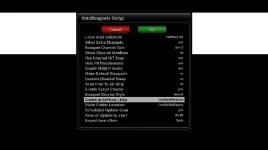
I tried using Lraizer's autobouquet's option of create Autopicon link, but had not much luck.Need some guidance please?
Just wondering for Sky UK which picon plugin will I need from the plugins menu?
 
just rename them with streaminfo.How: go to channel where picon is not shown.Select stream info and rename your picon with this info.
 
Pardon my ignorance but can you please advise me on how to do it?
 
To use lraizer auto picon function, all of your native picons need to be correct and present first, then scan with lraizer plugin and this creates symlinks do that you well never lose the picons on reference change,
As you have already lost several picons because of most probably reference change, that is why it wouldn't have looked like it would have worked for you.

Sent from my GT-I9195 using Tapatalk
 
To use lraizer auto picon function, all of your native picons need to be correct and present first, then scan with lraizer plugin and this creates symlinks do that you well never lose the picons on reference change,
As you have already lost several picons because of most probably reference change, that is why it wouldn't have looked like it would have worked for you.

Sent from my GT-I9195 using Tapatalk

Any suggestions on where to get correct native picons for Lraizer plugin?
 
I rename them under win explorer : \\IPADRESSBOX\Root\media\usb. You see the picons there.I set my box on the channel from missing picon and lookup stream info.Then I lookup under explorer the right picon and change the reference. The "." becomes "_". Easyast way if you have only a few picons to change.PS: afterwords I make a backup of the directory on my PC.Then I can kep them up to date there also.
 
What picon pack do you use?

Edit: Scratch that just read first post again

Sent from my GT-I9195 using Tapatalk

Any suggestions mate? also wondering for Sky UK which picon plugin will I need from the Vix plugins menu? I understand it should be east 28.2 but it seems missing from the list?
 
I rename them under win explorer : \\IPADRESSBOX\Root\media\usb. You see the picons there.I set my box on the channel from missing picon and lookup stream info.Then I lookup under explorer the right picon and change the reference. The "." becomes "_". Easyast way if you have only a few picons to change.PS: afterwords I make a backup of the directory on my PC.Then I can kep them up to date there also.

Thanks for your help but I am afraid it is beyond my level of understanding:(
 
If you are unsure what to do, just wait for rats to update his pack, so they are all current and working then run lraizer plugin to attach them.

Sent from my GT-I9195 using Tapatalk
 
There are no native picons for Lraizers plugin. The script will convert any picon set. As mentione d above, the picon set must be correct and complete in the first place. The reason I say complete, is that if there are 5 versions of a channel and the maintainer has named the picon only for the chanenl he uses, then the other four channels will not have a corresponding picon.

Channels (at least on 28.2) have unique EPG ID. This will never change. Lraizers autopicon script converts the existing/conventional names to unique ones. It then creates symlinks on every run so that any changed symlinks will point to the "fixed name" picon.

Once you have your picons in the autopicon format, you should not need to worry about picons for 28.2 if you are using AB 28.2. Apart from those that change picture or a new channel appears.
Where are your autopicon symlinks?
Where are your picons?
What format is the storage medium?
Did you restart your receiver? It does mention this during the process.

You should not be using a HDD for picons unless you have PTS running. The solo2 has plenty of memory for this.
 
There are no native picons for Lraizers plugin. The script will convert any picon set. As mentione d above, the picon set must be correct and complete in the first place. The reason I say complete, is that if there are 5 versions of a channel and the maintainer has named the picon only for the chanenl he uses, then the other four channels will not have a corresponding picon.

Channels (at least on 28.2) have unique EPG ID. This will never change. Lraizers autopicon script converts the existing/conventional names to unique ones. It then creates symlinks on every run so that any changed symlinks will point to the "fixed name" picon.

Once you have your picons in the autopicon format, you should not need to worry about picons for 28.2 if you are using AB 28.2. Apart from those that change picture or a new channel appears.
Where are your autopicon symlinks? Not sure where they are?
Where are your picons? External Hard drive root
What format is the storage medium? External Hard drive in Ext4 format
Did you restart your receiver? It does mention this during the process. Yes I did restart afterwards & there were no picons showing, so I disabled again from the plugin & reinstalled the picons on my hard drive

You should not be using a HDD for picons unless you have PTS running. The solo2 has plenty of memory for this.Where should I put them on my Solo2?
 
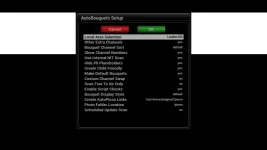
To take the guessing out of the equation, pleae post a screenshot of your settings for AB 28.2.
 
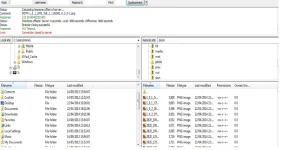
Those settings will work when you have a current working set of picons. If you ftp to box and look in your picon folder you should see all of your original picons and allot of extra symlinks.

Sent from my GT-I9195 using Tapatalk
 
1. Delete any existing picon folders on all your devices.
2. Manually download chosen picon and place on root of internal memory of receiver
3. Use the locations as in screenshot.
 

Attachments

  • cypher picon.webp
    cypher picon.webp
    14.3 KB · Views: 58
1. Delete any existing picon folders on all your devices. Deleted from hard drive
2. Manually download chosen picon and place on root of internal memory of receiver Placed Picon on root of solo2
3. Use the locations as in screenshot.
used the picon settings as suggested
Restarted the box as enigma 2 restart, now box showing no picons?
 
picon not Picon

Here is a screenshot of my one.
 

Attachments

  • cypher2.webp
    cypher2.webp
    32.3 KB · Views: 42
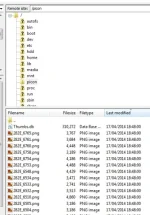
Picon.webpThat is my screen shot, but I have no picons displayed? Folder is picon not Picon.
 

Attachments

  • Picon.webp
    Picon.webp
    8.8 KB · Views: 34
Last edited:

OpenViX Feeds Status

Back
Top