Superb quality and spec AB-Com PULSe 4K SE. Crazy offer! Only £99! FREE UK DELIVERY! 4K UHD, Enigma 2, Multiboot 4 images & more!...
Superb quality and spec AB-Com PULSe 4K Rev II Twin Satellite tuner only £149! FREE UK DELIVERY! 4K UHD, Enigma 2, SATA HDD facility, Multiboot 4 images & more!...

Red-HD V1

  • Thread starter Thread starter rossi2000
  • Start date Start date
R

rossi2000

Guest
Red-HD V1.

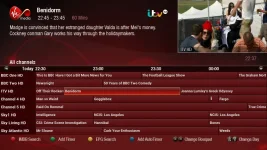
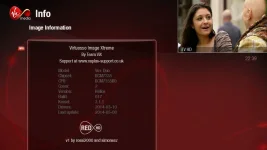
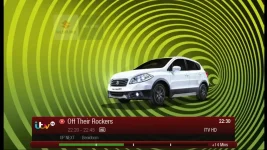
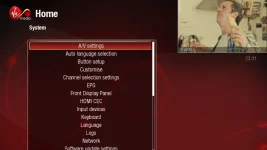
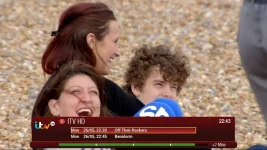
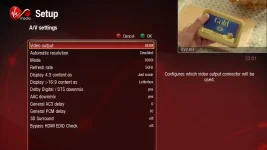
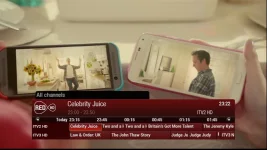
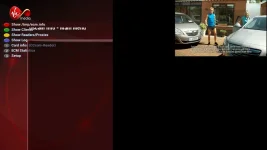
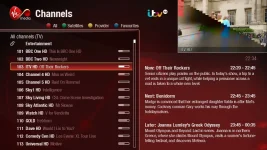
heres our latest skin. based on another provider. :)
mainly for vix image, it works on atv aswell but many screens arent skinned properly.
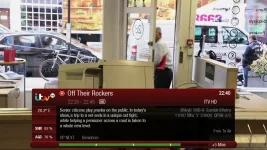
2ndinfobar.webp channelselection.webp epgpig.webp info.webp infobar.webp menu.webp quicksingleepg.webp settings.webp quickmulti.webp


feedback/suggestions etc welcome.

enjoy.


EDIT: 20151218. ipk has been removed removed. Please install from the plugin feeds.

To install the skin
Menu > Plugins > Green (download plugins) > skins > Select desired skin (openvix red hd)

To activate skin
Menu > Setup > System > User Interface > Skin Setup > Select desired skin
A GUI restart will be required foir this change to take effect

List of chanenls is condensed/squashed.
Open your chanenl list > Settings > Scroll down to "Number of rows" > Press left until number changes. 13 is suggested.

List of recordings condensed/squashed.
This is is because the default number of rows is set to 20. You need to change this to 9

Open your list of recordings > Then press menu > Settings > Scroll down to "Number of rows" >
Press left until number changes (9 is suggested) > Green for OK to save changes
 
Last edited by a moderator:
Looks nice, will try this out tomorrow.

Thanks to all involved for your hard work.
 
it works on atv aswell but many screens arent skinned properly.
Great work once again Rossi, do you want us to report screens that need to be skinned?

grab.webp grab2.webp

And again, as you'll probably guess I'm not a fan of non-needed graphics, while it displays a ViX logo but can & should be used on other images, I'd remove it & place the picon there.

grab3.webp

Other than that, some great new ideas, nice work & well done.
 
cheers all.

judge, yep i'll skin oscaminfo, the script runner screen i cant find the actual screen in the xmls atm lol
dont spose you know what the screen name is?

the skin needs a logo in the top left, the picon is in the top right next to the pig on screens where its needed. if i were to put the picon where the logo is there would be a gap on all the menu/setup screens etc
 
holyrossi and the dev of this skin

this skin is the best so far
brilliant
 
holyrossi and the dev of this skin

this skin is the best so far
brilliant

Rossi2000 is the coder, Simonsez is the graphical artist for this and other skins they produce.

Sent from my GT-I9300 using Tapatalk
 
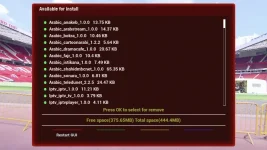
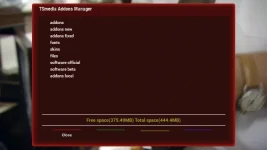
I've just installed redhd, on TSmedia when scrolling through some screens the text is neither highlighted or changes in anyway so its impossible to tell where on the screen you are.

Thanks again for the skin.

redhdts.webp

redhdts1.webp
 
This is fantastic guys, great work, updated to Apollo and just seen this, switched from the blue hd which is equally impressive.

Much appreciated! :cool::thumbsup:
 
I've just installed redhd, on TSmedia when scrolling through some screens the text is neither highlighted or changes in anyway so its impossible to tell where on the screen you are.

Thanks again for the skin.

View attachment 34918

View attachment 34919


cheers for the screenshots, TSMedia needs to be skinned, you can tell from the window'd box it appears in, it isnt skinned.

if you want to upload your TSMedia folder, i'll have a look at adding it to the skin. :)
 
are those files from extensions or systemplugins folder? they dont contain the main plugin files. .py files. or .pyo

the volume bar is set by the skin only.
 
judge, yep i'll skin oscaminfo, the script runner screen i cant find the actual screen in the xmls atm lol
dont spose you know what the screen name is?

Sorry Rossi, don't know.
Had a look in the debug log & it's not shown maybe Rob or Andy can tell you.
It's the blue button -> ViX -> Script Runner screen.

While looking in the debug log, I did notice this.
Code:
KEY: 352 OK
action ->  WizardActions ok
[ePNG] couldn't open /usr/share/enigma2/skin_default/Red-HD/buttons/FocusBar_H30x503.png
[Skin] Error: {Red-HD/skin.xml}: pixmap file /usr/share/enigma2/skin_default/Red-HD/buttons/FocusBar_H30x503.png not found!. Please contact the skin's author!
 
I installed this onto my Quad the other day and got a BSoD when going into the CCcam Info screen, if i remember in the morning i'll hunt for the log.
 
woah

that looks complicated to skin, i'll install it on my box and see how i can approach to skin it easily
 
Sorry Rossi, don't know.
Had a look in the debug log & it's not shown maybe Rob or Andy can tell you.
It's the blue button -> ViX -> Script Runner screen.

While looking in the debug log, I did notice this.
Code:
KEY: 352 OK
action ->  WizardActions ok
[ePNG] couldn't open /usr/share/enigma2/skin_default/Red-HD/buttons/FocusBar_H30x503.png
[Skin] Error: {Red-HD/skin.xml}: pixmap file /usr/share/enigma2/skin_default/Red-HD/buttons/FocusBar_H30x503.png not found!. Please contact the skin's author!


rob told me
fixed dude
aswell as oscaminfo

will be in todays build.


also ignore the focusbar errors for now, im moving them to the new selectionbars folder.
 
Last edited by a moderator:
woah

that looks complicated to skin, i'll install it on my box and see how i can approach to skin it easily

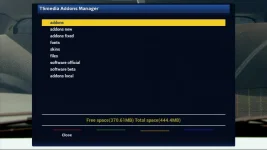
I've went back to BlueHD as the wife wasn't too keen on your new one and found the same screens were skinned

Bluetsm.webpBluetsm1.webp
 

OpenViX Feeds Status

Back
Top