T
thisntaht
Guest
Hi Guys,
This is probably not an image issue but just a settings issue so hope you can help,
I just updated to Apollo 025, Clean flash with no backup setting on a vu duo2. I have a legit card in this box and its working fine.
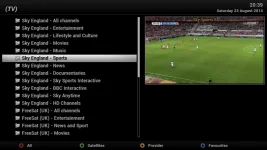
Everything is working fine but when I press the TV button on the remote to view bouquets list, the channel in the preview window always jumps to a specific channel, sky sports news.
No matter what channel I'm watching when I press TV to view the Bouquets list it always changes to sky sports news in the preview window,
How can I stop this so the preview window will stay at what I'm currently watching?
Also when I type in channel 401 sky sports news comes on (which is fine) and when I press the channel up button on the remote it will go to sky sports 1 but it will go no further,
No matter what I try it won't go past sky sports 1 on the channel up button on the remote and when I press the channel down button on the remote it jumps down the channels in increments of 10,
The channels all work fine as I can access them perfectly thought the bouquet list, why is this and how can I fix it?
One final thing, when I'm previewing channels on the "All channels bouquet" why I press on a channel, the preview window works fine but in the list, it automatically jumps down to the next channel below it,
For example, if I'm previewing channel 405 using the up and down arrows on the centre on the remote, once I select 405, then 405 will come up in the preview window but it has already jumped to 404 on the channel numbers and if I press ok on 404 it will preview 404 but jump down to 403 on the channel numbers etc,
Can I stop this and if so how?
I'm using blue HD skin and I've tried 2 Vix skins but the same result, I had none of these issues on vix 024 and yes I have a backup but I'd like to get this sorted if anyone can help
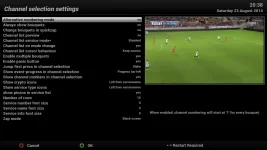
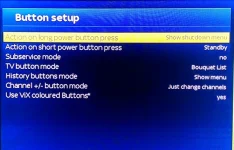
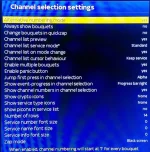
I tried making changes in the "Channel selection settings" and the "Button setup" and I've attached 2 pic's of the current settings, maybe someone can advice on how to fix this,
Hope I've explained this ok, if not just let me know,
Thanks in advance
This is probably not an image issue but just a settings issue so hope you can help,
I just updated to Apollo 025, Clean flash with no backup setting on a vu duo2. I have a legit card in this box and its working fine.
Everything is working fine but when I press the TV button on the remote to view bouquets list, the channel in the preview window always jumps to a specific channel, sky sports news.
No matter what channel I'm watching when I press TV to view the Bouquets list it always changes to sky sports news in the preview window,
How can I stop this so the preview window will stay at what I'm currently watching?
Also when I type in channel 401 sky sports news comes on (which is fine) and when I press the channel up button on the remote it will go to sky sports 1 but it will go no further,
No matter what I try it won't go past sky sports 1 on the channel up button on the remote and when I press the channel down button on the remote it jumps down the channels in increments of 10,
The channels all work fine as I can access them perfectly thought the bouquet list, why is this and how can I fix it?
One final thing, when I'm previewing channels on the "All channels bouquet" why I press on a channel, the preview window works fine but in the list, it automatically jumps down to the next channel below it,
For example, if I'm previewing channel 405 using the up and down arrows on the centre on the remote, once I select 405, then 405 will come up in the preview window but it has already jumped to 404 on the channel numbers and if I press ok on 404 it will preview 404 but jump down to 403 on the channel numbers etc,
Can I stop this and if so how?
I'm using blue HD skin and I've tried 2 Vix skins but the same result, I had none of these issues on vix 024 and yes I have a backup but I'd like to get this sorted if anyone can help
I tried making changes in the "Channel selection settings" and the "Button setup" and I've attached 2 pic's of the current settings, maybe someone can advice on how to fix this,
Hope I've explained this ok, if not just let me know,
Thanks in advance