Superb quality and spec AB-Com PULSe 4K SE. Crazy offer! Only £99! FREE UK DELIVERY! 4K UHD, Enigma 2, Multiboot 4 images & more!...
Superb quality and spec AB-Com PULSe 4K Rev II Twin Satellite tuner only £149! FREE UK DELIVERY! 4K UHD, Enigma 2, SATA HDD facility, Multiboot 4 images & more!...

[ViX_Misc] General Appolo 026 update question - applies to all receivers

timofee

Member
Joined
Jan 14, 2014
Messages
589
Reaction score
0
Points
16
This is a general question that would apply to anyone running ViX Apollo 024 and below wanting to update to ViX Apollo 026.

It has been stated many times that a settings backup should not be done. Ok got that.

But is it recommended to update using Image Manager to download the new ViX 026 image, and then install using the restore option within Image Manager (NB at the point it asks if you want to run the Restore Wizard you would say NO).

OR

Is it preferable to install Vix 026 using the USB stick method.
 
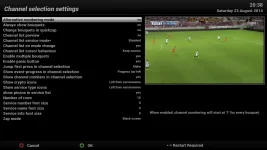
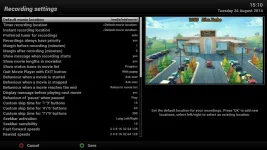
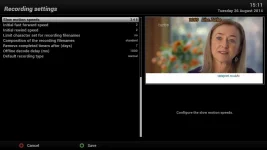
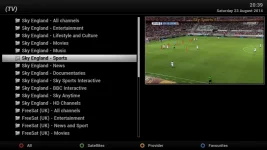
I went for the usb method yesterday but before I did I took photos on my mobile of what settings I had in the system menu like tuner config for my motor for instance so it was only a matter of looking at the pictures I had taken if I needed to alter anything. It didn't take long abd and I then knew it was a clean install.
 
USB method is tried and tested, and providing you make a note of your important settings, a fresh install should only take about 10 minutes.
 
you could also use the screen grab method to save your settings on your PC instead of using a mobile phone by entering your receivers ip address followed by (grab?format=jpg)

for example 192.168.*.**/grab?format=jpg

channel selection.webp Recording settings 1.webp Recording settings 2.webp TV  Button press.webp
 
Thanks for the interest, but it does not answer the question I asked.

My question is whether a Image Manager install is possible (without using the image restore wizard). I know that whichever method I use - Image Manager or USB stick - I have to reinstall settings from scratch.
 
Using the image manager to flash the receiver is no different to using a USB stick, in some cases it is the preferred method due to its ease of use. So yes you can use the image manager to flash the image.

Sent from my SM-G900F using Tapatalk
 
My Trusty old 4gig Kingston DataTraveler that I have always used to flash my Duo2 and Solo2 before that, is not getting recognised now by my Duo2 when I reflashed to 26 yesterday
I have formatted it totally wiped it tried the rear USB ports but it just boots up and dose not recognise it any more I had to use a 8gig Lexor to flash it yesterday
the reason I like using it is because it has the little LED Light so you can see that the Data is loading ah well all good things come to an end eventually :(
 
My Trusty old 4gig Kingston DataTraveler that I have always used to flash my Duo2 and Solo2 before that, is not getting recognised now by my Duo2 when I reflashed to 26 yesterday
I have formatted it totally wiped it tried the rear USB ports but it just boots up and dose not recognise it any more I had to use a 8gig Lexor to flash it yesterday
the reason I like using it is because it has the little LED Light so you can see that the Data is loading ah well all good things come to an end eventually :(

Vu+ receivers can be very temperamental with the USB sticks they accept for flashing images, even previously known working sticks can all of a sudden just stop working. I personally use either a Kingston DTSE9 8GB stick (the little metal ones) or a blade cruzor 4GB stick.

Sent from my iPad Air using Tapatalk HD
 
I have a couple of them little 8gig DTSE9 sticks but they do not have the Little flashing LED :rolleyes: :D
 
I have a couple of them little 8gig DTSE9 sticks but they do not have the Little flashing LED :rolleyes: :D

The ones with the L.E.D are handy but not really needed for receivers with a display like the Duo2.


Sent from my iPad Air using Tapatalk HD
 
I have a simple stick 8 GB from 4 euro's and working perfect.It's the one in the metal closier from hong kong.Also the Sony 4 GB is working fine.But thats the one for the epg and picons.
 
I have a simple stick 8 GB from 4 euro's and working perfect.It's the one in the metal closier from hong kong.Also the Sony 4 GB is working fine.But thats the one for the epg and picons.

I have never had any issues with a USB stick on my receivers including many cheap USB sticks, but as I said Vu+ receivers are especially picky when it comes to the sticks they will work with.

You could try using the HP format tool to correctly format the stick (search the forum for a copy).


Sent from my iPad Air using Tapatalk HD
 
I could never get HP format tool to work I don't know why as I have a top spec PC :confused:
 
I could never get HP format tool to work I don't know why as I have a top spec PC :confused:

Strange, there are a couple of other similar applications you could try to format the stick although I can't remember their names at present. When I am back on a PC / laptop I'll have a look to see what I have.


Sent from my iPad Air using Tapatalk HD
 
I normally use MiniTool Partition Wizard but even that did not fix it

Might just be one of those things where the USB stick has come to the end of it's working life, similar thing happened to me with a blade cruzor stick last year that had been working perfectly for two years in a Duo.


Sent from my iPad Air using Tapatalk HD
 
I've got a old tdk usb & it works every time on every thing / to answer the original question i updated both my solo2 boxes thru the online update from 024 to 026 without issues :lifting:
 
I've got a old tdk usb & it works every time on every thing / to answer the original question i updated both my solo2 boxes thru the online update from 024 to 026 without issues :lifting:

yet another user who disregards any advice we offer, so I will say again.

Build 024 is on OE-A 2.2 Build 025 onward in on OE-A 2.3, these OE cores are not cross compatible, which is why we give our advice not to use the online update method, rite now your image core is seriously messed up and it's not a matter of if something goes wrong but rather when.
 
to answer the original question i updated both my solo2 boxes thru the online update from 024 to 026 without issues :lifting:
Still not the best idea though. New OE, new Solo2 kernel, new Solo2 drivers.
Fair enough if you don't want to take team recommendations seriously, just don't expect much support besides 'fresh flash' in the future as you update the image & continue to restore backups made off the backup of an an incompatible build.
 
Might just be one of those things where the USB stick has come to the end of it's working life
Sent from my iPad Air using Tapatalk HD

I tried it with my LX3 simulated doing a re-flash but without pressing the button to set it away, the LX3 did not recognise it either and it just booted up as normal
so it looks like it will be put in the bin I have plenty of Memory sticks but they are all between 8 and 32 gig and it was a ideal size for saving backups and images
plus it had that little flashing led :D all my other 8 Kingston sticks do not have that led :(

mind you it must be about 10 years old so I really can not complain
 
Last edited:

OpenViX Feeds Status

Back
Top