Superb quality and spec AB-Com PULSe 4K SE. Crazy offer! Only £99! FREE UK DELIVERY! 4K UHD, Enigma 2, Multiboot 4 images & more!...
Superb quality and spec AB-Com PULSe 4K Rev II Twin Satellite tuner only £149! FREE UK DELIVERY! 4K UHD, Enigma 2, SATA HDD facility, Multiboot 4 images & more!...

New User - Low Priority - HD folder structure puzzle

leshay

New member
Joined
Sep 6, 2014
Messages
289
Reaction score
0
Points
0
Location
Livingston, Scotland
Hi
Elsewhere on the forum (VIX section), I read of a file called Terrestrial.xml, pertinent to an issue I had when I first tried scanning for my local transmitter (no channels found). The 'no channels' is not what this post is about though as I used Europe Africa etc and found the channels.

Anyway, I wondered what my Terrestrial.xml file held with respect to the Blackhill transmitter and so went looking for it.
A windows search on the Root folder of the GigaBlue internal HDD revealed about 20 hits, but I noticed that there seemed to be a strange hierarchy for the various paths it produced (I have never previously used a Linux system).

For example, here is one of the paths (one of the shorter ones):

"\\GBQUADPLUS\Root\proc\15559\root\proc\15559\root\proc\15559\root\proc\15559\root\proc\15559\root\proc\15559\root\proc\15761\root\proc\15761\root\proc\15761\root\proc\15761\root\share\terrestrial.xml"

Why would there be multiple sort of recursive paths like this - all one inside the other instead of what I'm used to on my Win7 system? Is this a valid path? It seems to be as I chased it all the way down and it seems it is all there on the disc alright.

I had it in my mind that perhaps that file need updating or something in light of the 'no channels' mentioned above as I also found what seems to be a 'Master' version of this data here:

https://github.com/oe-alliance/oe-alliance-tuxbox-common/blob/master/src/terrestrial.xml

and there is a difference in the sections pertinent to my local copy of the file.

I don't plan on doing anything crazy to my box operating system, but I find the above details strange.

Can anyone shed any light on the above?
 
The terretsrial.xml file is located at /etc/tuxbox/

Post what your transmitter is from the list here
Code:
http://www.ukfree.tv/closedown.php
 
The terretsrial.xml file is located at /etc/tuxbox/

Post what your transmitter is from the list here
Code:
http://www.ukfree.tv/closedown.php

My local transmitter is Blackhill, and the contents of the Terrestril.xml in the path you posted is the same as that in the file on the path I posted above, but both differ from the contents in the site I linked to above.
 
Last edited:
Can you try this xml file? Restart the receiver after transferring. Select United Kingdom in the tuner configuration.

Rather than list all the transmitters, I have listed all the frequencies.

EDIT: New attachment in post 12
 
Last edited:
For example, here is one of the paths (one of the shorter ones):

"\\GBQUADPLUS\Root\proc\15559\root\proc\15559\root\proc\15559\root\proc\15559\root\proc\15559\root\proc\15559\root\proc\15761\root\proc\15761\root\proc\15761\root\proc\15761\root\share\terrestrial.xml"

Why would there be multiple sort of recursive paths like this
Probably because whatever you are using to look for files on MS Windows doesn't understand about symbolic links on Linux, so follows them.

On Linux the proc file-system is a virtual one (it's just listing information directly form the kernel) about each process. One of these bits of info is a symbolic links called root, which points to where that process's actual root is within the real root file=-system (it might be chrooted for security, or running an emulator such as qemu).
So the file patch is valid, but nonsensical, since it's just recursing through the link in a loop.
You really just want to scan the / file system, not others mounted under it, but it looks like you'll be accessing this through Samba, and so it looks like that is configured to cross file-systems.
 
... pertinent to an issue I had when I first tried scanning for my local transmitter (no channels found). The 'no channels' is not what this post is about though as I used Europe Africa etc and found the channels.
I had the same issue (no channels found) when configuring my tuners for the Sandy Heath transmitter. It only seemed to scan channel 42 (whereas the transmitter broadcasts on 21, 24, 27, 32, 48, 51 and 52, with 34 joining in some time later this year). I also resolved this with a full Euro scan instead.

The problem I have now is that the scan doesn't pick up the designated Freeview(HD) channels, which is annoying when you only have Freeview as you tend to use channel numbers (and broadcasters often say, on Freeview channel X).

Is there anyway to get these set correctly?

And are there any Bouguets configurations(?) available for Freeview HD, rather than just Freeview?
 
ABM does not do HD channels yet. You could use it for the SD ones and manually move the HD ones into place.
 
ABM does not do HD channels yet. You could use it for the SD ones and manually move the HD ones into place.
I've sort of done that (I used the Web interface to arrange things).
But is there any way to set the channel numbers. BBC ONE HD should be on 101, not 71.
 
Hi

Thanks Birdman, I see what you mean there. I was using Win 7 search under the Start menu bar, then changed to a Custom search in that to the box.

It did look very strange to me :)
 
Can you try this xml file? Restart the receiver after transferring. Select United Kingdom in the tuner configuration.

Rather than list all the transmitters, I have listed all the frequencies.

Well, I tried that file, but although I was initially very pleased to see the HD channels appear (I couldn't get them previously), when it finished scanning and I tried it on a channel (a whole bunch of them actually). there was no sound at all, but perfect pictures.

After I reverted to the original, I get no HD channels, but got the sound back.

Thanks for trying though.
 
Last edited:
Hi
In my case, I used Autoscan this time, but I did normally use Manual scan with those settings. Do you want me to re-tune again Manually? No problem if that is what you want me to do.
 
Problem with terrestrial is you have to be in that location to test properly. I tested here and was OK.

I would appreciate it if you could change your tuner config to United Kingdom and perform the manual scan. If you feel adventurous, you can remove all existing settings by the following command in telnet. Obviously back up first.

Code:
init 4 && rm -rf /etc/enigma2/lamedb && rm -rf /etc/enigma2/*.tv && rm -rf /etc/enigma2/*.radio && init 3
 
A manual scan with clear settings should do. Much appreciated.

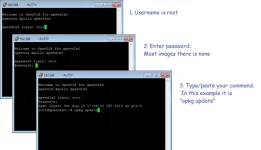
For another occasion. Should you be interested, (you will need to at some stage or other).
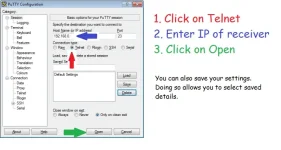
For Telnet I use a program called Putty.
 

Attachments

  • Main screen.webp
    Main screen.webp
    33.1 KB · Views: 12
  • opkg update.webp
    opkg update.webp
    23 KB · Views: 12
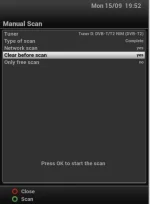
Menu > Setup > Service Seraching > Manual Scan

Scroll down and toggle right/left to alter options.
 

Attachments

  • manual scan.webp
    manual scan.webp
    7.6 KB · Views: 7

OpenViX Feeds Status

Back
Top