Superb quality and spec AB-Com PULSe 4K SE. Crazy offer! Only £99! FREE UK DELIVERY! 4K UHD, Enigma 2, Multiboot 4 images & more!...
Superb quality and spec AB-Com PULSe 4K Rev II Twin Satellite tuner only £149! FREE UK DELIVERY! 4K UHD, Enigma 2, SATA HDD facility, Multiboot 4 images & more!...

openvixhd

  • Thread starter Thread starter rossi2000
  • Start date Start date
Status
Not open for further replies.
@rossi - Online upgrade from 064 ViXHD to 070 just completed on my Quad Plus, but it's looping on boot. Didn't notice any automatic settings backup taking place prior to the online update :confused: Just about to look at debug log to see if I can see what's causing the issue.

crashlog says
Code:
[FONT] adding font /usr/share/fonts/youvix-b.ttf...FATAL:  failed: Operation not permitted
 
Last edited:
@rossi - Online upgrade from 064 ViXHD to 070 just completed on my Quad Plus, but it's looping on boot. Didn't notice any automatic settings backup taking place prior to the online update :confused: Just about to look at debug log to see if I can see what's causing the issue.

look in /hdd/backups/ to see if it created the settings backup (It should have as thats how the image is setup by default unless thats been changed in ViX HD).
 
look in /hdd/backups/ to see if it created the settings backup (It should have as thats how the image is setup by default unless thats been changed in ViX HD).

No - it didn't do a backup. Normally, the standard image does a backup.
 
No - it didn't do a backup. Normally, the standard image does a backup.

you can still activate that feature manually if its not already, as well as setting it to make a full image backup as part of the update process if required.
 
No - it didn't do a backup. Normally, the standard image does a backup.
Every now & again the image back-up doesn't work, better to check the size of the backup created before trying to restore it.
 
Downloaded 070 and USB flashed. Restored from manual settings backup of 064. All seems ok.

Will check backup settings for ViXHD in the morning - heading for the bed!
 
I Installed OpenVix-HD Apollo 70 today on my Duo2 via Couch Flash and every thing is working fine with my Backup of Apollo 64 the difference is amazing I love it, I tried the Red skin but Surprisingly I prefer the Default Blue skin, the only thing that I am having problems with is watching a program in Time shift as their dose not seem to be a time bar so I can not see how long I have left, but it might be that I have not set it up correctly as I am using my default settings from previous Apollo backups
one other thing that I noticed is that when I did a back up of the Image and backup it just says vuduo2-Apollo.70 with no reference to it being the HD version, no big deal for me but I just thought that I would mention it, been watching some old recordings and they look great it could just be me but they seem clearer it could be mind over mater but they seem better to me
so all in all I am very impressed with this new version of vix :thumbsup: :D
 
morning, hmmm regards the update, thats a missing font, ive been merging youvix-blue in with the skins_default skin.
strange why thats happened tho, all font are the in the right place as far as i can tell.


on timeshift, there is no bar, there are the times in bottom half of the numberzap box to indicate progress/remaining etc.


ive also been messing with the feeds to remove any incomptible plugins and things, so a load have been removed.
they can be made compatible and added back on user request.
 
morning, hmmm regards the update, thats a missing font, ive been merging youvix-blue in with the skins_default skin.
strange why thats happened tho, all font are the in the right place as far as i can tell.

@nsw
on timeshift, there is no bar, there are the times in bottom half of the numberzap box to indicate progress/remaining etc.

on your backup does it say openvixhd-apollo-duo2? or just openvix-apollo-duo2


ive also been messing with the feeds to remove any incomptible plugins and things, so a load have been removed.
they can be made compatible and added back on user request.


wtf double post! :)
 
I appreciate that this is a lot more than a fine looking project, but it is a fine looking project. Very well done mate.
 
My TV is't 1080p, just 1080i. Is it OK to use the HDimage? will I see any advantage? or am I better off sticking with the standard one?
 
Any plans for time shift/recording playback bar, it is THE reason we don't use your other skins.
Thanks.
 
Any plans for time shift/recording playback bar, it is THE reason we don't use your other skins.
Thanks.

timeshift/recording playback bar? screenshots plz

who is "we"?
first ive heard of people not using other skins becuase of a bar?
 
no sorry only for the latest generation vu models at this time.
Solo SE, Solo2 and Duo2
 
morning, hmmm regards the update, thats a missing font, ive been merging youvix-blue in with the skins_default skin.
strange why thats happened tho, all font are the in the right place as far as i can tell.


on timeshift, there is no bar, there are the times in bottom half of the numberzap box to indicate progress/remaining etc.


ive also been messing with the feeds to remove any incomptible plugins and things, so a load have been removed.
they can be made compatible and added back on user request.

It was fine on a full flash, so presumably something in the online update process went awry. Looks great with the new service and recording icons. Busy in the house with grandkids today, so will check out the logs and menus later for any missing pngs etc.
 
@nsw
on your backup does it say openvixhd-apollo-duo2? or just openvix-apollo-duo2
:)
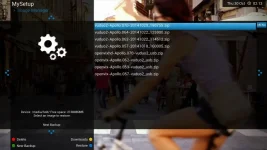
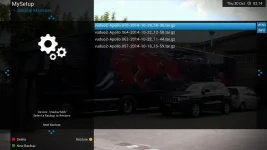
the 1st screen shot is my Image Manager folder with my Image downloads and saves and the 2nd one is my Backup Manager Saves Apollo 70 was saved after I had updated the Image

Vix-HD 1.webp Vix-HD 2.webp
 
hmmm thats strange its not adding the distro name openvixhd to it and it looks like its been doing it since build 57 at least

i'll double check it, thx
 
timeshift/recording bar?
You want me to provide you screenshots of a progress bar? You didn't seem to request them from nsw when he mentioned it a few posts back...
We are family, I ve got my wife and kids and me, and yes we really like the progress bar any everything we use so you can quickly visualise how long is left on a program, how far behind real time you are etc, vix night skin has it, xbmc has it our blu-ray player has it, our xbox one has it....
 
Status
Not open for further replies.

OpenViX Feeds Status

Back
Top