Superb quality and spec AB-Com PULSe 4K SE. Crazy offer! Only £99! FREE UK DELIVERY! 4K UHD, Enigma 2, Multiboot 4 images & more!...
Superb quality and spec AB-Com PULSe 4K Rev II Twin Satellite tuner only £149! FREE UK DELIVERY! 4K UHD, Enigma 2, SATA HDD facility, Multiboot 4 images & more!...

openvixhd

  • Thread starter Thread starter rossi2000
  • Start date Start date
Status
Not open for further replies.
Hi Rossi, well done and thank you for the great work in making our passion even better. I really like what you have done and have no issues with screens etc except one. I know you can't please everyone, but us it possible you could look at making a few changes to the Epg, it's rather annoying not being able to see the TV when in Epg on other skins there was a little box top right which worked great, is this something you can implement? Also one other thing has come to mind, are you able to show now, next and next rather than just now and next?

Many thanks..
 
Hi Rossi, well done and thank you for the great work in making our passion even better. I really like what you have done and have no issues with screens etc except one. I know you can't please everyone, but us it possible you could look at making a few changes to the Epg, it's rather annoying not being able to see the TV when in Epg on other skins there was a little box top right which worked great, is this something you can implement? Also one other thing has come to mind, are you able to show now, next and next rather than just now and next?

Hi lgleave, agree with everthing you say here, amazing work; i would also like to see the little picture..!
 
I'm not sure if this is an issue with the skin, so apologies if its been posted in the wrong thread. When viewing recordings, if I hold down the forward button to forward 10 mins for example, the dialogue box to enter how many mins to forward does not appear. If I put a value of 10 mins in and press ok, it will skip forward 10mins. So the issue is the dialogue box is not getting displayed even though the functionality still works.
 
I'm not sure if this is an issue with the skin, so apologies if its been posted in the wrong thread. When viewing recordings, if I hold down the forward button to forward 10 mins for example, the dialogue box to enter how many mins to forward does not appear. If I put a value of 10 mins in and press ok, it will skip forward 10mins. So the issue is the dialogue box is not getting displayed even though the functionality still works.

i fixed something like this a couple of builds ago,
could you show me a screenshot of where to do this?
 
Ill try and post something later. Essentially, view a recording, keep forward button pressed on remote for about 3 secs. enter 10 (*no dialogue will appear), then hit ok and the recording should move forward by 10 mins.
 
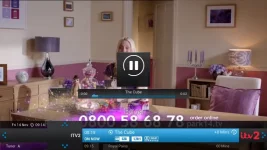
re-worked timeshift to include pts seeks and progressbar.

timeshift.webp

will be in next build
 
HI Rossi

Think it looks really good and only adds to the overall appeal of this skin - Thanks

Rossi, I notice from the screenshot above again the cool looking picon that is used (itv2) can I ask you the following in reference to the used picon above?

Is this type of channel indication only available for UK stations (via Freesat or is it also available for international channels, i.e. say German stations on 19e) and how can I obtain these for my own use?

I followed your previous instructions reference activating them (providing they are installed) you gave me the following instructions, while in the channel selection list hit menu/settings/show picons in service list/yes I did this but I forgot to mention to you that I don't believe I have any installed picons could you suggest a method of how to get these picons onto my VU+Solo2 system but only those that work 100% with your provided skin

Many thanks in advance

John
 
Does my post not get a reply, it's been completely ignored whilst others answered. Sorry of this is completely unreasonable to request..
 
Does my post not get a reply, it's been completely ignored whilst others answered. Sorry of this is completely unreasonable to request..
He already said in another reply that he was not going to have the TV preview screen in the EPG for these skins. Maybe in another some time but not in the YouViX skins.

Sent from my SM-G900F using Tapatalk
 
HI Rossi

Think it looks really good and only adds to the overall appeal of this skin - Thanks

Rossi, I notice from the screenshot above again the cool looking picon that is used (itv2) can I ask you the following in reference to the used picon above?

Is this type of channel indication only available for UK stations (via Freesat or is it also available for international channels, i.e. say German stations on 19e) and how can I obtain these for my own use?

I followed your previous instructions reference activating them (providing they are installed) you gave me the following instructions, while in the channel selection list hit menu/settings/show picons in service list/yes I did this but I forgot to mention to you that I don't believe I have any installed picons could you suggest a method of how to get these picons onto my VU+Solo2 system but only those that work 100% with your provided skin

Many thanks in advance

John


i use the picons from the openvix site
ocrams white are the best set to use for this, but in the feeds there are crokers which are equally nice too.
 
i use the picons from the openvix site
ocrams white are the best set to use for this, but in the feeds there are crokers which are equally nice too.

What are used in the picture you put up? Red itv2 with no/black background?
 
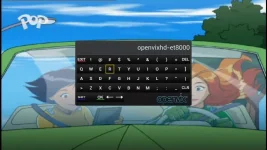
new youvix keyboard in next build.
i decided to change the default blue window'd keyboard.

keyboard.webp
 
I'm confused, should I be using this thread for HD skin issues or the one in the skin section ?
 
Hi Rossi.

Dunno if this is a bug or not. When I press down and lets say I'm in the Films Bouquet and I press EPG on lets say Sky Comedy, this gives you a 7 day guide on this one channel, on previous images I could scroll right to the end and then it would start from the beginning again, but with the hd image it stops at the end and doesn't start again.

Brilliant skin btw. :thumbsup:
 
Status
Not open for further replies.

OpenViX Feeds Status

Back
Top