Superb quality and spec AB-Com PULSe 4K SE. Crazy offer! Only £99! FREE UK DELIVERY! 4K UHD, Enigma 2, Multiboot 4 images & more!...
Superb quality and spec AB-Com PULSe 4K Rev II Twin Satellite tuner only £149! FREE UK DELIVERY! 4K UHD, Enigma 2, SATA HDD facility, Multiboot 4 images & more!...

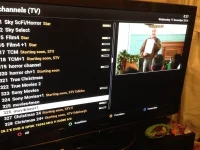
[VU+ Duo] EPG Problem "Starting Soon"

  • Thread starter Thread starter wubbster
  • Start date Start date
Do you only have the HDD connected, no USB stick?

If you deleted the epg.dat file while enigma was asleep, you should not have any epg data. I'm guessing the epg is being saved elsewhere.
 
Do you only have the HDD connected, no USB stick?

If you deleted the epg.dat file while enigma was asleep, you should not have any epg data. I'm guessing the epg is being saved elsewhere.
I have an external USB drive which I use for movies etc.

I assumed that as I had downloaded the epg again it would re-appear.
 
Still the same but missing a few entries.Photo 17-12-2014 00 31 29.webp
Got to head to bed now, but any new suggestions I will work on in the morning. Thank you all for your help so far.
 
Yes, you still haven't downloded CrossEPG -> OpenTV provider for 28.2 properly for some reason.

I have downloaded on EPG->Crossepg->download now and EPG->Crossepg->OpenTVpriv->download(on s*y uk OpenTV)
 
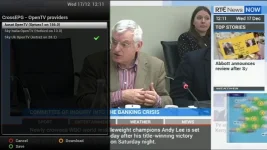
In the CrossEPG setup OpenTV Providers, you should have SKY OpenTV (Astra2 on 28.2) selected. It should have a green tick mark next to it. No other providers should be selected. Press Green to save. No other providers (XMLTV, XEPGDB or Scripts) should be enabled. No need for asterisks when typing SKY as there are none in the menus. Run download and, providing you have a good satellite connection you should get your EPG data.

SKY_EPG.webp
 
Last edited:
All my settings were as above. But I just changed location to USB and re-downloaded Epg and seems to be ok!

Thanks guys for your help and have learnt lots trying different things.
 
I just went to show my wife that the EPG was working and it was back to "starting soon" :(
 
What storage devices do you have?

Can you telnet following command and post results?
Code:
df-h
 
What storage devices do you have?

Can you telnet following command and post results?
Code:
df-h

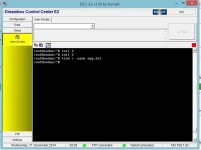
I have an internal HDD and a 150gb USB hard disk I usually ftp movies to. The -df-h says "-sh: df-h: not found"
 
Install this ipk

Transfer to /tmp/ directory. Then Blue Button > Vix> Install local extension
Running it should put enigma to sleep, remove any copies of epg.dat from several presumed locations and restart. Once you have run it and your problem is solved, uninstall it please.
 

Attachments

OpenViX Feeds Status

Back
Top