On a DUO2 , installed the plugin via Telnet after remote control install from plugins gave 5 second error that everyone is talking about.
Error when starting the plugin is that the Gui can't start
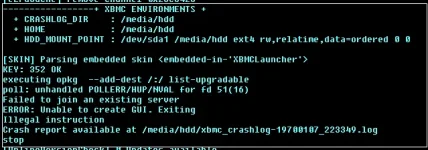
And from the debug log mentioned,
Lots of noise and verbose debug output, but the interesting part looks to be
06:33:49 T:1979449344 DEBUG: LoadMappings - loaded node "CEC Adapter"
06:33:49 T:1979449344 DEBUG: LoadMappings - loaded node "Pulse-Eight CEC Adapter"
06:33:49 T:1979449344 DEBUG: LoadMappings - loaded node "iMON HID device"
06:33:49 T:1979449344 DEBUG: CPeripheralBusUSB - initialised udev monitor
06:33:49 T:1978971280 NOTICE: Thread PeripBusUSBUdev start, auto delete: false
06:33:49 T:1979449344 DEBUG: UDisks: org.freedesktop.DBus.Error.ServiceUnknown - The name org.freedesktop.UDisks was not provided by any .service files
06:33:49 T:1979449344 DEBUG: DeviceKit.Disks: org.freedesktop.DBus.Error.ServiceUnknown - The name org.freedesktop.DeviceKit.Disks was not provided by any .service files
06:33:49 T:1979449344 DEBUG: Selected UDev as storage provider
06:33:49 T:1979449344 NOTICE: InitWindowSystem: Using EGL Implementation: dvbbox
06:33:49 T:1979449344 ERROR: InitWindowSystem: Could not get native display
06:33:49 T:1979449344 FATAL: CApplication::Create: Unable to init windowing system
06:33:49 T:1979449344 INFO: ADDON: cpluff: 'An unreleased information object was encountered at address 0x1370008 with reference count 1 when destroying the associated plug-in context. Not releasing the object.'
06:33:49 T:1979449344 INFO: ADDON: cpluff: 'An unreleased information object was encountered at address 0x1389dd0 with reference count 1 when destroying the associated plug-in context. Not releasing the object.'
06:33:49 T:1979449344 INFO: ADDON: cpluff: 'An unreleased information object was encountered at address 0x135bd90 with reference count 1 when destroying the associated plug-in context. Not releasing the object.'
06:33:49 T:1979449344 INFO: ADDON: cpluff: 'An unreleased information object was encountered at address 0x1386e18 with reference count 1 when destroying the associated plug-in context. Not releasing the object.'
06:33:49 T:1979449344 INFO: ADDON: cpluff: 'An unreleased information object was encountered at address 0x1360818 with reference count 1 when destroying the associated plug-in context. Not releasing the object.'
06:33:49 T:1979449344 INFO: ADDON: cpluff: 'An unreleased information object was encountered at address 0x13014e8 with reference count 1 when destroying the associated plug-in context. Not releasing the object.'
06:33:49 T:1979449344 INFO: ADDON: cpluff: 'An unreleased information object was encountered at address 0x13015a8 with reference count 1 when destroying the associated plug-in context. Not releasing the object.'
06:33:49 T:1979449344 INFO: ADDON: cpluff: 'An unreleased information object was encountered at address 0x13701f0 with reference count 1 when destroying the associated plug-in context. Not releasing the object.'
06:33:49 T:1979449344 INFO: ADDON: cpluff: 'An unreleased information object was encountered at address 0x12b6930 with reference count 1 when destroying the associated plug-in context. Not releasing the object.'
06:33:49 T:1979449344 INFO: ADDON: cpluff: 'An unreleased information object was encountered at address 0x1398f78 with reference count 1 when destroying the associated plug-in context. Not releasing the object.'
06:33:49 T:1979449344 INFO: ADDON: cpluff: 'An unreleased information object was encountered at address 0x1378538 with reference count 1 when destroying the associated plug-in context. Not releasing the object.'
06:33:49 T:1979449344 INFO: ADDON: cpluff: 'An unreleased information object was encountered at address 0x1366ef8 with reference count 1 when destroying the associated plug-in context. Not releasing the object.'
06:33:49 T:1979449344 INFO: ADDON: cpluff: 'An unreleased information object was encountered at address 0x1346e38 with reference count 1 when destroying the associated plug-in context. Not releasing the object.'
06:33:49 T:1979449344 INFO: ADDON: cpluff: 'An unreleased information object was encountered at address 0x12a6df8 with reference count 1 when destroying the associated plug-in context. Not releasing the object.'
06:33:49 T:1979449344 INFO: ADDON: cpluff: 'An unreleased information object was encountered at address 0x1303238 with reference count 1 when destroying the associated plug-in context. Not releasing the object.'
06:33:49 T:1979449344 DEBUG: PVRManager - destroyed
############### END LOG FILE ################
############ END XBMC CRASH LOG #############


