Superb quality and spec AB-Com PULSe 4K SE. Crazy offer! Only £99! FREE UK DELIVERY! 4K UHD, Enigma 2, Multiboot 4 images & more!...
Superb quality and spec AB-Com PULSe 4K Rev II Twin Satellite tuner only £149! FREE UK DELIVERY! 4K UHD, Enigma 2, SATA HDD facility, Multiboot 4 images & more!...

Some ideas to improve the Graphical EPG screen

@markus625, use the below code instead of the one I mentioned earlier...

Code:
self.ChoiceBoxDialog.instance.move(ePoint(posy[0]-self.ChoiceBoxDialog.instance.size().width(),self.instance.position().y()+posy[1]-self.ChoiceBoxDialog.instance.size().height()))

This now does it correctly and uses the height of the Matt's multibox option.

Have u got any screenshots of it, at work at moment so can't try it out.
 
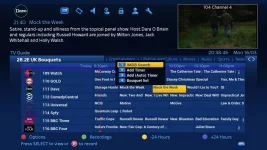
Just copied the code into my py file and rebooted, the menu still looks to be cut off at the bottom.
1_0_1_23FD_7F9_2_11A0000_0_0_0.webp

My mistake theres two lines that you need to replace.

1_0_1_23FD_7F9_2_11A0000_0_0_0 (1).webp
 
Last edited:
I never had to change two lines, that what I quoted is one long line which may look like two in Notepad++

At least it works anyhow.
 
Theres two instances of that code.

on line 1097
HTML:
self.ChoiceBoxDialog.instance.move(ePoint(posy[0]-self.ChoiceBoxDialog.instance.size().width(),self.instance.position().y()+posy[1]))
and line 1654
HTML:
self.ChoiceBoxDialog.instance.move(ePoint(posy[0]-self.ChoiceBoxDialog.instance.size().width(),self.instance.position().y()+posy[1]))
 
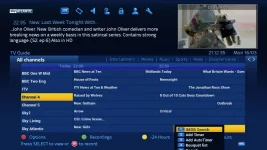
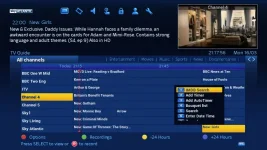
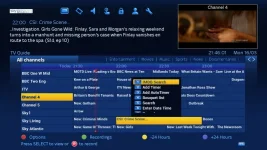
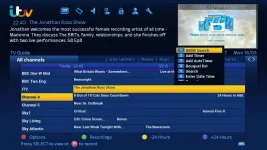
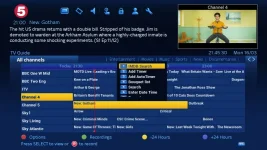
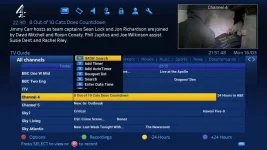
in the screenshots below the popup menu seems to be centred almost center to the epg row/event, would it look better if the popup always started at the beginning of the event.

1_0_1_23FD_7F9_2_11A0000_0_0_0 (3).webp
1_0_1_23FD_7F9_2_11A0000_0_0_0 (4).webp
1_0_1_23FD_7F9_2_11A0000_0_0_0 (2).webp

Ive moved it in my graphics editor

image-moved.webp
 
I never noticed that first line of code. I would put that back as it's not needed. Just the second line of code (near end of file).
 
How about a dialog that pop up in the centre of the screen rather than next to the selected event? That is certainly possible and if thats what the majority of people want then I can get it done probably tomorrow
 
How about a dialog that pop up in the centre of the screen rather than next to the selected event? That is certainly possible and if thats what the majority of people want then I can get it done probably tomorrow
It doesn't bother me personally. My concern was that when it was below the current event it went off screen on some skins (but not bluehd). Now that it sits above it then I think it's fine.

All other popups are around the event in question rather than centre screen so there would be no consistency imho.

If you could, when you have time, look at getting long number button to represent the old epg actions, leaving the normal number presses for your new jump/zap to channel I would appreciate that.

After that, then I would say your new feature is is fine, at least from my prespective.

Thanks again for your work Matt, it really is appreciated and has got me a little into python coding.
 
How about a dialog that pop up in the centre of the screen rather than next to the selected event? That is certainly possible and if thats what the majority of people want then I can get it done probably tomorrow

Thanks again matt and bbbuk for all your hard work getting this together.
I myself would favour the popup as well as the record popup to be either centred in the screen or to appear at the start of the event row like the mockup I did in post 206 I think this would make it more pleasing, unless we could control it in the skin xml.
If you got time matt could you try coding this to see what it looks like.
But i dont think we're too far away from getting this tested in different skins and thus submitted to getting it in the image build if the majority prefer it.
 
Hello men, Ive noticed on some of the screen shots on here that on your sky skin when you open your epg you have your boquets across the top. Mine doesn't have that, can you direct me to where I can get it please.
 
Hello men, Ive noticed on some of the screen shots on here that on your sky skin when you open your epg you have your boquets across the top. Mine doesn't have that, can you direct me to where I can get it please.
It's just being tested at this moment hence why you can't see it on your skin.

We're hoping it will be implemented once tested :)

If you wanted it in mean time and you're okay with FTP'ing into box and replacing files then see earlier in this thread for files attached by Matt (instructions on which files to replace can be found even earlier in this thread).

One thing i'm unsure of is when build 154 is released with new coding that has been done on the skins this may cause problems I'm not sure!!
 
Last edited:
Thanks a lot for updating me bbbuk, I'll look forward to its release.
 
Guys do you think that the modifications we are implementing in the g-epg be also applied to the quickepg as they are pretty much the same
 
Is it worth us still working on these modifications but from what it's worth im using the mods in my skin.
@matt007 is it possible to absolutely position the red button pop list, I'm working on a new skin and would like to implement some of these ideas even if it's not implemented into the image.
 
whats the point in creating a skin with features the image doenst have?
 
whats the point in creating a skin with features the image doenst have?

Once ive created and finished this new skin it should work with or without the mods, but ill be putting the mods on my box's from now on as it suits me.
 
Is it worth us still working on these modifications but from what it's worth im using the mods in my skin...
I'm also using the mod on my skin and I've noticed a few other people have also implemented the mod as well.

For what it's worth, I would like it to continue :)
 

OpenViX Feeds Status

Back
Top