Superb quality and spec AB-Com PULSe 4K SE. Crazy offer! Only £99! FREE UK DELIVERY! 4K UHD, Enigma 2, Multiboot 4 images & more!...
Superb quality and spec AB-Com PULSe 4K Rev II Twin Satellite tuner only £149! FREE UK DELIVERY! 4K UHD, Enigma 2, SATA HDD facility, Multiboot 4 images & more!...

Enigma2 Transcoder

  • Thread starter Thread starter spameris
  • Start date Start date
S

spameris

Guest
What is Enigma2 Transcoder ?

It is web application for transcoding, recompressing, resizing stream from your enigma2 receiver .

Why ?

You can stream your favorite HD TV show to your cell phone over 3G/4G. Stream will be scaled to not use so much bandwidth.

What i need for this web app ?

You need windows or linux computer and enigma2 based receiver.

How can i watch stream ?

With web application built in flash player, vlc player, BSPlayer (android)

How does it work ?

Between receiver and device where you want to see stream is computer which serves WEB application where you can select TV channel for transcoding. This computer transcodes your selected stream.
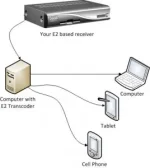
E2_transcoder-268x300.webp

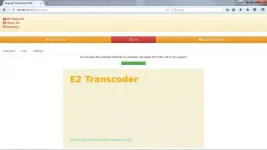
Screenshots:

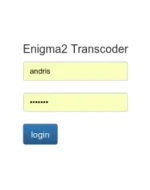
Login Page:
login_page-238x300.webp
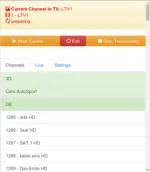
Main Page:
main_page-262x300.webp
Live:
live-255x300.webp
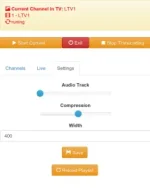
Settings:
settings-235x300.webp

How to install it:
This manual is how to install Enigma2 Transcoder on Windows Computer.

1. Download last application version from here

View attachment enigma2_transcoder_041.rar

2. Extract archive to disk c:

3. Edit file c:\DB\web\admin\config.php , set here receiver IP, username etc..

4. Start c:\DB\start.bat

5. Open link http://yourcomputerip:8888/admin/ on browser

6. under settings push button “reload playlist”, this will download bouquets to application

Notes:

If in “start.bat” window you see error probably you need install VC11 redistributable X86

web server port you can change in start.bat file

Basically E2 transcoder can run also on linux or windows computer, with any other web server like IIS, apache, nginx which supports PHP.
 
Installation steps for ubuntu linux

For linux it is necessary already installed web server with php installed, but i would not go into details how to install web server. Application should work on nginx and on apache.

1. Download last application version

2. Copy from archive /DB/web folders admin and stream somewhere to your web server path. Folders /admin/db and /stream/ should be writable by web server. In case of apache this is user apache for nginx www-data.

3. Sqlite database engine and avconv command it is necessary for transcoding, so let install em.

sudo apt-get install php5-sqlite libav-tools

4. Delete from folder /admin/ file config.php and rename config.linux_example.php to config.php.

5. edit this config.php file according your needs. As ubuntu uses avlib, command is avconv for converting video. For linux distributives with ffmpeg , ffmpeg can be used.

$conf[“command”]=”avconv”;

6. Open link http://yourwebserver/pathtoadminfolder/admin

7. under settings push button “reload playlist”, this will download bouquets to application
 
Last edited by a moderator:
New version of Enigma2 Transcoder

version 0.50

Download:
View attachment enigma2_transcoder_050.zip


change log:

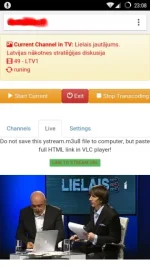
build in player replaced with momovi HLS video player. Thanks momovi. This player supports a HTML5 so now you can in your tablet or phone stream without any additional player installed. Tested on chrome and native browsers in android 4.4 and 5.0.

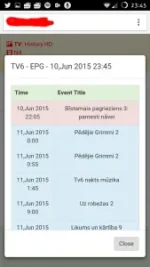
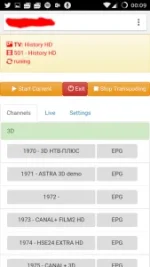
Android 5 Screenshot:
cellphone.webp
 
Last edited by a moderator:
Where to put the files admin and stream in debian

Hi all,

I am a neewbie in linux but i would like to try it in a debian server. Where to put the admin and stream files in debian?

Many thanks
 
New version:

View attachment enigma2_transcoder_052.zip

Change Log:
* Fixed some audio parameters for ffmpeg or avconv, this may decrease stream size
* Small interface changes, upper panel now have fixed position
* Other small fixes

!Note
If you are updating from existing version config.php file is recomended to replace.
 
Last edited by a moderator:
will this work with Mac? Thanks

In theory there should not be significal problems to run this app on MAC, you need working web server on mac with php, and php-sqlite extension. Also working version of ffmpeg for mac. Than follow same instructions as for linux. But i never tested this app on MAC. So im not for 100% sure does this class which controls ffmpeg process works correctly on mac https://github.com/andrisdru/E2Transcoder/blob/master/admin/lrun.php .
 
Hello!
I would like to inform that first unstable version of E2 transcoder for Raspberry PI2 is available in public. There is a lot of things which need to do to make this transcoder perfect, but if you wold like to test it you can do this.
Basically this is a rasbpian wheezy image with some modifications to make possible to run this app.

What you need to do, to install this app?
1. download image with torrent. Sorry for torrent image is 3GB :( e2transcoder-061-wheezy-unstable.torrent

2. Install on SD card this image, there should be a lot of instructions how to do this in insternet. I suspect you need at least 8GB SD card, not because all software is so big but because i took this image from my 8GB SD card.

3. If you want a transcode SD channels you need a MPEG2 license. MPEG2 license is necessary to PI2 could decode in HW mode mpeg2 streams. http://www.raspberrypi.com/mpeg-2-license-key/

4. run command in pi2 console
sudo chmod 666 /var/www/admin/db/dbtranscode.db
5. edit file /var/www/config.php for you needs, E2 receiver IP, username etc...

6. Open link http://yourpi2ipaddress

Ah, almoust forgot, PI2 linux username and password is
user: pi
password: raspberry
 
Hello I Try this on my PC (windows 7) and when I Copy files do C, click start.bat As admin. Try pyt my ip:8888/admin/
Dont see login page :O , have only info about problem with website "ERR_CONNECTION_REFUSED"
 
i Can't edit my last message :o

try just click on start.bat and working, but :o

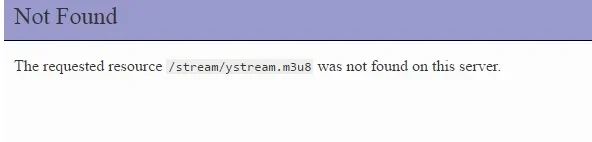
q1.webpq2.webp

when click to "click to stream URL" have error :O

still I can see preparing :o and dont work

I Think this program cant change channel on tv :O, because I Click here maybe on Discovery HD - okey, going to webui and see ? dont change channel
 
Last edited:
Hello,

sorry didnt checked this thread for some time, sorry for not giving support.

but....

New Version released 0.70 with IPTV support

Long time since there was no new versions of transcoder. But good news recently there is new version with new great feature, now you can add IPTV links manually to transcoder bouquets. Actually from this release enigma2 receiver is not mandatory anymore you can use it for transcoding IPTV only. Just do not forget in such case set option

$conf[“callreceiver”] = 0;

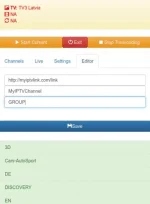
To add IPTV link go to Editor section.

editor.webp

Supported IPTV formats ? Must be everything what ffmpeg or avlib supports (as we can use one of those tools)

https://ffmpeg.org/general.html

download from here:View attachment enigma2_transcoder_070.zip
 
Last edited by a moderator:
Can't seem to get this to work properly on the Pi, also it does not create a port 8888
And on your instructions it says edit this path: /var/www/config.php, but that does not exist, this is the correct path /var/www/admin/config.php
 
it is possible to take more than one channel with this transcode
 

OpenViX Feeds Status

Back
Top