Superb quality and spec AB-Com PULSe 4K SE. Crazy offer! Only £99! FREE UK DELIVERY! 4K UHD, Enigma 2, Multiboot 4 images & more!...
Superb quality and spec AB-Com PULSe 4K Rev II Twin Satellite tuner only £149! FREE UK DELIVERY! 4K UHD, Enigma 2, SATA HDD facility, Multiboot 4 images & more!...

Vu+ Duo HMDI stopped working

  • Thread starter Thread starter Ibby
  • Start date Start date
Right an update.

I finally managed to purchase this cable off amazon
Code:
http://www.amazon.co.uk/gp/aw/d/B003OST5FG/ref=redir_mdp_mobile?ref_=pe_385721_37986871_TE_item

I have put all the composite cables in the vu+ duo and my samsung LCD tv and the optical cable in the "audio out" optical socket in my TV and the same directly in the VU+ duo (where it says SNPP or the like). Anyways I get a very clear picture but no sound. Have I set this up correctly and are there any set up methods for me to get sound? Sorry about the questions but I have never used such cables before.

Also the menu on the VU+ duo when looking on my TV are too much to one side meaning some of the letters/ words cant be seen. I have tried to select "just scale" on my tv as this then used to work but for some reason the option on my tv to just scale is greyed out meaning the menus are not looking right. Any ideas? Thanks
 
Last edited by a moderator:
About audio: Most TV's only have a digital output, not an input. But if it is an input indeed: see if you have set downmix to off.

About overscan: most TV's only allow this to be switched off on a digital input, not on analogue inputs. So in this case you'll have to adjust OSD on your box.
 
About audio: Most TV's only have a digital output, not an input. But if it is an input indeed: see if you have set downmix to off.

About overscan: most TV's only allow this to be switched off on a digital input, not on analogue inputs. So in this case you'll have to adjust OSD on your box.


I have tried the downmix thing but still no sound. I take it the cable I have purchased should do the trick without having to mess with the settings?
 
As I said: 'Most TV's only have a digital output, not an input'.

But yes: the digital output of the box is always active, regardless of any settings.
 
Last edited:
Ibby,
In your TV settings you should have an option that says 'Just Scan' or 'Just Scale', this is in the display or settings section, using this will correct your tv screen display.
 
Ibby,
In your TV settings you should have an option that says 'Just Scan' or 'Just Scale', this is in the display or settings section, using this will correct your tv screen display.

Probably not:
About overscan: most TV's only allow this to be switched off on a digital input, not on analogue inputs. So in this case you'll have to adjust OSD on your box.
 
As I said: 'Most TV's only have a digital output, not an input'.

But yes: the digital output of the box is always active, regardless of any settings.

Apologies about all of the questions I am a total novice when it comes to such things. As my tv only has a digital output I would assume I will need to purchase another cable for the sound?
 
Most TV's do have an analogue input (red & white cinch-connector): worth a try to use that.
Not needed to buy a new cable for that: any cable with the red&white connectors (on both ends) will do.

Best look in the TV's manual to see what inputs are supported (together with the component video signal)
 
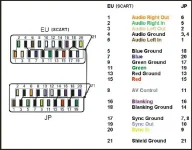
When both TV and STB support it, a good SCART cable can also do the job.
It has also RGB signal.
 

Attachments

  • scart.webp
    scart.webp
    38.6 KB · Views: 12
I don't think you can use cinch RGB and scart the same time.
It's one port or the other.
Scart has 2 ways for video signal transport. Composite video over pin 19/20 and/or RGB over the pins 7,11,15 both using the same audio pins.
There are scart cables where 7,11,15 are not wired. This cable can only transport composite video.
A full wired scart cable can do both. In some case you have to choose on the device scart av or scart RGB.
Probably you have the cable with only composite video wired.
 
You can also get a component to start converter which is supposed to be as good as hdmi. I used one earlier this year when hdmi went on my solo2.

Sent from my GT-I9305 using Tapatalk

Would this be HD signal?
 
I was told by mate it is
 
I was told by mate it is

but what do i do to achieve this,?
Anything else that can get me 720p signal other than HDMI?
Do i get a component to component cable ?
Can you possibly give me a link of what i need to buy?
Thanks Stan
 

OpenViX Feeds Status

Back
Top