Superb quality and spec AB-Com PULSe 4K SE. Crazy offer! Only £129! FREE UK DELIVERY! 4K UHD, Enigma 2, Multiboot 4 images & more!...
Superb quality and spec AB-Com PULSe 4K Rev II Twin Satellite tuner only £179! FREE UK DELIVERY! 4K UHD, Enigma 2, SATA HDD facility, Multiboot 4 images & more!...

[VU+ Duo2] Cron timers

maracsx

New member
Joined
Aug 18, 2010
Messages
46
Reaction score
0
Points
0
Hello guys,

can anybody help me how to put cron timer that remote control command "EXIT" be activated in 01.00 Daily.

I tried to add cron timer 'root' I've put the following code in root file in /etc/cron/root

Code:
30 * * * *    /usr/bin/ntpdate-sync silent
wget -q wget -q http://127.0.0.1/web/remotecontrol?command=174

but nothing happens.

I need that because "Behavior after movie reach the end" - "return to service" is nto workign properly. After movie reach the end it "return to movie list"
 
The first 5 fields in a crontab file are:
Code:
              field          allowed values
              -----          --------------
              minute         0-59
              hour           0-23
              day of month   1-31
              month          1-12 (or names, see below)
              day of week    0-7 (0 or 7 is Sun, or use names)
(although you might not be able to use names here...). A * in a field means "any value" (so * * * * * gets run every minute...).
Or read the readme.txt file in /etc/cron/crontabs/.

So, the line you need would be:
Code:
00 01 * * * wget -q [URL]http://127.0.0.1/web/remotecontrol?command=174[/URL]
Whether it is the correct thing to do is another matter.
 
Last edited:
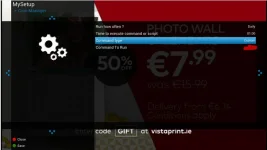
Thanks. What I should I put in vu duo2 menu, under "command to run" ?
 

Attachments

  • crontimers.webp
    crontimers.webp
    16.3 KB · Views: 19
Well - the command you gave is wrong in two ways. The PATH_INFO is wrong, and the command will try to right the result to a file called remotecontrol?command=174, which is an invalid file on the vfat file-system I was in while testing on my MBTwin (so an error was reported), but not illegal on my Linux laptop (which therefore worked). [I ended up running strace to resolve that one...].
So, the command you would need is:
Code:
wget -q -O /dev/null 'http://mbtwin/api/remotecontrol?command=174'

But the reference to "the correct thing" was that the issue should be fixed, not worked around.
 

OpenViX Feeds Status

Back
Top