Superb quality and spec AB-Com PULSe 4K SE. Crazy offer! Only £129! FREE UK DELIVERY! 4K UHD, Enigma 2, Multiboot 4 images & more!...
Superb quality and spec AB-Com PULSe 4K Rev II Twin Satellite tuner only £179! FREE UK DELIVERY! 4K UHD, Enigma 2, SATA HDD facility, Multiboot 4 images & more!...

[ViX_Misc] Different methos of adding AutoTimer causing issues?

  • Thread starter Thread starter AnotherDish
  • Start date Start date
A

AnotherDish

Guest
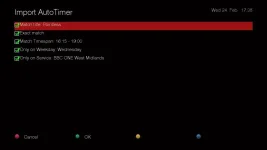
In the EPGPIG, if you hit the blue button (Add AutoTimer), it opens up the AutoTimerr setup, like below
2QiugzY.webp

But if I hit the record button, then move down to "Add AutoTimer" option and click it, the menu above doesn't pop up, but the timer gets added, just without letting me customise any options.
How can I make it so the menu does pop up? Or is this a bug?
 
Which EPG screen are you referring to? Can you post a screenshot please?

When I press Record in Graphical EPG, this is what I get with an option to do either.
 

Attachments

  • Record button in graphical EPG.webp
    Record button in graphical EPG.webp
    47.6 KB · Views: 20
I think he is saying that it would be good to have the edit screen also pop up when you add auto timer by pressing the record button option.
 
I think he is saying that it would be good to have the edit screen also pop up when you add auto timer by pressing the record button option.
Why? It uses the defaults that are set & configurable. If you want to set something different just use the green button instead of the record button.
 
I think you go into menu/timers/autotimers and press menu. Can't check at the moment.
 
Ah.. thanks for that - I hadn't noticed that option. Strange though, that if I add an autotimer in the EPG, then it does it for that day of the week, despite the fact that the filter for that is disabled.
 
Strange though, that if I add an autotimer in the EPG, then it does it for that day of the week, despite the fact that the filter for that is disabled.
If you add an AutoTimer from the EPG you pass through a screen with a set of 5 options on it, one of which is to restrict by day. If I unset that then the set autotimer has no day filter.

Mind you - whilst checking this I noticed that if I press Record in the EPG the Add timer/Add autotimer option pops up, but the Autotimer one doesn't actually do anything.

This is the associated debug log.

[InfoBarGenerics] KEY: 167 RECORD
[ActionMap] InfobarInstantRecord instantRecord
[ActionMap] unknown action InfobarInstantRecord/instantRecord! typo in keymap?
< 685.763196> [eInputDeviceInit] 0 a7 1
[InfoBarGenerics] KEY: 167 RECORD
[ActionMap] InfobarInstantRecord ShortRecord
[Skin] processing screen RecordTimerQuestion:
< 691.387447> [eInputDeviceInit] 1 6c 1
[InfoBarGenerics] KEY: 108 DOWN
[ActionMap] WizardActions down
[ActionMap] unknown action WizardActions/down! typo in keymap?
[ActionMap] WizardActions down
< 691.802200> [eInputDeviceInit] 0 6c 1
[InfoBarGenerics] KEY: 108 DOWN
< 694.729549> [eInputDeviceInit] 1 160 1
[InfoBarGenerics] KEY: 352 OK
[ActionMap] WizardActions ok
[ActionMap] unknown action WizardActions/ok! typo in keymap?
[ActionMap] WizardActions ok
[AutoTimer] No changes in configuration, won't parse
< 695.144194> [eInputDeviceInit] 0 160 1
[InfoBarGenerics] KEY: 352 OK
 
I think he is saying that it would be good to have the edit screen also pop up when you add auto timer by pressing the record button option.
[STRIKE]That is exactly what I did.[/STRIKE]
posted in error. please ignore
 
Last edited:
Mind you - whilst checking this I noticed that if I press Record in the EPG the Add timer/Add autotimer option pops up, but the Autotimer one doesn't actually do anything.
That seems to be specific to me and some AT extensions I have in place....
 
Which EPG screen are you referring to? Can you post a screenshot please?

When I press Record in Graphical EPG, this is what I get with an option to do either.

In the Graphical EPG, and yes, I get that little option selector that appears, but when I choose "Add Autotimer" from that list, nothing pops up (no chance to customize). Once I leave the graphical EPG screen I am told a event has been added to the timer (It seems to only add the event I selected, not any future cratons). Is this right?
 
Last edited by a moderator:
In the Graphical EPG, and yes, I get that little option selector that appears, but when I choose "Add Autotimer" from that list, nothing pops up (no chance to customize). Once I leave the graphical EPG screen I am told a event has been added to the timer (It seems to only add the event I selected, not any future cratons). Is this right?

Yes, that is correct behaviour.
 
Yes, that is correct behaviour.

I was of the understanding:
Selecting auto timer creates an auto timer entry using defaults (whch also covers future events). This in turn creates a timer for the event that had been highlighted immediately and then subsequent events that match the criteria.

Your statement suggest an auto timer and a single record timer are the same thing. Please elaborate.
 
I was of the understanding:
Selecting auto timer creates an auto timer entry using defaults (whch also covers future events). This in turn creates a timer for the event that had been highlighted immediately and then subsequent events that match the criteria.

Your statement suggest an auto timer and a single record timer are the same thing. Please elaborate.

Sorry Abu, I read that wrong, you are correct.
 
Thanks for clarifying.

On the subsequent "Import AutoTimer" screen, it would be nice if we could press a button and be able the AutoTimer values from there.
 
Looking at this again now & I don't see the issue.

In GEPG, short press record & get 2 options. Add Timer & Add AutoTimer. None require a confirmation or editing.
In GEPG, press green button for Add Timer, press blue button for Add AutoTimer. Both give you options to change settings.

What's the issue?
 
The penny has finally dropped for me, (duoduo got it in one ).

Setting up an autotimer without being able to edit the conditions is not as useful as setting one up and being able to edit it.

Difference between a blunt tool and a precision instrument.
 
Yes mate that's what I was saying. You see if you use the record button option then no customisation and so auto timers generated could include concurrent shows at all times of the day and not necessarily everyday at 8pm (as an example).
 
Setting up an autotimer without being able to edit the conditions is not as useful as setting one up and being able to edit it.

But that's what the blue button is for, or am I still confused?
 

OpenViX Feeds Status

Back
Top