Superb quality and spec AB-Com PULSe 4K SE. Crazy offer! Only £129! FREE UK DELIVERY! 4K UHD, Enigma 2, Multiboot 4 images & more!...
Superb quality and spec AB-Com PULSe 4K Rev II Twin Satellite tuner only £179! FREE UK DELIVERY! 4K UHD, Enigma 2, SATA HDD facility, Multiboot 4 images & more!...

Widescreen (16:9) via Composite?

Timbo

New member
Joined
Jan 14, 2013
Messages
19
Reaction score
0
Points
1
Hi All,

I purchased a Solo2 from WOS and it's a great box.

However, I pipe the signal around my house via a modulator and coax cable which looks like this:

Solo2 > Composite Out (yellow cable) > Modulator > Coax Cable > TV Tuner

No matter what I watch it only ever sends the picture to the TV's as a 4:3 ratio.

There doesn't seem to be any WSS via composite?

I tested WSS via scart and that works fine as it's pin 8 telling the TV the aspect ratio to use. (see http://www.skycopyplus.co.uk/skypluswss/wss.htm) there just doesn't seem to be any Line 23 information for WSS.

My Sky+HD box is able to "Widescreen Switch" via the same modulator and cables so that works fine on the same TV's.

Can anyone tell me if it's possible to get a Vu+ box to display a composite cable output as 16:9 natively? I want to leave the TV's in AUTO Aspect Ratio mode.

N.B. The box switches perfectly using HDMI too - it's just the Line 23 signal that seems to be lacking.

Does anyone have any knowledge on this? or can someone else test their box using a composite cable? make sure you have your TV in Auto Aspect mode though!
 
I use composite (using the yellow cinch connection) in my caravan (with a very small TV) and it displays 16:9 without any issue.

Edit: not sure if my TV uses 'auto' or 'fixed 16:9' though.
 
Thanks for taking the time to reply Rob van der Does.

What box do you have? You would soon know if it was a 4:3 signal stretched to 16:9 ratio by the TV as it'd be cropping the picture and you'd be missing things like the channel DOG on the channels that have it.
 
Composite video is just that - video. It doesn't contain any control signals. You will have to tell your tv to display the video in 16:9 format.
 
Composite video is just that - video. It doesn't contain any control signals. You will have to tell your tv to display the video in 16:9 format.
Not true - widescreen switching (WSS) should be output on line 23 of a PAL frame of composite video. Usually the conversion from digital to analogue video should identify widescreen (16:9) aspect ratio and insert the correct control signal. It may be that the VU Solo2 is not doing this correctly, either through a driver/firmware issue or it may not be capable. Maybe someone with a Solo2 could test?
 
Thanks for clarifying that Tony. Its a bad day that you don't learn something new. Anyway I connected my solo2 to my sony tv and it works. I set auto resolution on and it switched between 16:9 and 4:3 as it should so nothing wrong with the drivers.

Edit: Just to add - I set the video output to Scart + YPbPr
 
Thanks for clarifying that Tony. Its a bad day that you don't learn something new. Anyway I connected my solo2 to my sony tv and it works. I set auto resolution on and it switched between 16:9 and 4:3 as it should so nothing wrong with the drivers.

Edit: Just to add - I set the video output to Scart + YPbPr
@ronand - thanks for testing and proving that the Solo2 outputs the WSS on composite. Maybe the OP has some slightly different setup which is not working for him/her? Rob makes a good point in that all HD channels output 16:9 at all times and the broadcaster "pillar boxes" the occasional older 4:3 output in the 16:9 frame so there is no need for switching. For SD channels there is still the need to flag widescreen output, but the box "should" be doing that. I'll test my Miraclebox on composite and see if it works. I know my GB Quad Plus handles 4:3 and 16:9 switching on component video as that is the mode I use most often. Haven't tried composite as the picture quality is pretty rubbish.
 
I did use composite output cables (yellow/white/red). That's the video setting I selected as there is no specific setting for composite video.
 
SCART setting will be fine for composite - no specific setting for composite on my receiver either. I spent an hour testing composite on my Miraclebox Twin. Having disconnected HDMI lead from my Sony TV, I set it for auto (Smart) screen on the AV3 input. Switched fine between 16:9 (adverts) and 4:3 (Frasier) on Channel 4 SD during programmes or on recording as expected. Same with the other usual Freesat channels showing old TV series in 4:3 format. The only thing I had to change on the Miraclebox receiver was the screen position and size for the menu (on-screen display) as the AV input on the Sony overscans slightly and you can't set it to "exact pixel" like on the HDMI or component inputs.

@Timbo - could it be that your TV is defaulting to 4:3 on the AV (composite) input? On my Sony every single input (there are 4 HDMI, one component set and one composite set) has a separate settings entry to handle screen ratios, screen overscan etc. I don't think it's a problem with the Solo2 as @ronand has tested his.
 
Indeed, as Tony said: normally TV's have separate settings per input. Sometimes one can choose to activate the same settings for all inputs.
 
Thank you guys so much for your testing. I am wondering if the key is "PAL widescreen switching" as I seem to remember putting my Solo2 box into "multi" mode rather than selecting 50hz (PAL) or 60hz (NTSC). Would this stop the WSS on Line 23 from being sent to the TV via the composite cable it it had defaulted to 60hz?

Hopefully it's my setup that is wrong and it's great to hear that other people are able to get it to work - it means (99%) that it's something I am doing and not a hardware limitation of the box itself.

I'll test it when i get home tonight and report back.
 
Another thought is the Modulator - would that have any bearing on it? Although the Sky+HD box uses the same modulator and WSS's no problem.

Recap:

Solo2 > Composite out (yellow cable) > Modulator > Coax Cable > TV Tuner (No WSS)

Sky+HD > Composite out (yellow cable) > Modulator > Coax Cable > TV Tuner (WSS works fine)

The Modulator in use is a 4 channel modulator so it's the same unit in both examples - I have even swapped the cables between the boxes but the same outcome occurs - So I fail to see how it can be the modulator, but I'm happy for someone to prove me wrong :)
 
Just setup Solo2 --> Composite (yellow cinch, multi) --> Sony TV: when zapping between 16:9 & 3:4 services the TV-picture switches perfectly.

Maybe you could try the same (so without the modulator)?
 
Sorry, I didn't get time to test it last night but just wondering which image you have installed on your Solo2 that works on the yellow cable?

Would the image have any bearing on the problem of WSS switching?
 
As Rob says - unlikely to be image related. It's almost certainly a setting error on your side somewhere. Try a direct connection. Won't (shouldn't) be the modulator, though as that just takes the video and audio and modulates an RF carrier with it. Usual issues with modulators are with the sound sub carrier being on the wrong offset spacing (PAL-G vs PAL-I as used in UK/Ireland).
 
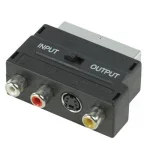
Just remembered, at home I am using a Scart to RCA adapter to convert into the Modulator.

One of these SCT-PPPSW-150x150.webp - That's not going to matter is it? (I'm using one on the Sky+HD box too so that's exactly the same setup cable wise)
 

OpenViX Feeds Status

Back
Top