Superb quality and spec AB-Com PULSe 4K SE. Crazy offer! Only £129! FREE UK DELIVERY! 4K UHD, Enigma 2, Multiboot 4 images & more!...
Superb quality and spec AB-Com PULSe 4K Rev II Twin Satellite tuner only £179! FREE UK DELIVERY! 4K UHD, Enigma 2, SATA HDD facility, Multiboot 4 images & more!...

Widescreen (16:9) via Composite?

No - that adapter just connects the L and R audio and the composite pins from SCART to the phono sockets.
Just remembered, at home I am using a Scart to RCA adapter to convert into the Modulator.

One of these View attachment 48210 - That's not going to matter is it? (I'm using one on the Sky+HD box too so that's exactly the same setup cable wise)
 
Another thought - will having a HDMI cable attached at the same time stop / suppress the WSS-flag from being sent down the analogue cable?
 
Another thought - will having a HDMI cable attached at the same time stop / suppress the WSS-flag from being sent down the analogue cable?

No - you're clutching at straws at this stage ;) Just test a direct connection from the receiver to the TV composite AV input and play with the settings on the TV :)
 
haha - I've been clutching at straws since I noticed I had this problem with the Vu+ Solo2 and not the Sky+HD box when using the same cables / ports etc.
 
As I said before: just use a single yellow cable to connect the box directly to the TV; then you're sure it's (not) the modulator.
 
OK guys - ready for this?

Spent hours last night going through all the various possibilities with the Solo2 box, LG TV and cables. I used BBC One HD as the channel to test each scenario with as being a HD channel is by default outputted at 16:9. Apologies for the glare on the TV screen - it was a bit sunny yesterday evening.

Here are the results (basically, I still stand by my first post about WSS only seeming to occur when using a SCART cable (PIN 8??) and not when using the RCA cable):


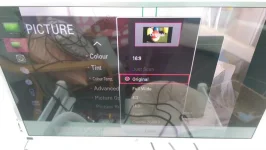
LG TV Set to output ORIGINAL for all Ports = IMAG2014.webp


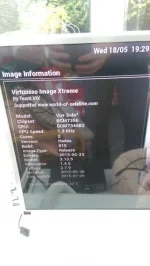
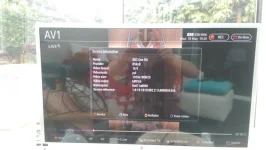
Solo2 Information = IMAG2019.webp


Test 1) Solo2 > SCART 21 pin cable > TV SCART SOCKET


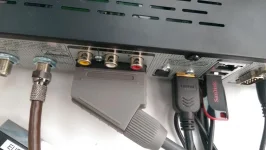
Rear Connections on Solo2 = IMAG2017.webp


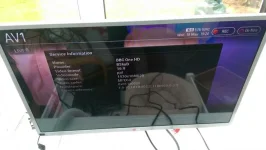
LG TV Output = IMAG2016.webp


RESULT = ALL WORKING OK AS EXPECTED


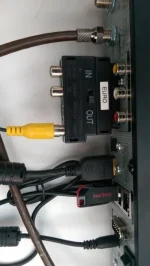
Test 2) Solo2 > SCART to RCA Adapter > Yellow RCA Cable > TV Yellow RCA Socket


Rear Conenctions on Solo2 = IMAG2018.webp


LG TV Output = IMAG2012.webp


RESULT = OUTPUT DISPLAYED INCORRECTLY AS 4:3 (black bars down sides)


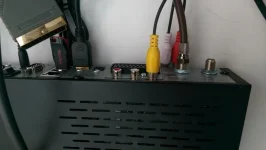
Test 3) Solo2 > Yellow RCA Socket > RCA Cable > TV Yellow RCA Socket


Rear Connections on Solo2 = IMAG2010.webp


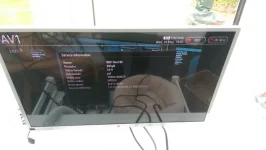
LG TV Output = IMAG2013.webp


RESULT = OUTPUT DISPLAYED INCORRECTLY AS 4:3 (black bars down sides)


HELP! Can anyone with it working on a Solo2 provide a backup image that I can try on my box? Or at least provide screenshots of their "A/V Settings" in Setup so I can copy them?
 
Not that it might help, but if you want more people to reproduce, use a current image, not an old build.
 
Forgot to mention that I thought it might be the Image so I installed the latest ViX image from www.openvix.co.uk - 4.1.009 - the issue still occured and the version of driver (kernel) was the same.
 
In the AV settings on the solo2 what is the output set as? I used the yellow rca socket without problem.
 
Also you are using AV1 for both scart and composite on your TV? On my TVs (and any others I have seen) these are separate inputs.
 
I can only repeat that using one single yellow cinch connection between my Solo2 and my Sony TV switching between 3:4 & 16:9 works as expected. I didn't even setup anything analogue output related: my A/V-settings remained untouched on HDMI/1080p/multi.
 
Also you are using AV1 for both scart and composite on your TV? On my TVs (and any others I have seen) these are separate inputs.

I think I uploaded the wrong photo... but the results were the same - even on AV2 (i think it was)
 
I think I uploaded the wrong photo... but the results were the same - even on AV2 (i think it was)


As per @ronand's reply - AV1, AV2 and AV3 are physically separate connections on my TV also. AV1 is SCART, AV2 is S-Video and AV3 is the composite. You should use connection-specific settings on the TV rather than the same for everything. On my HDMI input I use "exact pixel" so there is no overscan. On AV3 I use "wide" as the default and the picture switches between widescreen and 4:3 as the broadcaster changes aspect ratio. I think the ViX info screen for the broadcast channel will always show 16:9 as the screen ratio as this is derived from the satellite/cable/terrestrial meta data transmitted. It is the actual video stream content data that will switch from 16:9 to 4:3 as necessary.

Try setting your AV2 (or whatever) to "full wide" and flick from channel to channel - usually CBS Action or one of the low-budget channels will be showing 4:3 material through the day. (or Channel 4 from 08:00 - 10:30)
 
I can only repeat that using one single yellow cinch connection between my Solo2 and my Sony TV switching between 3:4 & 16:9 works as expected. I didn't even setup anything analogue output related: my A/V-settings remained untouched on HDMI/1080p/multi.

I've clearly set a setting somewhere.. or the box is faulty (but can't see how).

Can anyone provide an image that works out of the box with a channel list that I can use to test on my setup? Google Drive or summat?
 
It doesn't take long to set up a fresh image using ABM (autobouquetmaker) to set up your channels.
 
Test 1 in #28 shows that the Solo2 SCART is working as expected.
Test 2 shows that when you put that same (working) signal through your RCA cable it stops working at the TV end.
So it's not the Solo2 failing.

Do you have another RCA cable?
 
Well, in test #1 it can be the WSS-signal on the dedicated scart-pin, which is not being used when using only the yellow cable.
Anyway: IMHO a TV issue, as it works perfect here.
 
Well, in test #1 it can be the WSS-signal on the dedicated scart-pin, which is not being used when using only the yellow cable.
Anyway: IMHO a TV issue, as it works perfect here.

And how do you explain that it works fine and switches between 16:9 and 4:3 depending on the broadcaster signal with the Sky+HD box using the same cables, same ports, same TV?

I can feel a video coming on to demonstrate the problem.
 

OpenViX Feeds Status

Back
Top