Superb quality and spec AB-Com PULSe 4K SE. Crazy offer! Only £129! FREE UK DELIVERY! 4K UHD, Enigma 2, Multiboot 4 images & more!...
Superb quality and spec AB-Com PULSe 4K Rev II Twin Satellite tuner only £179! FREE UK DELIVERY! 4K UHD, Enigma 2, SATA HDD facility, Multiboot 4 images & more!...

[VU+ Duo] High Upload Bandwith - 60GB Daily!

  • Thread starter Thread starter Cem
  • Start date Start date
C

Cem

Guest
Hi guys,

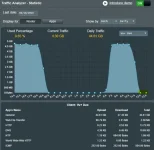
I am seeing something very strange happening where my box is uploading on average about 4.4GB an hour and is uploading around 60GB daily.
Upload.webp

The box is connected to two separate sat dishes and never receive the error message "Tuner is in use".

I have changed the port 80 to anther closed port on OpenWebif. I have have only 5 plugins installed; CrossEPG Downloader, EPG-Importer, Media scanner, OpenWebif and Picture Player. Using the default OpenVix Night Skin. Also running the latest image 4.1.012 (Release).

I have also uploaded a list a list of packages running on the box.

Does anyone have any ideas where I can look next or what is causing this issue and how to resolve it?
 

Attachments

Last edited by a moderator:
External streaming by you or more likely, someone else.
 
This is what I am thinking although it's strange because I have seen this before but it would display "Tuner is in use" when someone else was watching externally without knowledge. It's not me streaming so I would stop someone streaming from my box?

I also changed the box's FTP password but this did not make a difference.
 
Last edited by a moderator:
What router have you got. Can you set up your own Openvpn on your router.
 
I have Asus DSL-AC68U with PPTP VPN enabled and can see when someone is connected to it or disconnected. It is disconnected and no one is connected to it.

Is there anything else I can look for?
 
mgcamd.1.38 is running and CCcam.2.2.1 is inactive and not started.
 
Can you log into your box and look at the mg_cfg file. Tell me what item L is set to. Should be {0}
 
So it looks like it is set to 3!


# Log option, summ of:
# 00 off
# 01 network udp log
# 02 log to console
# 04 file, appended ! delete it by yourself, before it eat all your hdd
# + IP udp-port log-file-name
L: { 03 } 172.16.1.1 28007 /tmp/mgcamd.log


Does yours look the same but just has 0 where mine has 3?
 
Change it to {0} and you can remove the rest on the line. so it just reads L: {0}
 
Thanks Ashley, I have changed made the change you suggested and will monitor for about 2 hour as it reports the usage hourly. Just for my knowledge what does the L: do? :)
 
Its something to do with the network protocol and the data transmission. UDP is apparently uses less bandwidth over TCP and has less latency. Someone with more technical knowledge on this subject may enhance on my explanation.
The changing to zero on line L has cropped up before and has fixed the issue for people who were experiencing your issue. Why it has fixed it I'm unsure.

With the earlier reference to VPN. Why do you not activate youR OPENVPN on your router which is more secure the PPTP.
 
Just for my knowledge what does the L: do? :)
That L line is for logging. Sending a log to an IP that doesn't exist on your network will cause issues.
Doesn't sound like your issue though.
 
You can eliminate the cams from the equation by disabling them all and leave the box on a FTA channel for the test.
 
Thanks Ashley, I'm now using OPENVPN instead of PPTP!

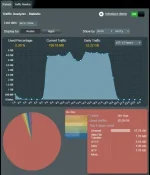
It seems like changing from 3 to 0 has worked for now but I will monitor it more but after 2 hours the upload usage has dropped from 4GB which was constant for 4 hours before the change and it has dropped down to 5kbs. Which is great! I will monitor it more closely and see if it goes up again.

What version of mgmcamd is the most stable that everyone is using?

If the upload starts to increase again I will disable the cam and then monitor more but so far so good after 2 hours!

Capture.webp
 
Good stuff. Hope it works.
OPENVPN on the asus router is great. I can access my network from outside securely using the OPENVPN App on IOS or android.
Just have a quick periodic check that its got the green Connected status in the VPN menu.
View attachment 48546
 
Good stuff. Hope it works.
OPENVPN on the asus router is great. I can access my network from outside securely using the OPENVPN App on IOS or android.
Just have a quick periodic check that its got the green Connected status in the VPN menu.
View attachment 48546

Yes it has worked! :) Saw it was connected when I was on it via my iPhone so all is working nicely! The Asus router in general is excellent and has so many cool features built into it. 4 hours in and the upload is still low, happy days!
 
Perhaps someone is streaming a recording from you...

I don't think so because I only have a few recordings on my HDD and the upload is constant. 7 hours in after I have applied the changed and the upload is still low which is great. Will keep checking it to see if it goes high again.
 
Good stuff. Hope it works.
OPENVPN on the asus router is great. I can access my network from outside securely using the OPENVPN App on IOS or android.
Just have a quick periodic check that its got the green Connected status in the VPN menu.
View attachment 48546

how have you set this up?
been trying for days but it always times out after my device has connected.
i use an asus N66u with merlin build.
 

OpenViX Feeds Status

Back
Top