Superb quality and spec AB-Com PULSe 4K SE. Crazy offer! Only £129! FREE UK DELIVERY! 4K UHD, Enigma 2, Multiboot 4 images & more!...
Superb quality and spec AB-Com PULSe 4K Rev II Twin Satellite tuner only £179! FREE UK DELIVERY! 4K UHD, Enigma 2, SATA HDD facility, Multiboot 4 images & more!...

[VU+ Solo2] Switched to new router and ISP, no longer can see VUSOLO as part of network (windows)

  • Thread starter Thread starter JOHNSTON
  • Start date Start date
J

JOHNSTON

Guest
Hi All

I used to be able to see an icon for VUSOLO here (see pic below).

I have:

uninstalled and reinstalled Samba
uninstalled and reinstalled NFS
Allowed UnPnP on the router

I cannot get the icon to appear on either winodws or mac. This is causing me an issue as I have to put any downloaded avi or whatever onto a USB stick and then watch things that way. Before I could drag and drop from my computer to the VUSOLO hard disk.
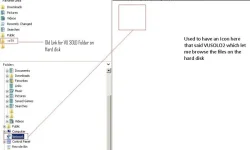

vu.webp
 
use FileZilla till you find a solution
 
use FileZilla till you find a solution

Well I cannot for example even browse to the box by using the run command \\192.168.1.1

Also I am having issues installing any FTP client, other exe will seem to open the installer but any FTP clients will not install. Very odd
 
Have you checked what the IP address of the receiver is?
It may be 192.168.0.xx instead of 192.168.1.xx

Or even tried "vusulo.local". I am guessing the hostname is vusolo, please check in the network settings. It is buried in one of the menus.

Also, which build number of 4.1 image are you using?
 
Have you checked that Samba is actually running after re-installing it?
 
Well I cannot for example even browse to the box by using the run command \\192.168.1.1

Also I am having issues installing any FTP client, other exe will seem to open the installer but any FTP clients will not install. Very odd

seems like the new router may have a different addressing range. Can you ping your VI box successfully?
 
when you installed new router, did windows ask you what the network connection was, "home" "public" "private" ? you may have it set to public, which turns off network discovery by default.
 
change dhpc to yes or no
Not sure what that is or where to do it.

Have you checked what the IP address of the receiver is?
It may be 192.168.0.xx instead of 192.168.1.xx

Or even tried "vusulo.local". I am guessing the hostname is vusolo, please check in the network settings. It is buried in one of the menus.

Also, which build number of 4.1 image are you using?

All it says is 4.1.010 (release)

I can browse to the IP address via Chrome, it brings up open webif.

Have you checked that Samba is actually running after re-installing it?
Yes it was

seems like the new router may have a different addressing range. Can you ping your VI box successfully?
Yes can ping it

when you installed new router, did windows ask you what the network connection was, "home" "public" "private" ? you may have it set to public, which turns off network discovery by default.

All that is set to on I checked in network and sharing center
 
Filezilla on the mac lets me connect and transferring right now

Cannot browse via finder (under shared) from mac either though
 

OpenViX Feeds Status

Back
Top