Superb quality and spec AB-Com PULSe 4K SE. Crazy offer! Only £99! FREE UK DELIVERY! 4K UHD, Enigma 2, Multiboot 4 images & more!...
Superb quality and spec AB-Com PULSe 4K Rev II Twin Satellite tuner only £149! FREE UK DELIVERY! 4K UHD, Enigma 2, SATA HDD facility, Multiboot 4 images & more!...

Help needed please with cron timer

This isn't python. It's a shell script and you can format it how you wish to enhance readability.

i'm giving everything i can think of a try but not succeeding at the moment, it is literally the very last line it's not happy with saying 'expecting done' but the last line says 'done' and doesn't have any trailing whitespace
 
Apologies, when you said remove the '\' i assumed i didn't have to paste it back in after moving line 51 to line 50.
You shouldn't. But you didn't mention that you'd combined the lines into one.

Code:
./toppicks2.sh: line 62: syntax error: unexpected word (expecting "do")

so i placed '\' at the end of line 62 which resolved this one
Removing an error message does not necessarily mean that you have resolved what was causing it. You've just combined that line with the next one and moved the reported problem elsewhere.

All I can assume is that the fact that you are editing things on a Mac then transferring them onto the box is causing a text formatting problem in the script.
That script runs fine for me on my box, and on my desktop and laptop, which run Linux Mint. It's just a simple shell script.

If you tell me what workdir setting you wish to use I could post a version with that edited in, so you wouldn't need to edit at all and we could see how that gets on.
 
Last edited:
i'm giving everything i can think of a try but not succeeding at the moment, it is literally the very last line it's not happy with saying 'expecting done' but the last line says 'done' and doesn't have any trailing whitespace
It should have a trailing newline, though.
I know that some editors think that this isn't needed....
 
You shouldn't. But you didn't mention that you'd combined the lines into one.

Removing an error message does not necessarily mean that you have resolved what was causing it. You've just combined that line with the next one and moved the reported problem elsewhere.

All I can assume is that the fact that you are editing things on a Mac then transferring them onto the box is causing a text formatting problem in the script.
That script runs fine for me on my box, and on my desktop and laptop, which run Linux Mint. It's just a simple shell script.

If you tell me what workdir setting you wish to use I could post a version with that edited in, so you wouldn't need to edit at all and we could see how that gets on.

sorry, i thought i had mentioned it ; apologies - my brain is just going to mush trying to get this to work

well at first because many others had the same script and it was working for them i assumed it could be something to do with my box, and when i posted up the script i them thought after your reply that the script was wrong even though it was working for some, but i agree and you are more than likely right that its something to do with the editing on mac

by workdir do you mean where the images will be saved? this will bee /usr/share/enigma2/slyk-1-hd/skyicons

or where the script is going to be on the box /usr/script/toppicks2

thanks birdman, really appreciate the help; apologies for my lack of knowledge at this point
 
by workdir do you mean where the images will be saved? this will bee /usr/share/enigma2/slyk-1-hd/skyicons

or where the script is going to be on the box /usr/script/toppicks2
The latter. i.e. the value for workdir in the script.

This one should be all set up for you.

View attachment toppicks2.sh.zip

I suggest you copy the zip file into /usr/script/toppicks2 then run
Code:
unzip toppicks2.sh.zip
to ensure that you have an exact copy of what I have...
 
..... don't forget to cd /usr/script/toppicks2 before unzipping.
 
The latter. i.e. the value for workdir in the script.

This one should be all set up for you.

View attachment 50441

I suggest you copy the zip file into /usr/script/toppicks2 then run
Code:
unzip toppicks2.sh.zip
to ensure that you have an exact copy of what I have...

LEGEND! IT WORKED!! :)

Birdman, thank you so much for all your help; really appreciate it; I've asked all over the place and got help but no fix

Now I can set up the cron to run it automatically and i'm not going to touch it

but for future purposes for other scripts i may get involved in for the future, would you happen to know if there are any mac based apps/programs I will be able to edit shell on without having the same problem again? no worries if not

thanks again Birdman, I bet it's a relief for you too, I can now stop pestering you haha!
 
but for future purposes for other scripts i may get involved in for the future, would you happen to know if there are any mac based apps/programs I will be able to edit shell on without having the same problem again? no worries if not
The editor you are using claims to be able to handle Mac, Unix and DOS text files "automatically". Perhaps there is a "Save" option that lets you force the text format?
But there is also the issue of how you then get the files onto the box - you haven't said how you do that.
If you are using FTP then you could either write the file in Unix format then transfer it as a binary file, or write it in Mac format then transfer it as an ASCII/text one.
 
The editor you are using claims to be able to handle Mac, Unix and DOS text files "automatically". Perhaps there is a "Save" option that lets you force the text format?
But there is also the issue of how you then get the files onto the box - you haven't said how you do that.
If you are using FTP then you could either write the file in Unix format then transfer it as a binary file, or write it in Mac format then transfer it as an ASCII/text one.

I'll have a look to see if it has that possibility - that's a very good point - I only ever save as ASCII/text unless it's already binary ; i'll have a look at the settings/preferences on text wrangler (i'm told it's the best editor for mac and the equivalent of notepad++)
 
I'll have a look to see if it has that possibility - that's a very good point - I only ever save as ASCII/text unless it's already binary ; i'll have a look at the settings/preferences on text wrangler (i'm told it's the best editor for mac and the equivalent of notepad++)

Hi, birdman

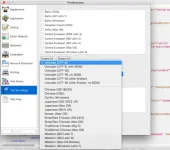
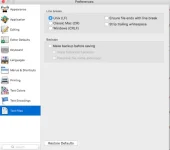
I looked at the text wrangler preferences; I can change to different editors and download additional formats if needed ; the application itself is apparently already saving as unix ; but one thing on this i never noticed before; it has it's own built in script editor which i wasn't using for the shell; just the default text wrangler ; and it also has the function to check syntax before running commands :)

Screen Shot 2016-09-19 at 17.54.39.webpScreen Shot 2016-09-19 at 17.54.03.webpScreen Shot 2016-09-19 at 17.53.25.webp
 
I only ever save as ASCII/text unless it's already binary
If it were binary you wouldn't have opened it in TextWrangler...
But you still haven't mentioned how you get the file onto the box.

(i'm told it's the best editor for mac and the equivalent of notepad++)
I use a Unix text editor on the box itself...the same one I use on me desktop/laptop - and the same one I've used for the last 25+ years....
 
If it were binary you wouldn't have opened it in TextWrangler...
But you still haven't mentioned how you get the file onto the box.

I use a Unix text editor on the box itself...the same one I use on me desktop/laptop - and the same one I've used for the last 25+ years....

yeah thats what i mean, if its binary i dont open it; just transfer to box

i get the files onto the box by ftp using filezilla

i wasn't even aware there was a unix editor built into enigma2! where's that? thanks
 
i wasn't even aware there was a unix editor built into enigma2! where's that? thanks
There appear to be three editors in the packages - joe, nano and vim. None is installed by default.

But I use an old, much modified version of microemacs that we used at work (it ran on every system we ever had). It's what Linus Torvalds uses, except he has a much later version that can handle utf-8 - perhaps one day I'll try to merge the sources....
 
Hi, Birdman.

Sorry to bring this thread up again.

The same skin mod from the screenshot in page 1 has now been edited with two new shell scripts; and seems to be working again for everyone except those with vu boxes...

I have uploaded the two sh files, would you mind taking a look and adjust as necessary and send them back to me ?

I ran commands through telnet but just getting a bunch of (in my opinion) gibberish i cant get my head around :

telnet results :

Code:
Last login: Tue Sep 20 23:09:38 IST 2016 from 192.168.0.5 on pts/0
root@vuduo2:~# cd /usr/script
root@vuduo2:/usr/script# ./toppicks1.sh
-sh: ./toppicks1.sh: not found
root@vuduo2:/usr/script# ./topppicks1.sh
-sh: ./topppicks1.sh: not found
root@vuduo2:/usr/script# ./toppicks2.sh
-sh: ./toppicks2.sh: not found
root@vuduo2:/usr/script# /usr/script/toppicks1.sh
-sh: /usr/script/toppicks1.sh: not found
root@vuduo2:/usr/script# /bin/bash ./toppicks1.sh
: not found.sh: line 3: 
: not found.sh: line 5: 
./toppicks1.sh: line 88: syntax error: unexpected end of file (expecting "then")
root@vuduo2:/usr/script# /bin/bash ./toppicks1.sh
: not found.sh: line 3: 
: not found.sh: line 5: 
./toppicks1.sh: line 69: syntax error: unexpected end of file (expecting "then")
root@vuduo2:/usr/script# /bin/bash .toppicks1.sh
/bin/bash: can't open '.toppicks1.sh'
root@vuduo2:/usr/script# /bin/bash ./toppicks1.sh
: not found.sh: line 3: 
: not found.sh: line 5: 
./toppicks1.sh: line 69: syntax error: unexpected end of file
root@vuduo2:/usr/script# /bin/bash ./toppicks1.sh
: not found.sh: line 3: 
: not found.sh: line 5: 
./toppicks1.sh: line 69: syntax error: unexpected "done" (expecting "then")
root@vuduo2:/usr/script# ./toppicks1.sh
-sh: ./toppicks1.sh: not found
root@vuduo2:/usr/script# /bin/bash ./toppicks1.sh
: not found.sh: line 3: 
: not found.sh: line 5: 
./toppicks1.sh: line 70: syntax error: unexpected "done" (expecting "then")
root@vuduo2:/usr/script# /bin/bash ./toppicks1.sh
: not found.sh: line 3: 
: not found.sh: line 5: 
./toppicks1.sh: line 70: syntax error: unexpected ";"
root@vuduo2:/usr/script# /bin/bash ./toppicks1.sh
: not found.sh: line 3: 
: not found.sh: line 5: 
./toppicks1.sh: line 70: syntax error: unexpected ";"
root@vuduo2:/usr/script# /bin/bash ./toppicks1.sh
: not found.sh: line 3: 
: not found.sh: line 5: 
./toppicks1.sh: line 70: syntax error: unexpected "done"
root@vuduo2:/usr/script# /bin/bash ./toppicks1.sh
: not found.sh: line 3: 
: not found.sh: line 5: 
./toppicks1.sh: line 70: syntax error: unexpected end of file
root@vuduo2:/usr/script# /bin/bash ./toppicks2.sh
: not found.sh: line 3: 
: not found.sh: line 7: 
./toppicks2.sh: cd: line 8: can't cd to /usr/script/scrapes
: not found.sh: line 9: 
/premiere.png': No such file or directory-hd/toppicks/picons-base/
./toppicks2.sh: line 12: can't open new.txt: no such file
./toppicks2.sh: line 13: arithmetic syntax error
root@vuduo2:/usr/script#

as you can see i tried to play around with it a bit but had no such luck

attached .sh files are default releases and unchanged; if you can find the error as with the last script, would be greatly appreciated

many thanks in advance
 

Attachments

what happens when using script runner? can you ftp extention create a folder call it what you want ie updatetoppicks then creat a file called plugin.py inside the plugin.py paste these contents

Code:
from Plugins.Plugin import PluginDescriptor
from os import system


def main(session, **kwargs):
       system('/usr/script/toppicks1.sh &')


###########################################################################


def Plugins(**kwargs):
        return PluginDescriptor(
                name="Update Toppics",
                description="Update Toppicks files for slyk1hd",
                where = PluginDescriptor.WHERE_PLUGINMENU,
                fnc=main)

add another file called __init__.py leave it blank

ensure the script is in usr/script

reboot box and see if you can run the plugin
 
Last edited:
what happens when using script runner? can you ftp extention create a folder call it what you want ie updatetoppicks then creat a file called plugin.py inside the plugin.py paste these contents

Code:
from Plugins.Plugin import PluginDescriptor
from os import system


def main(session, **kwargs):
       system('/usr/script/toppicks1.sh &')


###########################################################################


def Plugins(**kwargs):
        return PluginDescriptor(
                name="Update Toppics",
                description="Update Toppicks files for slyk1hd",
                where = PluginDescriptor.WHERE_PLUGINMENU,
                fnc=main)

add another file called __init__.py leave it blank

ensure the script is in usr/script

reboot box and see if you can run the plugin

thanks for the reply dsayers , ran script runner but i just get 'unexpected end of file'
 
what happens when using script runner?
With errors like those reported it's not going to run anywhere.

Code:
root@vuduo2:/usr/script# ./toppicks1.sh
-sh: ./toppicks1.sh: not found
That, for instance, means that ./toppicks.sh exists and the OS start to run it. It reads the first line (#!/bin/sh) and since that starts with #!, /bin/sh is invoked as the interpreter and passed the script name. But sh can't find that file - despite the fact that it must have been there in order to get to that point!?!

Everything about it seems to indicate to me that the script has been somehow garbled in being copied.

grantdavey9, run:

Code:
od -c ./toppicks1.sh

and paste the first twenty lines or so here.
 
With errors like those reported it's not going to run anywhere.

Code:
root@vuduo2:/usr/script# ./toppicks1.sh
-sh: ./toppicks1.sh: not found
That, for instance, means that ./toppicks.sh exists and the OS start to run it. It reads the first line (#!/bin/sh) and since that starts with #!, /bin/sh is invoked as the interpreter and passed the script name. But sh can't find that file - despite the fact that it must have been there in order to get to that point!?!

Everything about it seems to indicate to me that the script has been somehow garbled in being copied.

grantdavey9, run:

Code:
od -c ./toppicks1.sh

and paste the first twenty lines or so here.

thanks for the reply birdman

ran the command, here's the 1st 30 lines :

Code:
root@vuduo2:/usr/script# od -c ./toppicks1.sh
0000000    #   !   /   b   i   n   /   s   h  \r  \n   #  \r  \n  \r  \n
0000020    u   n   s   e   t       L   D   _   P   R   E   L   O   A   D
0000040   \r  \n  \r  \n   w   o   r   k   d   i   r   =   /   u   s   r
0000060    /   s   c   r   i   p   t   /   s   c   r   a   p   e   s  \r
0000100   \n   i   f       [       !       -   d       "   $   w   o   r
0000120    k   d   i   r   "       ]   ;       t   h   e   n  \r  \n    
0000140            m   k   d   i   r       /   u   s   r   /   s   c   r
0000160    i   p   t   /   s   c   r   a   p   e   s  \r  \n   f   i  \r
0000200   \n  \r  \n   c   d       /   u   s   r   /   s   c   r   i   p
0000220    t   /   s   c   r   a   p   e   s  \r  \n  \r  \n   #   d   e
0000240    s   t   =   /   u   s   r   /   s   h   a   r   e   /   e   n
0000260    i   g   m   a   2   /   s   l   y   k   -   1   -   h   d   /
0000300    s   c   r   e   e   n   s  \r  \n   #   i   f       [       !
0000320        -   d       "   $   d   e   s   t   "       ]   ;       t
0000340    h   e   n  \r  \n   #           e   c   h   o       >   &   2
0000360        "   $   d   e   s   t       d   o   e   s       n   o   t
0000400        e   x   i   s   t   "  \r  \n   #               e   x   i
0000420    t       2  \r  \n   #   f   i  \r  \n  \r  \n   #       l   a
0000440    r   g   e       p   i   c   k   1  \r  \n   e   c   h   o    
0000460    s   c   r   a   p   i   n   g       p   i   c   k   1       n
0000500    e   w       p   r   e   m   i   e   r   e   s  \r  \n   w   g
0000520    e   t       -   q       -   O       n   e   w       "   h   t
0000540    t   p   :   /   /   w   w   w   .   s   k   y   .   c   o   m
0000560    /   t   v   /   c   h   a   n   n   e   l   /   s   k   y   c
0000600    i   n   e   m   a   /   g   a   l   l   e   r   y   /   c   o
0000620    m   i   n   g   -   s   o   o   n   -   t   o   -   s   k   y
0000640    -   c   i   n   e   m   a   -   p   r   e   m   i   e   r   e
0000660    "  \r  \n   g   r   e   p       -   E   o       "   h   t   t
0000700    p   :   /   /   w   w   w   .   a   s   s   e   t   1   .   n
0000720    e   t   /   t   v   /   p   i   c   t   u   r   e   s   /   m

thanks for your help on this, i know i keep saying it but it is greatly appreciated :)
 
thanks for the reply birdman

ran the command, here's the 1st 30 lines :

Code:
root@vuduo2:/usr/script# od -c ./toppicks1.sh
0000000    #   !   /   b   i   n   /   s   h  \r  \n   #  \r  \n  \r  \n

thanks for your help on this, i know i keep saying it but it is greatly appreciated :)
Well, there's your problem.

The \r\n (i.e. <CR><LF>).

That file is a DOS text file, not a Unix one. You need to get rid of the <CR>s (\r).
 
However, back to the actual scripts.


toppicks1.sh:

Code:
workdir=/usr/script/scrapes
if [ ! -d "$workdir" ]; then
   mkdir /usr/script/scrapes
fi
should really be:
Code:
workdir=/usr/script/scrapes
if [ ! -d "$workdir" ]; then
   mkdir "$workdir"
fi

toppicks2.sh:
This uses let, which is a bash-only construct, so line one should be #!/bin/bash (in case that isn't a symlink to bash, which it isn't on Vix by default).

Code:
        if [ $pick == 1 ]; then
should be
Code:
        if [ $pick -eq 1 ]; then
since you are expecting it to be a number, not text.

Code:
        if [ $pick == 1 ]; then
.
        elif [ $pick == 2 ]; then
.
        elif [ $pick == 3 ]; then
.
        else
is better done as:
Code:
case $pick in
1)
.;;
2)
.;;
3)
.;;
*)
.;;
esac


both:

Code:
cd /usr/script/scrapes
should be:
Code:
cd /usr/script/scrapes || exit
or
Code:
if ! cd /usr/script/scrapes; then
   echo >&2 "Failed to reach /usr/script/scrapes"
fi
since you shouldn't continue on an error.
 
Last edited:

OpenViX Feeds Status

Back
Top