Superb quality and spec AB-Com PULSe 4K SE. Crazy offer! Only £99! FREE UK DELIVERY! 4K UHD, Enigma 2, Multiboot 4 images & more!...
Superb quality and spec AB-Com PULSe 4K Rev II Twin Satellite tuner only £149! FREE UK DELIVERY! 4K UHD, Enigma 2, SATA HDD facility, Multiboot 4 images & more!...

[Mut@nt HD2400] Can't Start Samba

  • Thread starter Thread starter JeanReno
  • Start date Start date
J

JeanReno

Guest
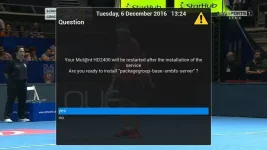
I can't seem to get Samba to install since my USB update to 4.2.016 and subsequently to 4.2.020.

When entering Samba Setup it just gets stuck in a loop of trying to install "packagegroup-base-smbfs-server". It tries to install, reboots and when entering Samba Setup it wants to install again.

Any ideas please? Previous threads I searched for didn't help.
1_0_1_1076_7E5_2_11A0000_0_0_0.webp
 
Try installing Samba after the usb flash, but before you restore any plugins/settings.
 
Thanks, I saw your previous posts suggesting this, but yet another USB install is my very last resort. I'm fed up of restoring and having to manually download and reconfigure everything that didn't backup.
 
Can't you do a settings backup, usb flash and restore them when Samba has started ok?

Do an image backup at the same time, and then if you can't get Samba going, you can get back to where you were in a few minutes.
 
Last edited:
I will if there's no alternative such as a manual samba install from the command line. Whenever I do a settings backup it never seems to backup everything :(
 
What do you lose?
 
I always lose my skins, LCD skins, and numerous plugins such as Kodi Direct and AceStream. I've got pretty quick at setting it all back up, but I'd rather avoid it if possible.
 
What happens if you execute
Code:
opkg install packagegroup-base-smbfs-server
right on the shell of the box (via Telnet or ssh)?
 
I get:

Code:
root@mutant2400:~# opkg install packagegroup-base-smbfs-server
Installing packagegroup-base-smbfs-server (1.0-r83.1) on root.
cifs: unsatisfied recommendation for kernel-module-cifs
packagegroup-base-smbfs: unsatisfied recommendation for kernel-module-cifs
packagegroup-base-smbfs: unsatisfied recommendation for kernel-module-smbfs
Installing packagegroup-base-smbfs (1.0-r83.1) on root.
Installing cifs (5.9-r3) on root.
Downloading http://www.openvix.co.uk/feeds/openvix/release/4.2/hd2400/mips32el/cifs_5.9-r3_mips32el.ipk.
Removing corrupt package file /var/cache/opkg/2ba12fb29cdcf9635720deec506d59d5_cifs_5.9-r3_mips32el.ipk.
Collected errors:
 * opkg_install_pkg: Failed to download cifs. Perhaps you need to run 'opkg update'?
 * opkg_install: Cannot install package packagegroup-base-smbfs-server.
 
Seems either your download of cifs is corrupt or the file on the feed.
 
This problem first started about 9 months ago, but only a few users were ever effected by it, so it was never fully investigated.
 
Code:
cd /tmp
wget http://www.openvix.co.uk/feeds/openvix/release/4.2/hd2400/mips32el/cifs_5.9-r3_mips32el.ipk
opkg install cifs_5.9-r3_mips32el.ipk
would have done then too ... unless it's wget on the box that breaks the download, but I wouldn't know why.

I tried that first and can't recall the error, but it may well have been wget that broke the download.
 
Actually I already start to fail understanding at the point why ViX comes without Samba support out of the box.

Gesendet von meinem Siemens C25 mit Tapatalk
 
Agree entirely. It always used work out of the box, but that seems to have changed along the line somewhere.
 
Actually I already start to fail understanding at the point why ViX comes without Samba support out of the box.
I think Samba is installed in VIX, it's switching it on which can cause problems.
 
Nah, it's really missing as in not pre-installed.
JeanReno had to install the packages to get it running.

Gesendet von meinem Siemens C25 mit Tapatalk
 
Yes, you're absolutely right.
As you were posting, I was trying to start Samba from a fresh install with no network access, and it didn't work.
 

OpenViX Feeds Status

Back
Top