Superb quality and spec AB-Com PULSe 4K SE. Crazy offer! Only £99! FREE UK DELIVERY! 4K UHD, Enigma 2, Multiboot 4 images & more!...
Superb quality and spec AB-Com PULSe 4K Rev II Twin Satellite tuner only £149! FREE UK DELIVERY! 4K UHD, Enigma 2, SATA HDD facility, Multiboot 4 images & more!...

[VU+ Duo2] Timer Sanity Error (2 conflicting timers on a dual-dish/dual-tuner system)

  • Thread starter Thread starter LeeC22
  • Start date Start date
L

LeeC22

Guest
I have seen other posts on this but I am still confused as to why I am seeing this error. I have a dual-dish system, one fixed (pointed at 28.2E) and one motorised. I am trying to set 2 timers on Friday, one on Hotbird 13.0E from 5:57 to 7:05 and one on Astra 28.2E from 6:27 to 7:05. The one on Astra is a weekly repeated timer.

Those are the only two timers set to record on that day. The one on KBS HD would start first, so that should take control of my tuner connected to my motorised dish, leaving my other tuner to use my fixed dish, as NHK World HD is on 28.2E... so that can use either tuner.

I have recorded multiple programmes at the same time before and it usually results in me being forced to watch one or the other while it is recording. I'm not sure what's causing this conflict, or how to avoid it. It's almost as if the NHK World HD timer has claimed one of the tuners and can only use that tuner. I have no preferred tuners set up, it is set to auto, which is why I presumed it would know what to do in instances like this.

Can anyone offer any suggestions as to what might be the cause of the problem?
 
Last edited by a moderator:
Does setting up the two timers (after deleting them first) in a different order make any difference?
And is the conflict that shows actually a conflict between only those two timers, or is an other timer being mentioned? I ask, because what you describe also happens when a timer conflict already exists (for whatever what reason). And if that's the case deleting that 'strange' timer does the trick.
 
I ended up waiting until I was on my way to bed and then changing the current channel to NHK World HD, which forced Tuner B onto that channel. I figured that there was no way it was going to switch Tuners to record the channel it was already on, meaning Tuner A (my motorised dish) would be guaranteed to be free. At that point, it let me set the timer for KBS HD with no conflict.

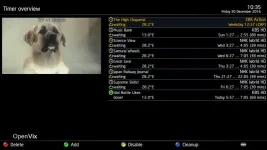
Here's a screengrab of my timer list as it currently is, you can see the completed timer at the bottom. I always manage my recording times to guarantee that there is only 1 programme recording at any one time, to allow me to add a second timer should I need to do so. NHK World HD repeats every programme 4 times over a 24hr period, so it's easy to do.

The only possible reason that I could see to cause this conflict, is that the system had allocated Tuner A to that repeated recording at some time in the past and had based the next recording on those conditions, thus preventing Tuner A from being allocated elsewhere.

Deleting the timers and recreating them may have worked, but as a software developer, I tend to try and diagnose things to death before taking what might seem like the obvious solution. Old habits I'm afraid... So for now this problem has been bypassed but I am none the wiser as to why it occurred in the first instance.

timers.webp
 
Deleting the timers and recreating them may have worked, but as a software developer, I tend to try and diagnose things to death before taking what might seem like the obvious solution. Old habits I'm afraid...
I understand and agree with that. But sometimes finding the cause of an issue isn't very easy.
 
I understand and agree with that. But sometimes finding the cause of an issue isn't very easy.

I agree and that's why I would rather try and give you more information about the problem, than taking the easy fix.

Because the timer that caused a conflict is a repeating timer, it means that it is still there ready for next week. So later on I will try and set the same pair of timers, and see if that causes the same problem. If it doesn't, then maybe my theory about the system pre-allocating a tuner based on the previous recording conditions, might be a possible avenue to look into. Last time it recorded it might have used Tuner A, this time I forced it to use Tuner B.

Unless of course you would prefer I simply let this thread disappear, seeing as I resolved the issue... that's entirely your choice.
 
Okay... I can't set the matching timers yet as the KBS HD schedule doesn't go far enough into next week, however, I have been able to test with other timers earlier in the week.

On Wednesday there are two existing repeat timers set, one at 03:27 and another at 06:27. both on NHK World HD. On KBS HD, there is a programme starting at 02:40 and another at 06:20.

If I set a timer to record the programme at 02:40, the timer sets with no problem. If I try to set a timer for the programme starting at 06:20, I get a Timer Sanity Error. So that's two timers on the same two channels, with different results.

Here's where it gets a bit interesting... the programmes on the first timer I can set, start at different times and end at different times. The second timer I can't set, start at different times but end at the same time. 07:05 for both programmes.

The previous timer conflict... also started at different times but ended at the same time. Interestingly, both timers that caused a conflict ended at 07:05 but that might be just coincidence. All my timers have a pre-start period of -3 minutes and a post-end period of +5 minutes. I did consider that it might be an issue with the start times but after changing the start time of the programme at 02:40, to take it closer to the repeat timer's start time, it still set with no problem.

The next logical test will be to find two programmes on the same satellite that end at the same time, to see if they cause a conflict. But at this point, all evidence found so far, seems to indicate the end times being the same, as possibly contributing to (or directly causing) this problem.
 
If it doesn't, then maybe my theory about the system pre-allocating a tuner based on the previous recording conditions, might be a possible avenue to look into. Last time it recorded it might have used Tuner A, this time I forced it to use Tuner B.
What happens if you set your preferred tuner to tuner B? That should mean that A is only used when B can't be.
 
What happens if you set your preferred tuner to tuner B? That should mean that A is only used when B can't be.

After the testing that I posted about in the post just above yours, I am now convinced this isn't tuner related at all. I now suspect this is purely down to how the system is evaluating the timer events and is flagging a conflict where one doesn't really exist.

I have a habit of speculating out loud, and at the time I said that, I had nothing else really to go on. I just throw ideas out there, just in case it triggers something with someone. :)
 
After the testing that I posted about in the post just above yours, I am now convinced this isn't tuner related at all. I now suspect this is purely down to how the system is evaluating the timer events and is flagging a conflict where one doesn't really exist.
Well, as has been noted elsewhere, if there was already a timer conflict somewhere else (from an Auto Timer, say) then an apparently incorrect conflict will be reported as each new timer is added.
 
Well, as has been noted elsewhere, if there was already a timer conflict somewhere else (from an Auto Timer, say) then an apparently incorrect conflict will be reported as each new timer is added.

I only ever use manual timers, either single event or repeating. I have no autotimers or power timers. All you see in that image I posted, is every timer I have in use in the whole system.
 
I hate my brain sometimes. :D I'm walking round in GTAV trying to test some mod code changes in two different mods I'm writing, along with some website issues I need to deal with on my own website and this keeps nagging away at the back of my mind, just to add to the confusion.
I said I was convinced that this wasn't tuner related but I'm now thinking, if that's the case, why did changing to NHK World last night cure the problem with the previous conflict?
 
The next logical test will be to find two programmes on the same satellite that end at the same time, to see if they cause a conflict.
You can set a timer tot start and stop at any time. Just press Add in that Timer Overview menu and adjust start/stop times.
 
Because the timer that caused a conflict is a repeating timer, it means that it is still there ready for next week.
A repeating timer is still just one timer. But it's set up such that when it completes it sets another timer for the next time...
However, the conflict timer code does have to cater for this, as you could have a daily one set -up and it would need to know that there will be a timer there tomorrow.

So later on I will try and set the same pair of timers, and see if that causes the same problem.
A screenshot of the timer conflict resolution screen when it occurs might be helpful.

Last time it recorded it might have used Tuner A, this time I forced it to use Tuner B.
Which is why I suggested you see what happens if you set your preferred tuner to B. I don't think you've reported back on that yet?
 
A repeating timer is still just one timer. But it's set up such that when it completes it sets another timer for the next time...
However, the conflict timer code does have to cater for this, as you could have a daily one set -up and it would need to know that there will be a timer there tomorrow.

It's confusing the thread by picking snippets of quotes and then dealing with them out of context. My reference about the repeating timer was simply to state that I wouldn't have to re-create the timer, as it was still there because it was a repeating timer. Thus making it easier to test the same situation, as the same programmes would be on at the same time next week.

A screenshot of the timer conflict resolution screen when it occurs might be helpful.
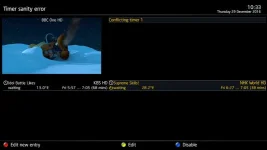
Do you mean this screen as the timer conflict resolution screen or do you mean another screen?

timer-conflict.webp

You also picked out this quote
So later on I will try and set the same pair of timers, and see if that causes the same problem.
but I had already dealt with that when I said
I can't set the matching timers yet as the KBS HD schedule doesn't go far enough into next week.
So the image I have attached is from yesterday's conflict.

Which is why I suggested you see what happens if you set your preferred tuner to B. I don't think you've reported back on that yet?
I haven't reported back on that tuner setting simply because I see no reason why it would only occur on one particular timer out of two that I tried to set. If there was a tuner conflict, it wouldn't have let me set the first timer, because it was using the same pair of tuner configurations. This is the thing that is making this so confusing to track down, in theory it should have caused an error with both timer attempts but it didn't. It only caused the error with the second timer.

And just to go back to your previous quote
You can set a timer tot start and stop at any time. Just press Add in that Timer Overview menu and adjust start/stop times.

As I said previously
I did consider that it might be an issue with the start times but after changing the start time of the programme at 02:40, to take it closer to the repeat timer's start time, it still set with no problem.
I am familiar with manually changing start and end times but adjusting them doesn't seem to have any effect on whether it either sets, or generates the error. Either that or you have to change them by a significant amount and I just haven't changed them by the right amount. But adding an extra 10 minutes to a conflicting timer end time had no effect.

If you have questions about what I have posted, it makes it much easier if you not only treat them in context but also in chronological order. I am trying to help diagnose this but I do also have at least two coding projects and a website on the go. If I have to answer questions out of order, the whole thread loses any sense of progression, which just makes it harder for anyone else to follow. And it also means I end up with a spaghetti multi-quote like this one, that is simply quoting previously stated information.

If you have a set of steps you believe will help, then please post them but please do so having taken into account any information I have already posted, that might cover any of the steps you suggest. My PC is upstairs and my satellite is downstairs, so I have to stop what I am doing to test things. So I need to do them all at once, so I spend as little time going up and down stairs as possible. Age hasn't been kind to my back and legs, stairs are hard work sometimes. :(
 
Do you mean this screen as the timer conflict resolution screen
Yes - that's the one I meant.
I haven't reported back on that tuner setting simply because I see no reason why it would only occur on one particular timer out of two that I tried to set.
Well, if I'm reading things correctly (in post #7) then the one which worked went channel only on tuner A, then channel on A or B while the one which produced a conflict did the channels the other way around.
 
Well, if I'm reading things correctly (in post #7) then the one which worked went channel only on tuner A, then channel on A or B while the one which produced a conflict did the channels the other way around.

No, in post #7, the channels were identical. Both situations had a timer already existing on NHK World HD and I was trying to set a timer for a programme on KBS HD. A programme at 02:40 on KBS HD set correctly, a programme at 06:20 on KBS HD caused the conflict. Same channels, same tuners, different times.

The existing schedule is in the first image I posted.
 
No, in post #7, the channels were identical...
...but the order of recording starts was not.

On Wednesday there are two existing repeat timers set, one at 03:27 and another at 06:27. both on NHK World HD. On KBS HD, there is a programme starting at 02:40 and another at 06:20.
So in the first case you have a recording on KBS (tuner A) followed by an overlap with NHK (A or B), while in the second you have a recording on NHK (tuner A or B) overlapping with a later start on KBS (needs tuner A).
 
@LeeC22: indeed both screens you posted now (timer overview & timer conflict manager) are important to post in case of issues.
Please be aware that 'Preferred tuner' and 'Preferred tuner for recordings' are separate settings and that you must have a good reason and know what you're doing when changing them. In case of unexpected/unexplainable results you'd best set/leave them to default values. There is seldom any reason to set those values, as E2 has sufficient build-in intelligence for tuner management.
But I realize that your original issue was with default values.
 
...but the order of recording starts was not.


So in the first case you have a recording on KBS (tuner A) followed by an overlap with NHK (A or B), while in the second you have a recording on NHK (tuner A or B) overlapping with a later start on KBS (needs tuner A).

That's not what post #7 says at all, both KBS starts are earlier than the NHK World starts, it's getting a but frustrating to keep reposting information... so let me clarify this.

This timer sets with no problem, the KBS HD programme starts first.
KBS HD - 2016 KBS Drama Awards Start - 02:40 - Finish 04:30
NHK HD - Science View - Start 03:30 - Finish 04:00

This timer causes a conflict, KBS HD programme starts first.
KBS HD - First Love Again - 06:20 - Finish 07:00
NHK HD - Samurai Wheels - Start 06:30 - Finish 07:00

And to add one more pairing that causes a conflict.
KBS HD - Pops in Seoul - 06:00 - Finish 06:30
NHK HD - Samurai Wheels - Start 06:30 - Finish 07:00

In no situation is there ever an NHK World HD programme starting first... which is exactly what post #7 said.
 
Last edited by a moderator:

OpenViX Feeds Status

Back
Top