hi guys
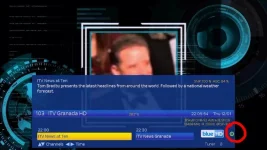
recent convert to open vix, have just noticed a flashing icon on the info bar and would like to know what it is?
see attached pic with icon circled
I know about the green flashing dot (or red) but I now see I have a yellow flashing dot and I can't work out what it is - can anyone enlighten my darkness?
Ah, thanks for that. I probably had my "dream epg" open on the tablet then- although it was not actually streaming but I guess the connection was enough to trigger tbe indicator?
Is there any more coloured dots to discover I wonder?
If you're not sure it was you streaming, then it could indicate that someone outside your home network is accessing your box.
Have you port forwarding setup on your router?
I too have a flashing yellow dot on 5.0.013. It is on the info bar to the left of REC.
How do I disable it? I can Webif, ftp etc if need be.
I have just flashed 5.0.013 on a Mutant HD2400.
Also re Red and Green dots. Is it correct that they would appear to the left of the Yellow dot?
Is Green for update available?
What is a Red dot for?
I understand I must be "streaming" but how come I am.
Is there a setting in Openvix to disable it.
I did not deliberately set it - must have done acidentally somehow.
If you're not sure it was you streaming, then it could indicate that someone outside your home network is accessing your box.
Have you port forwarding setup on your router?
If you check under System/Info/Streaming Clients you may see what is streaming. I use Kodi occasionally to stream from my receiver on my LAN and the yellow dot flashes. As pointed out by @ccs, if you have port forwarding set up on your router you could be being accessed from the web.
Thanks Guys.
I went Menu/Information/Streaming... and saw a client streaming: sa180.saturn.dedi..... (won't give full entry unless requested).
I did indeed have Port Forwarding enabled in the router so disabled it.
Rebooted Router and HD2400 and no yellow dot flashing anymore.
Did have a flashing Green dot for update available but that gone now as well. Try to update in box and says use USB as kernel change. Not a problem.
This site uses cookies to help personalise content, tailor your experience and to keep you logged in if you register.
By continuing to use this site, you are consenting to our use of cookies.