steveharman
New member
- Joined
- Mar 8, 2014
- Messages
- 175
- Reaction score
- 0
- Points
- 0
- Age
- 57
Hi,
Every now and again I have to go through the torture of disabling subtitles from movie files. Perhaps after a software update or something?
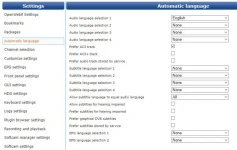
At some point I'll stumble on the correct combination of AC3 this, select default language that, disable preferred masonic habdshake or whatever, in the Audio settings and I will no longer have English language subtitles on English language movie files for a while. Which if I'm honest feels like a fairly reasonable default position.
Can anyone help me understand what my seemingly random selection of options needs to be, to fully, permanently, never again have English subs when watching movies with an English audio track please?
I can't find any suggestions in other posts which work for me on the latest Openvix build. On Kodi it's this; "Subtitles: off" when playing a movie.
Thanks in advance.
Steve
Every now and again I have to go through the torture of disabling subtitles from movie files. Perhaps after a software update or something?
At some point I'll stumble on the correct combination of AC3 this, select default language that, disable preferred masonic habdshake or whatever, in the Audio settings and I will no longer have English language subtitles on English language movie files for a while. Which if I'm honest feels like a fairly reasonable default position.
Can anyone help me understand what my seemingly random selection of options needs to be, to fully, permanently, never again have English subs when watching movies with an English audio track please?
I can't find any suggestions in other posts which work for me on the latest Openvix build. On Kodi it's this; "Subtitles: off" when playing a movie.
Thanks in advance.
Steve