Superb quality and spec AB-Com PULSe 4K SE. Crazy offer! Only £129! FREE UK DELIVERY! 4K UHD, Enigma 2, Multiboot 4 images & more!...
Superb quality and spec AB-Com PULSe 4K Rev II Twin Satellite tuner only £179! FREE UK DELIVERY! 4K UHD, Enigma 2, SATA HDD facility, Multiboot 4 images & more!...

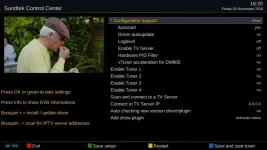
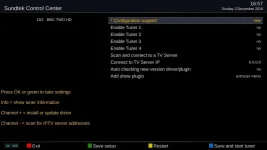
[ViX_Misc] Sundtek Control Centre

A screenshot might have helped...…
 

Attachments

  • Sundtek.webp
    Sundtek.webp
    36.9 KB · Views: 24
FWIW, menu still gets you the option to update the drivers (rather than Bouquet + :confused:)
 
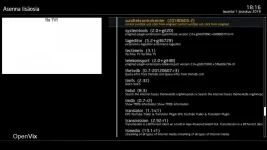
In my ViX 5.2 015 for Ultimo 4K this sundtekcontrolcenter is the only one sundtekcontrolcenter.webpavailable. So from where did you get the new one?
 
A good question, a bit of digging shows that it is in fact the one dated 20180605-2, so it must be the Simple1080 skin I'm currently trying that has changed the interface that I'm now seeing.:o

The Sundtek driver site doesn't show the version number, which I had checked before posting.

Code:
http://sundtek.de/media/
 
Last edited:
Have a look at line 328 of SundtekControlCenter.py

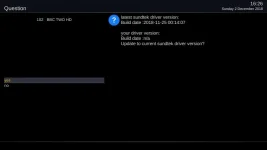
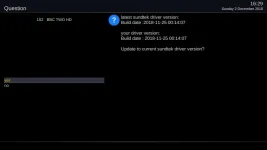
Channel + works for me

EDIT: Driver version shows after an update.
 

Attachments

  • sundtek channel up.webp
    sundtek channel up.webp
    9.4 KB · Views: 7
  • sundtek channel up after update.webp
    sundtek channel up after update.webp
    10.3 KB · Views: 6
Last edited:
Have a look at line 328 of SundtekControlCenter.py

Channel + works for me

EDIT: Driver version shows after an update.

Cheers, - but it refers to bouquet + , something I've never used and I didn't have a clue what it was until you mentioned channel +.


EDIT: The Sundtek Control Centre version number doesn't show in Simple1080, but does in the default skin.
 
Last edited:
I have sent @sundtek a skype message to change the wording on line 328/329 to say Channel as well as another tweak.
 

Attachments

  • sundtek channel up modded.webp
    sundtek channel up modded.webp
    22.6 KB · Views: 9
Pictures please

Post #2 doesn't show the version number :), I'll need to change skins to the default to show it.

It'll have to wait for a while, recording at the moment.
 
Don't worry, I'll do it myself.

OK.

An update to the Control Centre has been expected for over 5 weeks now, hence my original post, which jumped to the wrong conclusions.
 
EDIT: The Sundtek Control Centre version number doesn't show in Simple1080, but does in the default skin.

The default skin (vix night hd) does not have it. The skin embedded in the plugin has it. I will add to simple 1080. But the plugin uses non-standard button definitions.

Code:
<   198.787> [Skin] Parsing embedded skin <embedded-in-'SundtekControlCenter'>
<   198.788> [Skin] processing screen <embedded-in-'SundtekControlCenter'>:
 

OpenViX Feeds Status

Back
Top