Superb quality and spec AB-Com PULSe 4K SE. Crazy offer! Only £129! FREE UK DELIVERY! 4K UHD, Enigma 2, Multiboot 4 images & more!...
Superb quality and spec AB-Com PULSe 4K Rev II Twin Satellite tuner only £179! FREE UK DELIVERY! 4K UHD, Enigma 2, SATA HDD facility, Multiboot 4 images & more!...

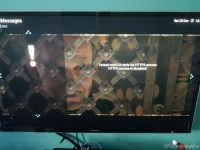
[VU+ Duo2] cannot read ca certs for https access. access disabled openvix

djz46

Forum Supporter
Donated Member
Joined
Apr 30, 2015
Messages
117
Reaction score
0
Points
0
Hi, i am not one to post for help as i usually read through the forums first and find my answer. I am afraid i have drawn a blank on this one though.

I use the VU+ player app on my android phone and it has been great up until last week. I noticed it is not connecting (i use it if i am out and forget to set epg) i usually connect through a dns server which updates the ip address etc. I noticed when i boot my Duo2 up it says "cannot read ca certs for https access". "Access disabled".
"
I have tried to enable https through openwebif in plugins but it will not save my settings. I have not changed anything other than updating the openvix when it said there was a new version.

I am stuck as to what i should do next. As i said i usually find an answer in the forums but to no avail.

Thanks in advance
 
So did you update the Duo? If so how?
Also if you go to plugins/openWebif - what are the settings for https & https authentication??
 
Last edited:
I did the update through the box.
I only update from USB stick if it says so on forum.
Should i do i fresh install from stick?
 
Is it possible to post a link to your updated webif thread i have searched but cannot see ????
 
..... It's post #2 in this thread.
 
Sorry cannot see the wood for the trees!
 
20181229_143519.webp

These are my settings. When i try to "enable https" and save it will not save.

I know this as when i go back into When i go back into openwebif it is disabled. This never happened before.
 
Doesn‘t happen to me - everything saved.
You could backup your settings (ViX plugin -> settings backup) and then use ImageManager to flash online a new image.
 
Thanks, already tried it. Same thing happens. Also removed openwebif extension then re installed it. Still the same.

I will try and get my head around it.

I think the problem is when it says on boot up cannot read ca certs for https access. Access disabled
 
Which skin are you using, I can't see the green to save button on the picture you posted?
 
… is there a green to save button?
 
Yes, when i try and change the https that is the first thing i do green to save.
 
Ok so i removed the plugin openwebif. Restarted, installed plugin openwebif. Tried to enable https it stalled then crashed and said restart please send log etc. Then rebooted and came up with this again on screen.20181229_152059.webp
 
Reflashed. I went into openwebif it let me enable https i saved witht the green button.

Went back in as soon as i enabled "authentication for streaming" and tried to save again and exit it went back to "https enabled no"

Its a puzzling one this.
 
When I Enable https, Enable https authentication appears, set to yes.

(No mention of streaming.)
 
Last edited:

OpenViX Feeds Status

Back
Top