Superb quality and spec AB-Com PULSe 4K SE. Crazy offer! Only £129! FREE UK DELIVERY! 4K UHD, Enigma 2, Multiboot 4 images & more!...
Superb quality and spec AB-Com PULSe 4K Rev II Twin Satellite tuner only £179! FREE UK DELIVERY! 4K UHD, Enigma 2, SATA HDD facility, Multiboot 4 images & more!...

[MB Premium Twin+ Plus] Only two out of three DVB T2 tuners work

keith1200rs

New member
Joined
Nov 4, 2016
Messages
54
Reaction score
0
Points
0
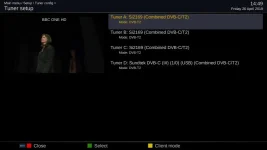
5.2.030 is OK. 5.2.034 and 5.2.039 show the problem. When recording with two of the tuners, selecting to view or record a channel which would need the third tuner says "tune failed". I noticed that while 5.2.030 shows the tuners as DVB T2, the later versions 5.2.034 and 5.2.039 show the tuners as DVB-C/T2. Maybe the drivers have changed?
 
If you look in Menu > Info > About it will tell you the date of the drivers attached to that image.


Sent from my iPhone using Tapatalk
 
The drivers on the 5.2.030 (which works) are dated 2017-06-14. I don't know what the driver dates on the 5.2.034/5.2.039 are because I am obviously running the working version at the moment.
 
Don't know. Does that apply to 5.2.034? It seems to follow the reference to 5.2.035. Also, what do the tuner settings need to be set to? As far as I recall the tuners were identified as DVB-C/T2 which as far as I know is what I have. Is there another setting related to the tuner that needs changing?
 
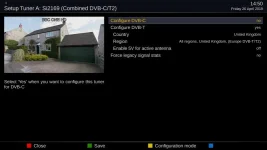
I had to change mine, there are now 2 options as far as I can remember, one for DVB-C and the other for DVB-T/T2.

Mine are all DVB-C/T/T2 tuners.
 
Last edited:
I will have to install it again and see what options there are. My tuners are DVB-C/T2 according to the original order. I thought that was what it came up with when I checked, but I cannot be sure. Certainly the other option didn't seem appropriate (DVD-C, I think, but again, I cannot be sure).
 
This is what I've got setup, T and T2 references are a bit random. (5.2.039)
 

Attachments

  • t1.webp
    t1.webp
    17 KB · Views: 5
  • t2.webp
    t2.webp
    25.8 KB · Views: 7
Well, I have re-flashed 5.2.039 again and checked the tuner configuration. It seems to come up with DVB-C/T2 for the tuner type and DVB-T2 for the mode selected, which I assume is correct. The only other choices are DVB-C or disabled. Back to 5.2.030!
 
…. maybe a debug log will help?
 
These are multi-type tuners. Apparently you can combine signal and they will work as required. You can now individually configure the modes.
 
Well, I have the problem again, and yet I am still running 5.2.030 which I previously decided was the older, working version. I have debug logs enabled so I don't know if helps - reference 1556830782.8. I can attach a copy here if that number doesn't help. The puzzling thing is that it seems to be happening at the same time exactly one week later. The Miraclebox will be trying to record the same two channels as last week. The symptoms are that whatever channel I select it says "tune failed" and I get a blank screen. The two recordings it was making are also blank. The only solution seems to be to remove the power, and it then works fine on all channels, including the two it was trying to record. Any suggestions would be gratefully received.

Thanks.

Keith
 
There seems to be an extra log with the same time (and a couple of others with an earlier date). They are labelled as debug logs rather than crash logs. I have attached the latest, and also a couple of others dated 28.4.19 - presumably from when I enabled logging.
 

Attachments

Are the debug logs any use in diagnosing the problem? There in one crash log but the crash was later - while viewing the debug logs! That log was emailed using the reference number I gave.
 
There are references to "tune failed" in the debug logs but it means nothing to me.

Code:
<358972.987> [eDVBFrontend1] startTuneTimeout 5000
<358972.987> [eDVBFrontend1] setVoltage 0
<358972.987> [eDVBFrontend1] setFrontend 1
<358972.987> [eDVBFrontend1] setting frontend
<358972.987> [eDVBFrontend1] fe event: status 0, inversion off, m_tuning 1
<358975.039> [eDVBFrontend1] fe event: status 20, inversion off, m_tuning 2
<358975.039> [eDVBFrontend1] FE_TIMEDOUT! ..abort
<358975.039> [eDVBChannel] OURSTATE: failed, retune
<358975.039> [eDVBFrontend1] tune
<358975.040> [eDVBChannel] OURSTATE: tuning
<358975.040> [eDVBServicePMTHandler] tune failed.
<358975.040> [eDVBServiceRecord] RECORD service event 1
<358975.040> [eDVBServiceRecord] record failed to tune
<358975.040> [eDVBServicePMTHandler] ignore sdt update data.... incorrect transponder tuned!!!
<358975.040> [eDVBServicePMTHandler] incorrect namespace. expected: eeee0000 current: ffffffff
<358975.040> [eDVBServicePMTHandler] incorrect transport_stream_id. expected: 2019 current: ffffffff
<358975.040> [eDVBServicePMTHandler] incorrect original_network_id. expected: 233a current: ffffffff
 
Frontend 0 = Tuner A
Frontend 1 = Tuner B
Frontend 2 = Tuner C

Your larger log shows the tuning failed on Frontend 1, Tuner B. Check cabling and connections. Disable Tuner A and Tuner C. That should give you a constant tuner error if something is wrong with tuner B.

If Tuner B consistently fails, you can then label the tuner cards, and test them one by one in different tuner slots.
 
Thanks for the reply.

I have disabled A & C and B works fine. The cabling looks fine (and is daisy chained, so C should also fail if the cabling to B is faulty). I wonder if it is an intermittent fault with the tuner. Last week when this happened I suspected tuner B but the next day I did more tests and couldn't pin it down to tuner B - it seemed to be when I tried to record using 3 tuners. It could be a bad motherboard connection to that tuner, I guess. I will open up the box and have a look.
 
If you go to timers, highlight a completed timer, and press info, it will tell you which tuner was used.
 

OpenViX Feeds Status

Back
Top