Superb quality and spec AB-Com PULSe 4K SE. Crazy offer! Only £129! FREE UK DELIVERY! 4K UHD, Enigma 2, Multiboot 4 images & more!...
Superb quality and spec AB-Com PULSe 4K Rev II Twin Satellite tuner only £179! FREE UK DELIVERY! 4K UHD, Enigma 2, SATA HDD facility, Multiboot 4 images & more!...

[VU+ Duo4K] Picons not loading after full reboot

pmatil

New member
Joined
May 8, 2016
Messages
72
Reaction score
0
Points
0
Location
Finland
Minor issue with picons loading. If the box is rebooted fully, the picons will not load. I always have to reboot Enigma2, and then the picons always load. This is a new problem with Duo 4k, I never had issues with Duo2 on older images with the same setup.

My picons are on a USB 3 stick on the back of the box and there's a symlink at /usr/share/enigma2 pointing to the USB device.

Log at bootup, same lines for full reboot and Enigma2 only:

[Picon] adding path: /usr/share/enigma2/picon/

And then a bit later:

Current Picon Path : /usr/share/enigma2/picon/

But still the picons will not load. There is no errors in the log regarding picons or the USB drive. After Enigma2 reboot, picons load and they continue to work just fine until the next full reboot. Also, it does not matter if there are any other USB devices plugged in or not.
 
Not sure what you mean, how does it know picons are there without it? The picons are not at the root of the drive but in a directory.
 
E2 will find the picons automatically by itself - thats why you should make sure that you only have one set installed - doesn‘t need a symbolic link
Just install in the base of the usb
 
Like @Twol says. Picons just need to be in a folder called”picon” to the root of your usb3 flash drive, no nedd to complicate things with symlinks.


Sent from my iPhone using Tapatalk
 
Thanks, I always thought you'd need the symlink. So I removed the symlink and put all the picons in a "picon" folder. Now the log says: Current Picon Path : /media/usb/picon/

But still there's some weirdness here. I did some more investigating and the USB3 HDD which I have plugged in for additional recordings does now have some effect since without it plugged in the picons will load after full reboot. It's weird since I have set the mountpoints in the settings so that /media/usb is always the mountpoint for the picon drive and the HDD is /media/sdc1.

If I then copy the picon folder into sdc1, the picons will still not load and the log shows only one picon folder found: Current Picon Path : /media/usb/picon/

Maybe there's a timeout when doing a full reboot so that USB devices don't have enough time to initialize properly.
 
why not put picons in root ? Much easyer.Just make backup so you can transfer them again after a flash.
 
OpenViX does not allow you to set picon paths. It checks a list of locations. If your storage devices have picon folders, delete the ones you don't want.

Yes, you can specify a specific set of picons for front display.
 
I was just trying to see if the HDD would get erroneusly mapped as a picon location during boot but it doesn't since it couldn't find the picon folder in there either. /media/usb was there, it was found but somehow picons not displayed or loaded.
 
There is no "picon location" mapping. There is a list of locations that are checked.

Undo all the things you have done, enable debug logs, restart and then upload debug log here if you want people to look at it for you. Edit out IPTV details.
 
It sounds like you have specifically mounting drives yourself. Was there a reason for this rather than let it automount?

Could you, from putty/telnet, type:
Code:
df -mh
and post back with results as I'm curious of mountpoints.

Also following command:
Code:
find / -name picon
This will search for anything named "picon". There should really only be one result and should match location of where your picons are.
 
It sounds like you have specifically mounting drives yourself. Was there a reason for this rather than let it automount?

Could you, from putty/telnet, type:
Code:
df -mh
and post back with results as I'm curious of mountpoints.

Also following command:
Code:
find / -name picon
This will search for anything named "picon". There should really only be one result and should match location of where your picons are.

I have specified mountpoints inside OpenVIX, in the recording list view, press menu and then "Device mounts...". In there, my USB drive is mounted as /media/usb and USB HDD as /media/sdc1. Otherwise, during boot they can be either way around and so all the bookmarks etc. would be randomly different. And also, picons wouldn't load if the drive without picon folder would end up as /media/usb.

Code:
df -mh:

Filesystem                Size      Used Available Use% Mounted on
/dev/root                 3.5G    338.7M      3.0G  10% /
devtmpfs                268.9M      8.0K    268.9M   0% /dev
tmpfs                    64.0K         0     64.0K   0% /media
tmpfs                   277.1M    220.0K    276.9M   0% /var/volatile
/dev/sda1               930.4G    319.5G    610.8G  34% /media/hdd
/dev/sdb1                14.4G      1.2M     14.4G   0% /media/usb
/dev/sdc1               930.4G    359.8G    570.5G  39% /media/sdc1

find / -name picon:
/media/usb/picon
 
Filesystem Size Used Available Use% Mounted on
/dev/sda1 930.4G 319.5G 610.8G 34% /media/hdd
/dev/sdb1 14.4G 1.2M 14.4G 0% /media/usb
/dev/sdc1 930.4G 359.8G 570.5G 39% /media/sdc1
Am I correct in saying the mountpoints are:

sda1 internal HDD
sdb1 USB v3 stick
sdc1 external HDD

Do you use timeshift and if so, which are they mounted too?
Which one do you normally record too (ie default)?
 
Am I correct in saying the mountpoints are:

sda1 internal HDD
sdb1 USB v3 stick
sdc1 external HDD

Do you use timeshift and if so, which are they mounted too?
Which one do you normally record too (ie default)?

Yes you are correct. I don't use timeshift but the settings for it point to /media/hdd/timeshift. /media/hdd/movie is the default record location. Mostly I record to /media/hdd/movie and transfer to /media/sdc1 if necessary.
 
The logs show this
Code:
<    16.072> [Picon] adding path: /media/usb/picon/
<    19.865> Current Picon Path : /media/usb/picon/

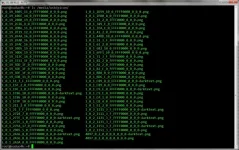
Can you please post a screenshot of the folder layout of the picon folder itself. Just in case you have a sub folder. Sorry to ask.

The larger device is meat to be mounted as HDD by default as this was the most logical approach at the time as people would have the HDD internally within the STB. However, you have an external device that has the same size as the internal one. There is a way to assign devices to specific mount points. I can't remember how. It stops devices changing order etc. This probably explains the jumping around of mount points.

I prefer df -Th, but not important now.
 
In my previous message I replied to bbbuk, the place you probably remember is the same place I did it and it does work great when the system is up and running.

Here's the screenshot:

picon-dir.webp
 
Do the picons work fine on the GUI? I don't know much about L4L. You don't need it though.
 

OpenViX Feeds Status

Back
Top