Superb quality and spec AB-Com PULSe 4K SE. Crazy offer! Only £129! FREE UK DELIVERY! 4K UHD, Enigma 2, Multiboot 4 images & more!...
Superb quality and spec AB-Com PULSe 4K Rev II Twin Satellite tuner only £179! FREE UK DELIVERY! 4K UHD, Enigma 2, SATA HDD facility, Multiboot 4 images & more!...

[Zgemma H9S] ZGemma H9S OpenWebif remote button press do wrong functions

xsony_ngux

New member
Joined
Jun 28, 2016
Messages
102
Reaction score
0
Points
0
The zgemma remote via OpenWebif is not working correctly. When some buttons are pressed, it performs the wrong actions.

I am hoping this could use the correct zgemma remote (the one's that came with the H2S/H2H) and tested, as whenever I press a button it will do something else. I have the latest Wi-Fi model which now come with new remote.
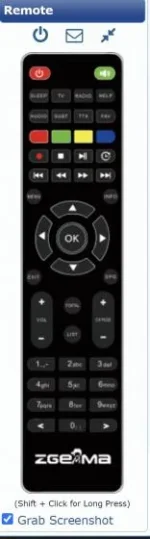
Screenshot 2020-09-19 203341.webp
 
I can confirm that the supplied remote for the ZGemma H9S is not the same as that shown in Webif, and that the button functions on the Webif remote representation do not match those on the real remote.

My remote for this box is identical to ......
Code:
https://www.ebay.co.uk/itm/original-remote-control-for-ZGEMMA-H9S-SINGLE-TUNER-4K-SATELLITE-RECEIVER-/254029831983
 
The remote is taken from boxbranding and matches what is used during the build process. Sometimes boxes ship with different remotes in different countries. If you change it, people with opposite remote will complain. We will need to get agreement/confirmation.

The zgemma folder in following location has under-listed remotes
Code:
https://github.com/oe-alliance/branding-module/tree/master/BoxBranding/remotes


Code:
https://github.com/oe-alliance/branding-module/blob/master/BoxBranding/remotes/zgemma1/rc.png
https://github.com/oe-alliance/branding-module/blob/master/BoxBranding/remotes/zgemma2/rc.png
https://github.com/oe-alliance/branding-module/blob/master/BoxBranding/remotes/zgemma3/rc.png
https://github.com/oe-alliance/branding-module/blob/master/BoxBranding/remotes/zgemma4/rc.png
https://github.com/oe-alliance/branding-module/blob/master/BoxBranding/remotes/zgemma5/rc.png
https://github.com/oe-alliance/branding-module/blob/master/BoxBranding/remotes/zgemma6/rc.png
https://github.com/oe-alliance/branding-module/blob/master/BoxBranding/remotes/zgemma7/rc.png

The correlation is done in RcModel.py. A bit weird some H9 boxes are using 6 and others 3
Code:
https://github.com/oe-alliance/branding-module/blob/master/BoxBranding/RcModel.py

Code:
"zgemmah10": "zgemma3",
"zgemmah102h": "zgemma7",
"zgemmah102s": "zgemma7",
"zgemmah10combo": "zgemma7",
"zgemmah2h": "zgemma3",
"zgemmah2s": "zgemma3",
"zgemmah2splus": "zgemma3",
"zgemmah32tc": "zgemma3",
"zgemmah3ac": "zgemma3",
"zgemmah4": "zgemma3",
"zgemmah5": "zgemma3",
"zgemmah52s": "zgemma3",
"zgemmah52splus": "zgemma3",
"zgemmah52tc": "zgemma3",
"zgemmah5ac": "zgemma3",
"zgemmah6": "zgemma3",
"zgemmah7": "zgemma3",
"zgemmah7c": "zgemma3",
"zgemmah7s": "zgemma3",
"zgemmah92h": "zgemma3",
"zgemmah92s": "zgemma3",
"zgemmah9combo": "zgemma3",
"zgemmah9s": "zgemma6",
"zgemmah9splus": "zgemma6",
"zgemmah9t": "zgemma6",
"zgemmah9twin": "zgemma3",
"zgemmahs": "zgemma3",
"zgemmahzeros": "zgemma3",
"zgemmai55": "zgemma5",
"zgemmai55plus": "zgemma3",
"zgemmas2s": "zgemma1",
"zgemmash1": "zgemma1",
"zgemmash2": "zgemma2",
"zgemmaslc": "zgemma2",
"zgemmass": "zgemma2"

I have asked if we can change it to the one in the zgemma3 folder.
 
Last edited:
I think this remote issue is to do with the WiFi and Non-WiFi Model of the box.

Because the Non-WiFi model did come with the remote I attached earlier.
The WiFi model on the other hand came with the remote that came with boxes like ZGemma H2H and H2S.

As already pointed out earlier, the key functions on OpenWebIf are all mixed up so for e.g. the number '1' button is showing at the top of remote and where the '1' icon is on the remote it is showing as record. So quite confusing since the wrong remote is there.

Hopefully this is fixed ASAP.
 
Last edited by a moderator:
ZGemma H9S OpenWebif remote button press do

I received information that the original receivers were shipped with the pictured remote. My Duo 4K has a different remote in OWIF and wizard/help screens because box has two remotes. If we change it, it will be "wrong remote" for other people.

The OWIF remote buttons should match the pictured remote in OWIF, not necessarily the one in your hand. Is this not the case?
 
Last edited:
Here is someone selling a H9 shipped with the other type of remote.
Code:
https://www.ebay.co.uk/itm/Zgemma-H9S-2K-UHD-Satellite-Box/284025932207

It has a button with "Mouse" text.

Anyway, I have committed some changes for now and will be in the next update/image. I don't have the box, so can't test.
Code:
https://github.com/oe-alliance/branding-module/commits/master
 
Here is someone selling a H9 shipped with the other type of remote.

It's a completely different box and it's not the H9S box that I purchased from WOS in the past few months. The Ebay back panel picture does not show any connections for the 2 Wi-fi antennas that the H9S comes with.

Openvix reports my box as a H9S and the front panel says H9S.

hs9_a.webp
 
It's a completely different box and it's not the H9S box that I purchased from WOS in the past few months. The Ebay back panel picture does not show any connections for the 2 Wi-fi antennas that the H9S comes with.

Openvix reports my box as a H9S and the front panel says H9S.
Not that it matters to what we can do, what does the front of the box on that picture on Ebay say?
 
The files on receiver are located in /usr/share/enigma2/rc_models

Those who are bothered by the mismatch in remotes, should move files between the zgemma3/ zgemma6 folders. Make a backup before you tinker! Remote png path file will need slight edit.
 
Last edited:
I received information that the original receivers were shipped with the pictured remote. My Duo 4K has a different remote in OWIF and wizard/help screens because box has two remotes. If we change it, it will be "wrong remote" for other people.

The OWIF remote buttons should match the pictured remote in OWIF, not necessarily the one in your hand. Is this not the case?
Eventhough I have a different remote, the OWIF remote has the button keys in different places as said earlier.
 
Here is someone selling a H9 shipped with the other type of remote.
Code:
https://www.ebay.co.uk/itm/Zgemma-H9S-2K-UHD-Satellite-Box/284025932207

It has a button with "Mouse" text.

Anyway, I have committed some changes for now and will be in the next update/image. I don't have the box, so can't test.
Code:
https://github.com/oe-alliance/branding-module/commits/master

I have this one you can see remote in picture, it allows Wi-Fi and has antenna's included:

Code:
https://www.ebay.co.uk/itm/New-Zgemma-Star-H9S-Wifi-4K-IPTV-UHD-Single-Sat-Receiver-DVB-S2X-Stalker/324135686690?_trkparms=ispr%3D1&hash=item4b77fe1222:g:EHIAAOSwIXldgkQB&amdata=enc%3AAQAFAAACYBaobrjLl8XobRIiIML1V4Imu%252Fn%252BzU5L90Z278x5ickk5v8gVt3hEWLVg%252F253w6XCWPm4xLBSg5UPsgbnMaGFpzcn9pyOE78QqB8L8EA4nVilpT2oroOuKQaMyk88tebeQdjIp52gDnK1ElbzGgarsUVL%252BcBrerey1hW7Wy1TGxbu2vNpvvUvpI0LJTHIr0YDZZc6NLMH6ehupVBfQKrTldI6zkIiOOxCsC4FiccX7f2I3CLUMVOu9s%252F0TO89bGPOSk0FheOtZiK4QnJYGbxQ4zXUtn7X%252Bk%252BiMKK8CL7In8KF01UFcfOFFjDdkLXLTzz7GgzFr1uSXp9ZW8TesXfiW6I4NWdzqm3M9VRzqL0iQwv9hwoFaLz322%252FZWA%252Byohzw4ppmo1n3h1ZQCus78XOkcGR%252FqvOQUZ8mc5lvmaIaHXWLJZH%252FGKcuSPlVtaFXRzR7a6Cm2A%252FHjEUZ3R6%252FlJDxAgxkldharoNNwo7BSZu7YCDh42EBjB93ex2TI%252FQY0EPRE9jBps1qfzot%252FTukl56x2SOx%252FwmbqiwYZ2Yyryh5kc8J8TUzom3vG%252FWIoM%252BhYjNxtM41GQKXa%252BVjmLXXtnt51FkZprl3trMSIfd3KHw3YGxtv%252Fowt4OWk1viFk2GH%252FvMYKUshAP5MtV83XVG%252F0nMBx5F%252FzVvPiuEVtl462%252BJi6okyLWEkZRHIsInTH7nNTv3zngaYWd1AGYxTJkodhfVqnrBbWA4NgDaDlPvb6Q%252BvrWPtdAmFQcxmH2ry2ipv1uAlffig%252FNJNw5yIHg45C063zwSm2wzE5I%252Bg4lpNjCf%252FLd%7Ccksum%3A324135686690caf0a0438d464ecc8d17a0db9f776954%7Campid%3APL_CLK%7Cclp%3A2334524
 
The files on receiver are located in /usr/share/enigma2/rc_models

Those who are bothered by the mismatch in remotes, should move files between the zgemma3/ zgemma6 folders. Make a backup before you tinker! Remote png path file will need slight edit.

I'll try this out, thanks

This seemed to have fixed it, thank you.
 
Last edited:
The Zgemma H9 comes with different remotes. Granted, the newer ones have the zgemma 3 remote and not zgemma 6. We cannot change it because it will always be wrong for someone. Post as many links as you want, it won't make a difference to the situation. The case is exactly the same for the Vu Duo 4K and some of the Technomates.

The OWIF remote should function as pictured on OWIF from next image. If you want to test it now, unzip the attachment and send to /usr/share/enigma2/rc_models/zgemma6 Reboot box and make sure you reload web browser on PC.
 

OpenViX Feeds Status

Back
Top