Superb quality and spec AB-Com PULSe 4K SE. Crazy offer! Only £129! FREE UK DELIVERY! 4K UHD, Enigma 2, Multiboot 4 images & more!...
Superb quality and spec AB-Com PULSe 4K Rev II Twin Satellite tuner only £179! FREE UK DELIVERY! 4K UHD, Enigma 2, SATA HDD facility, Multiboot 4 images & more!...

[ViX_Misc] Recording, playback & timeshift in 5.4

The standard Vix night skin would be the "default" then? I've tested the menu navigation changes using that skin and the normal left/right/up/down arrows on the D-pad should work. Pressing the HELP key should list the navigation keys specific to that box and remote.
Thanks fat-tony ok I will change back to default skin and see what happened

Edit:
after changing back to Vix night skin give me the same result
 
Last edited:
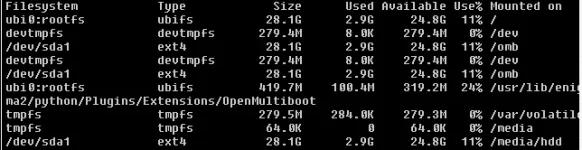
Please issue this command and post back the results

df -Th
Thanks abu baniaz

this is result

Filesystem Type Size Used Available Use% Mounted on
ubi0:rootfs ubifs 28.1G 2.9G 24.8G 11% /
devtmpfs devtmpfs 279.4M 8.0K 279.4M 0% /dev
/dev/sda1 ext4 28.1G 2.9G 24.8G 11% /omb
devtmpfs devtmpfs 279.4M 8.0K 279.4M 0% /dev
/dev/sda1 ext4 28.1G 2.9G 24.8G 11% /omb
ubi0:rootfs ubifs 419.7M 100.4M 319.2M 24% /usr/lib/eni
ma2/python/Plugins/Extensions/OpenMultiboot
tmpfs tmpfs 279.5M 280.0K 279.3M 0% /var/volatil
tmpfs tmpfs 64.0K 0 64.0K 0% /media
/dev/sda1 ext4 28.1G 2.9G 24.8G 11% /media/hdd

Screenshot 2020-10-15 192658.webp
 
Last edited:
/media/hdd is there. You are running this on OpenMultiBoot, so I suspect this is why you are having issues.

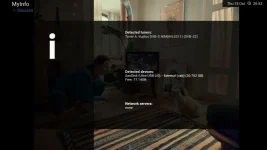
Can you please post a screenshot of Menu > Information > Devices
 
/media/hdd is there. You are running this on OpenMultiBoot, so I suspect this is why you are having issues.

Can you please post a screenshot of Menu > Information > Devices

yes I'm running ViX 5.4 on (OpenMultiboot 2.6 for PLi)
I dont know if that any information in it. but here you go
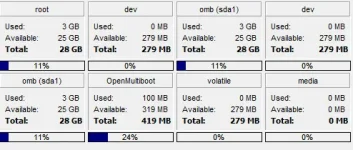
also that I took screenshot of memory info

device.webp
Screenshot 2020-10-15 210030.webp
 
Last edited:
There are a few similar reports on PLI with OpenMultiBoot. A solution has not been looked at because they don't like OMB. Workaround is to have ViX/ATV on flash memory.

Still doesn't explain why previous image is fine.

Which PLI image is on flash memory? 7.3?
 
The OMB info is rather relevant. The impression given initially was that it was an issue with OpenViX 5.4. Can you try a clean flash with OpenViX 5.4? That's what all the testing was done on.
 
There are a few similar reports on PLI with OpenMultiBoot. A solution has not been looked at because they don't like OMB. Workaround is to have ViX/ATV on flash memory.

Still doesn't explain why previous image is fine.

Which PLI image is on flash memory? 7.3?

Hi abu baniaz as I explained before I have OpenBH 4.3 in flash and uninstalled their Openmultiboot plugin
because they are not been updated it like forever. if installed images like openpli or vti etc it will take the name openBH 4.3 when boot up
I have never try ViX in flash before to be honest. but is not OpenVix is very similar to OpenBH?
for ATV I try 6.4 but after installing 3 to 4 images in OMB it's get corrupted
I even try 6.3 but got the same results
 
The OMB info is rather relevant. The impression given initially was that it was an issue with OpenViX 5.4. Can you try a clean flash with OpenViX 5.4? That's what all the testing was done on.

Hi fat-tony do you mean flashing new ViX 5.4 in FLASH not OMB? or flashing new 5.4 on OMB
 
I meant flashing ViX on dedicated partition on flash, rather than using OMB. Using OMB brings another environment variable into play which may affect behaviour. There have been a lot of coding changes in regard to menu navigation in 5.4, but they should work the same.
 

OpenViX Feeds Status

Back
Top