Superb quality and spec AB-Com PULSe 4K SE. Crazy offer! Only £99! FREE UK DELIVERY! 4K UHD, Enigma 2, Multiboot 4 images & more!...
Superb quality and spec AB-Com PULSe 4K Rev II Twin Satellite tuner only £149! FREE UK DELIVERY! 4K UHD, Enigma 2, SATA HDD facility, Multiboot 4 images & more!...

[ViX_Misc] EPG Refresh, iEPG and VPS

Your image confirms it does not have "EIT schedule", just now/next. Freesat EPG is something else.

EIT schedule looks like this:
View attachment 61361
I'll ask again, where does the eit field get populated from in the examples I and others have posted, I do NOT have Freesat enabled?

Also now the code's been remediated how is it picking up the correct values from iepg-1?

Thanks

Sent from my IN2013 using Tapatalk
 
Your image confirms it does not have "EIT schedule", just now/next. Freesat EPG is something else.

EIT schedule looks like this:
View attachment 61361

So "Other TS - Schedule" is not a schedule? The EPG will be populated from the transponder over a period of 10'ish minutes with the Freesat reader enabled and no other reader enabled. If I drill down into the items marked "Other TS - Schedule" (as per the xml file above) I see all the EPG entry details - date/time/Programme Name/synopsis/event id etc. Is this just a question of terminology? @goRt was asking about the source of the eit field (actually the Event ID). The Event Id is available in the tables as parsed by TS Analyser on a per transponder/service table entry. The OpenTV data is held in private data tables which the TS Analyser can't parse, but which the OpenTV reader can, presumably?
 
Following LraiZer's patch, the "OpenTV EPG reader" will now obtain the same "EIT number" as "now/next EIT EPG reader".
 
Last edited:
Is there some guide on manually updating the files so I can test this also? I would need the broadcom binaries (Solo2).

But tbh I only ever had occasional issue previously when I used EPGRefresh (none with CrossEPG). Not yet noticed it using OpenTV.
 
Is there some guide on manually updating the files so I can test this also? I would need the broadcom binaries (Solo2).

But tbh I only ever had occasional issue previously when I used EPGRefresh (none with CrossEPG). Not yet noticed it using OpenTV.
It's offered on the other thread.
Opentv processes the data from iepg-1, so you will have the issue until the patch is applied

Sent from my IN2013 using Tapatalk
 
It's offered on the other thread.
Opentv processes the data from iepg-1, so you will have the issue until the patch is applied
I must have missed that. Where? I know @Heuvus offered the arm binary but I would need the broadcom or a guide on how I compile it (is it like py to pyo)?
 
.... the binaries haven't been made available to download, the patch is in c++ which can't be added like .py files, they need compiling first.
 
I can build myself but was looking at a manual method like py but obviously not. I may look at rebuilding Dev release rather than normal release.
 
... there may be a short cut way of compiling an individual module, but I've not spotted anyone mentioning it before.
 
... there may be a short cut way of compiling an individual module, but I've not spotted anyone mentioning it before.
Code:
cd /home/openvix/5.4/builds/openvix/experimental/vuultimo4k
. env.source
bitbake enigma2

If you build one package, packages.gz doesn't update as it is openvix-image.bb that does that job. Therefore you would have to grab the ipk manually from:
Code:
/home/openvix/5.4/builds/openvix/experimental/vuultimo4k/tmp/deploy/ipk/vuultimo4kenigma2_5.4+git26187+3794707-r0_vuultimo4k.ipk
 
@goRt - question regarding VPS usage!

Does it work on single (one-off) recordings scheduled from the EPG using the green button? I tried a couple of recordings, but it just seemed to use my normal settings with padding before and after recording.

I then tried an autotimer (blue button) and it offered to enable VPS in the AT settings. However, the recording I set failed to start, so I figured that I might have some old data in the EPG cache. I cleared the EPG cache completely and re-ran the OpenTvzapper and set another AT. This seems to have kicked off ok, so I will wait until it's finished and check results. I'll give it an extensive test during the week to see if there are any other issues, before I install VPS on the main box.
 
@goRt - question regarding VPS usage!

Does it work on single (one-off) recordings scheduled from the EPG using the green button? I tried a couple of recordings, but it just seemed to use my normal settings with padding before and after recording.

I then tried an autotimer (blue button) and it offered to enable VPS in the AT settings. However, the recording I set failed to start, so I figured that I might have some old data in the EPG cache. I cleared the EPG cache completely and re-ran the OpenTvzapper and set another AT. This seems to have kicked off ok, so I will wait until it's finished and check results. I'll give it an extensive test during the week to see if there are any other issues, before I install VPS on the main box.

There's a mention here....

https://www.world-of-satellite.com/...lugin-Bootloop&p=505071&viewfull=1#post505071

I'm 95% sure it applies to manual timers, but openwebif is the main issue.
 
If you build one package, packages.gz doesn't update as it is openvix-image.bb that does that job. Therefore you would have to grab the ipk manually from:
Code:
/home/openvix/5.4/builds/openvix/experimental/vuultimo4k/tmp/deploy/ipk/vuultimo4kenigma2_5.4+git26187+3794707-r0_vuultimo4k.ipk
What's the difference between experimental and developer?
 
Thanks @ccs - I had forgotten that thread. Seems to only work with autotimers. I used to use the "exact recording" functionality on my Humax Freesat recorder and it worked very well. Normal autotimers work 90+% for me as I have padding before and after the event. It's only the very occasional event that gets delayed and I miss the end! Playing with the VPS plugin is mostly just an exercise in testing the functionality for me!
 
Thanks @ccs - I had forgotten that thread. Seems to only work with autotimers. I used to use the "exact recording" functionality on my Humax Freesat recorder and it worked very well. Normal autotimers work 90+% for me as I have padding before and after the event. It's only the very occasional event that gets delayed and I miss the end! Playing with the VPS plugin is mostly just an exercise in testing the functionality for me!

I used topfield series links with great success for many years, but have found autotimers equal to the task.

Reschedules actually work well, although I run autotimer every 25 minutes to make sure they're caught - they usually are soon after the epg changes.

I adjust things a bit during Wimbledon to take into account the bbc's obsession with moving bbc1 programmes over to bbc2 instead of leaving them well alone.
 
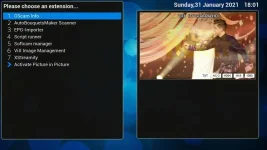
ok, so I built current developer image today to try the new OpenTV changes. However, I came across is no way to manually force OpenTV downloader from the Blue button from Live TV!!

I have posted this here as don't know if its related to recent few changes to OpenTV?

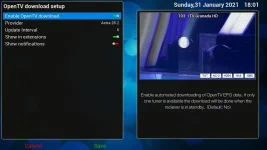
Below is screenshot of OpenTV settings and what is displayed when I press Blue button from live TV...

opentv_settings.webp opentv_noforcedownload.webp

The only way I was able to force a download was to toggle it off/on etc which triggered download. I also didn't get the full 7 days EPG.

Is this just me having no easy way of manually downloading EPG via OpenTV?
 

OpenViX Feeds Status

Back
Top