Superb quality and spec AB-Com PULSe 4K SE. Crazy offer! Only £99! FREE UK DELIVERY! 4K UHD, Enigma 2, Multiboot 4 images & more!...
Superb quality and spec AB-Com PULSe 4K Rev II Twin Satellite tuner only £149! FREE UK DELIVERY! 4K UHD, Enigma 2, SATA HDD facility, Multiboot 4 images & more!...

Testers required for OpenViX Python 3 images

Status
Not open for further replies.
Are you starting multiple instances of Oscam? I've seen similar when oscam is running and I manually start a different version

Ah ha!

It looks to me like something is starting oscam up with this command line:
Code:
/usr/softcams/oscam-latest --config-dir /etc/tuxbox/config/oscam-latest --daemon --pidfile /var/tmp/oscam-latest.pid --restart 2 --utf8 2
which seems to be wrong and not work.


The oscam that works is just started up with this line:
Code:
/usr/softcams/oscam-latest -b
 
Is that config directory correct? if it's looking in the wrong folder then it won't find the config for the reader. If you have that folder, have you tried deleting it or as a workaround, putting your configs in there as well as the usual /etc/tuxbox/config

Have you added something to start oscam with those settings?
 
Softcam binaries should only be in /usr/softcams on an openvix system. Configs go in /etc/tuxbox/config. You must have installed some oscam version that was not in the feeds. Its best to stick with those.

Edit: ccs has probably found the issue. No problems with oscam on my H7 btw
 
Openatv scripts use /etc/tuxbox/config/oscam-name possibly used there script
 
So :!
Late last week, I added the scripts used by OpenPli/OpenATV to the softcam builds for OScam/CCcam.(which I have been testing for the last 4 -5 weeks)
I didn't expect users to see any difference, but obviously BefuddledBrian has both in use as this
Code:
/usr/softcams/oscam-latest --config-dir /etc/tuxbox/config/oscam-latest --daemon --pidfile /var/tmp/oscam-latest.pid --restart 2 --utf8 2
is from the Softcam script code which has been in Py3 for a few weeks
- so please follow instructions below.

This means that you can run the Oscam binary in usr/softcams from either
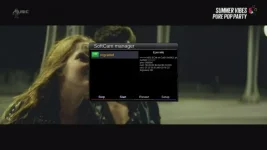
1) SoftcamManager as has been done for ever. (but see last note)
2) you can disable SoftcamManager (no autostart, stop the OScam, turn off in Menu options detect freeze) and in menu/setup/softcam ---> Softcam script Setup ---> select the softcam e.g. Oscam-latest ALSO you must install the softcam configs in etc/tuxbox/config/camname where camname in this case will be Oscam-latest.
3) run your own scripts.

If you are running SoftcamManager just make sure that in menu/setup/softcam ---> Softcam script Setup----> Select Softcam is set to None

I happen to now use the script technique because I get virtually instantaneous picture on my 27.5W services at startup compared to SoftcamManager (which does offer far more options)

So apologies to everyone for the confusion - I just didn't expect anyone to run into this situation until an information update was issued - following more testing to ensure the softcam build change had been implemented OK!
 
Last edited:
At least for me, the oscam that automatically starts running if you have installed oscam-latest from the feeds and runs (without you even touching softcam manager) with this command line:
Code:
/usr/softcams/oscam-latest --config-dir /etc/tuxbox/config/oscam-latest --daemon --pidfile /var/tmp/oscam-latest.pid --restart 2 --utf8 2
Is completely non functional and also stops any oscam subsequently started by Softcam manager's autostartup from working.
 
Last edited:
At least for me, the oscam that automatically starts running if you have installed oscam-latest from the feeds and runs (without you even touching softcam manager) with this command line:
Code:
/usr/softcams/oscam-latest --config-dir /etc/tuxbox/config/oscam-latest --daemon --pidfile /var/tmp/oscam-latest.pid --restart 2 --utf8 2
Is completely non functional and also stops any oscam subsequently started by Softcam manager's autostartup from working.
Have you checked here menu/setup/softcam ---> Softcam script Setup - if not do so and set to none. Reboot.
Post results
 
Have you checked here menu/setup/softcam ---> Softcam script Setup - if not do so and set to none. Reboot.
Post results

Setting that new menu to "None" fixes it but I didn't know it even existed until a few minutes ago and it appears to default to "oscam-latest" which breaks oscam.
(I guess it breaks it because the configuration files are in the wrong place)
 
Setting that new menu to "None" fixes it but I didn't know it even existed until a few minutes ago and it appears to default to "oscam-latest" which breaks oscam.
(I guess it breaks it because the configuration files are in the wrong place)
Hopefully if you read post #686 above, it will be a little clearer, Using the script system above it lists the installed softcams and coupled to config files with the same name, means you can flip between different softcams very easily. Therefore the start command is specific to a softcam and its config file.
 
The conventional location for softcam config files is "/etc/tuxbox/config". This is what is used when you are using Softcam Manager.

When running the new feature the location of the config files is "/etc/tuxbox/config/<SOFTCAM-NAME>", e.g. "/etc/tuxbox/config/oscam-latest".

This means, for example, if you are running oscam-emu and oscam-latest, both softcams can have individual configuration files rather than sharing them like happened in the conventional location.
 
Hopefully if you read post #686 above, it will be a little clearer, Using the script system above it lists the installed softcams and coupled to config files with the same name, means you can flip between different softcams very easily. Therefore the start command is specific to a softcam and its config file.

Shouldn't the new script option default to "None"?
Then if, like me, you just restore settings from an older version that was using Softcam manager you won't have the two instances of oscam racing against each other?
If like me your setup happens to lead to the broken unconfigured oscam always winning you get stuck not knowing why oscam doesn't work while everyone for whom the working oscam happens to win tells you you're wrong and there is no problem with oscam in this version.
 
Last edited:
Shouldn't the new script option default to "None"?
Then if, like me, you just restore settings from an older version that was using Softcam manager you won't have the two instances of oscam racing against each other?
If like me your setup happens to lead to the broken unconfigured oscam always winning you get stuck not knowing why oscam doesn't work while everyone for whom the working oscam happens to win tells you you're wrong and there is no problem with oscam in this version.

Yes, you are correct and I will try to implement a change to make sure it defaults to None
 
Not wishing to undermine anyone's efforts here but just offering up an alternative option for GUI cam control.

I use mgcamd and have always had issues with ViX softcam manager so always used an alternative softcam control.

The previous plugin I used does not work with py3 so I found an alternative plugin that works well with py3.

AlternativeSoftcamManager

The default location for cams is/usr/bin/cam but the location for bin and config are configurable and then original location can be deleted.

It also comes with various versions of oscam.
 

Attachments

I may be going blind, didn't see an image for the Duo 4k

These images are for testing purposes and only a limited number of receivers supported atm. You can build your own if you like.
 
Can we have a recap of who is still testing and which boxes.

It seems we are building test images for a lot of boxes with very little feedback.

So any machines not claimed by testers I will remove from the build.
 
Vu Ultimo4K - 100% ok.
 
Last edited:
mutant hd51 and ax61. Both very stable at present but last images are 12 days and 20 days old respectively.
 
Status
Not open for further replies.

OpenViX Feeds Status

Back
Top