birdman
Moderator
I'm intending to get the et8000 running it next week.


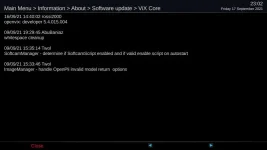
That is already being built.Ops, bit late but... Vu Ultimo4K
Yes, you are correct and I will try to implement a change to make sure it defaults to None

Well it's different in 5.5.015.002.
But now the new option is "none" but oscam-latest is started with the new command line anyway and softcam manager doesn't even seem to start another oscam-latest at boot time.
		if self["config"].getCurrent() == config.misc.softcams and config.misc.softcams.value and config.misc.softcams.value.lower() != "[COLOR="#FF0000"]none[/COLOR]":


https://github.com/OpenViX/enigma2/commit/3c3490e44017b3ddcf0f72e344004f2c10b5a293#diff-af1c8c5aff5c6a15c51a29a03e177e0287e09e86f0ac9bd4660f8566448d2d0eR69Probably. I wrote that mesage from memory.Should "none" be "None" ??
Probably. I wrote that mesage from memory.
Well it's different in 5.5.015.002.
But now the new option is "none" but oscam-latest is started with the new command line anyway and softcam manager doesn't even seem to start another oscam-latest at boot time.
Later:
I'm trying it set up with the new "startup script" method now.
So far it all works.
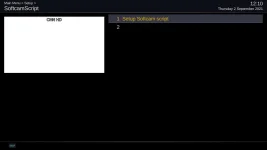
There is an extra blank entry in the menu:
View attachment 62555
Wrong "none" - check the rest of my post.
Unless config.misc.softcams.value.lower means lower case, in which case please ignore.
Sharp eyes! Yes there is a blank line to trick the system, forget you saw it. ....Also how do you get the numbers?????? Never had that, you cannot see the blank line on my systems
The oscam installs the script and setup (but no longer starts the selected Oscam) - if you start with script and go to SoftcamManager - it should show its running and say so in top message (where normally it identifies the softcam)
If running with script don't forget to remove freeze check in SoftcamManager menu options
Sharp eyes! Yes there is a blank line to trick the system, forget you saw it. ....Also how do you get the numbers?????? Never had that, you cannot see the blank line on my systems
The oscam installs the script and setup (but no longer automatically starts the selected Oscam) - if you start with script and go to SoftcamManager - it should show softcam running by SoftcamScript and say so in top message (where normally it identifies the softcam)
If running with script don't forget to remove freeze check in SoftcamManager menu options
The softcam install also adds an entry to /etc/tuxbox/config with the name of the softcam e.g. oscam-latest stick your config in there (although I have had one case where it wanted both config & config/oscm-latest)
He must have numbering enabled in his config. And as this is just a standard Setup screen it should inherit the full behaviour of any Setup screen.
What was the blank line needed for?
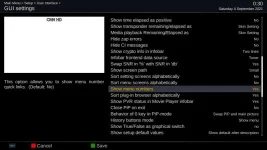
It gives a nice quick way to naviagte the menus by just pressing the number.
for example [5] instead of, [down] [down] [down] [down] [Ok]
It's very well implemented. It even works quite well beyond the 9th menu entry by using a timeout to decide when you've finished keying numbers.
[1] [1] (for eleven) instead of [down] [down] [down] [down] [down] [down] [down] [down] [down] [down] [Ok].
Well yes, but beyond about 4 or 5 it helps a lot to have the numbers present.That works like that irrespective of whether the numbers are displayed or not.
@twol When using the new softcam script feature what is the correct procedure to get the softcam running again after flashing a new OpenVIX Version?
I upgrade OpenVIX, restore my settings, and as far as I can see softcam script is all set up exactly as before but the softcam doesn't run, so I've just been sort of fiddling with it until I find my softcam is again running and stays running after a reboot.